

 Premium
What's new in Microsoft OneDrive 5.45.1
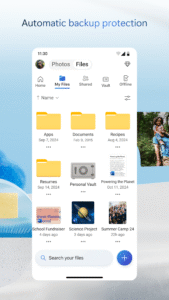
We’re improving the layout of file list and tile views so your content looks more gorgeous & consistent across all your devices. Searching for files in business and school accounts just got faster and better (sorry if that made it easier to find all your homework assignments!).
And as always, we’ve squashed minor bugs, and made performance & reliability improvements across the entire app. If you run into any issues, please shake your device and tap “Report a Problem”.
About Microsoft OneDrive 5.45.1
Microsoft OneDrive keeps your photos and files backed up, protected, synced, and accessible on all your devices. This OneDrive app lets you view and share OneDrive files, documents, and photos with friends and family. Plus, you can use the app to automatically back up your phone’s photos and videos. Start with 5 GB of free cloud storage or upgrade to an Office 365 subscription to get 1 TB of storage.
Premium
Microsoft OneDrive offers the following features:
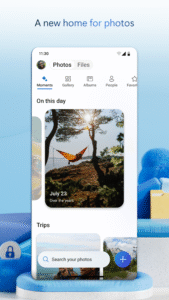
Back up photos & videos
• Automatic photo backup when you turn on Camera Upload
• Find photos easily thanks to automatic tagging
• Photo sync helps save space on your device
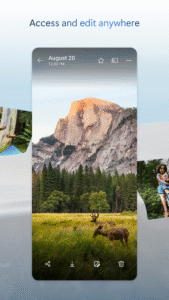
• View photos on your phone, computer, and online
• Access entire folders on the app without being online*
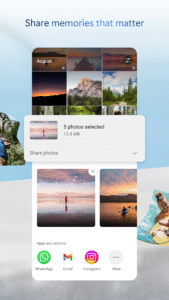
File sharing
• Share photos, videos, and albums with friends and family
• Get notifications when a shared document is edited
• Set password-protected or expiring sharing links*
Scan
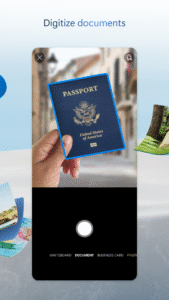
• Scan documents, receipts, whiteboards, and more
• Scan, sign, and send docs right from the OneDrive mobile app
• Document scanning, business card scanning, and photo scanning from your phone
Organize
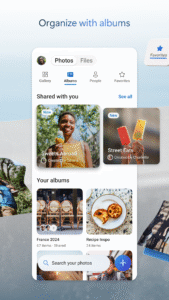
• Search photos by what’s in them (i.e. beach, snow, etc.)
• Search docs by name or content
Security
• All OneDrive files are encrypted at rest and in transit
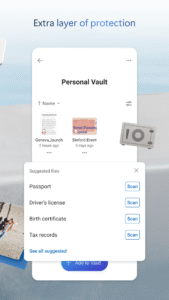
• Personal Vault lets you protect your important files with identity verification
• Restore documents with version history on all files
• Ransomware detection & recovery*
Microsoft Office
• Back up, view, and save your Office documents.
• Use Microsoft Office apps to edit and collaborate in real time on Word, Excel, PowerPoint, and OneNote files stored in OneDrive.
The OneDrive app for Android offers 5 GB of free cloud sync file storage, file upload, file sharing, and file backup in the cloud.
Using this app with OneDrive for Business
For you to sign into OneDrive for Business, your organization needs to have a qualifying SharePoint Online or Office 365 business subscription plan. Camera upload, search, sort, and the ability to add OneDrive for Business accounts are available only on devices running Android 4.0 or later.
This app is provided by Microsoft. Data provided through the use of this store and this app may be accessible to Microsoft and transferred to, stored, and processed in the United States or any other country where Microsoft or its affiliates maintain facilities.
*Requires Office 365 subscription

Download Microsoft OneDrive 5.45.1
This release comes in several variants (we currently have 4). Consult our handy FAQ to see which download is right for you.

Version:7.57 (Beta 2)
Uploaded:June 8, 2026 at 6:36AM UTC
File size:100.47 MB
Downloads:48
Version:7.56
Uploaded:June 6, 2026 at 5:24PM UTC
File size:97.71 MB
Downloads:107
Version:7.57 (Beta 1)
Uploaded:June 5, 2026 at 7:33AM UTC
File size:100.47 MB
Downloads:81
Version:7.56 (Beta 3)
Uploaded:June 3, 2026 at 6:18PM UTC
File size:100.29 MB
Downloads:103
Version:7.56 (Beta 1)
Uploaded:May 26, 2026 at 1:58AM UTC
File size:100.29 MB
Downloads:120
Version:7.55
Uploaded:May 22, 2026 at 4:58PM UTC
File size:96.77 MB
Downloads:238
Version:7.55 (Beta 2)
Uploaded:May 19, 2026 at 3:20AM UTC
File size:99.35 MB
Downloads:94
Version:7.55 (Beta 1)
Uploaded:May 14, 2026 at 6:48AM UTC
File size:99.35 MB
Downloads:163
Version:7.54.1
Uploaded:May 9, 2026 at 2:20AM UTC
File size:107.01 MB
Downloads:276
Version:7.53.2
Uploaded:May 1, 2026 at 6:53PM UTC
File size:104.40 MB
Downloads:184
Follow APK Mirror


