

 Premium
Download Quick Notes: Pin to Status Bar 7.1 APK
Target: Android 17 (API 37)

What's new in Quick Notes: Pin to Status Bar 7.1
• Hold a note and drag it to reorder; your notifications follow the same order
• New setting: hide your notes on the lock screen
• New setting: clear done notes after 1, 7 or 30 days
• Now in 11 languages, with a language picker in Settings
About Quick Notes: Pin to Status Bar 7.1
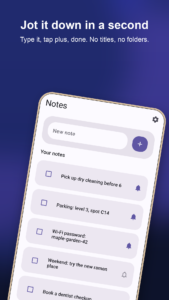
Quick Notes is for the small things you need to remember in the next few hours: a parking spot, a door code, something to pick up on the way home. Type it, tap plus, and it stays in your notification shade where you will see it, until you mark it done.
Premium
WRITE IT DOWN FAST
• One text box at the top of the screen. No titles, no folders, no sign up
• Share text from any app into Quick Notes and it lands ready to save
• A home screen shortcut opens straight to a new note with the keyboard up
• Optionally open the keyboard as soon as the app starts, or close the app after saving
RIGHT IN YOUR NOTIFICATIONS
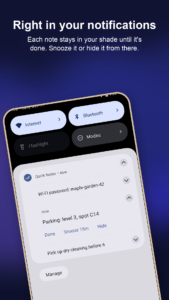
• New notes stay in your notification shade until they are done
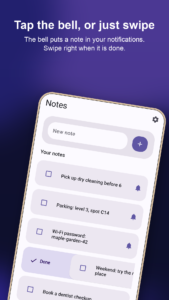
• Tap the bell on any note to put it in your notifications or take it out
• Done, Snooze and Copy buttons right on the notification, so a door code or password is one tap away
• Snooze hides a note for 5 minutes up to 2 hours, then brings it back
• Swiped a notification away? Tap the bell and it is back
• Notes in your notifications come back after the phone restarts
• Prefer to choose? Turn it off for new notes and add only the ones you want
SWIPE AND TICK OFF
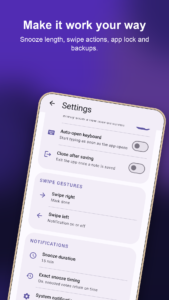
• Swipe right to mark a note done, swipe left to add it to your notifications or take it out, with Undo
• Choose what each swipe does in Settings: mark done, notification on or off, delete, or nothing
• Tick a note to move it to Done, and bring it back later if you need it
• Long press to select several notes and copy them, add them to your notifications, mark them done or delete them
• Hold a note and drag it to move it. Your notifications follow the same order
• Tap a note to edit it in place
• Done notes can clear themselves after 1, 7 or 30 days, if you turn it on
ON YOUR HOME SCREEN
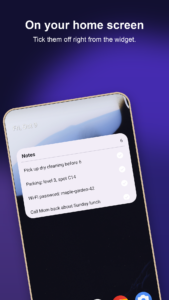
• A Notes widget lists what is still open, with a button to tick each one off and a plus button for a new note
PRIVATE BY DESIGN
• Quick Notes has no internet permission, so your notes cannot leave your phone
• No account, no ads, no analytics
• Optional App lock with your fingerprint, face or screen lock
• Optionally hide your notes from the lock screen until you unlock your phone
• Back up your notes to a file you choose, and restore them on a new phone
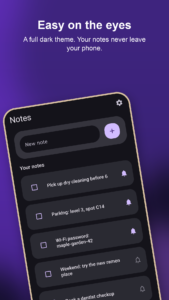
Light and dark themes, and it follows your system setting by default. Available in English, Spanish, Portuguese, Hindi, Indonesian, Russian, German, French, Japanese, Arabic and Hebrew.
Quick Notes: Pin to Status Bar 7.1 variants
This release may come in several variants. Consult our handy FAQ to see which download is right for you.

Version:7.1(71) for Android 7.0+ (Nougat, API 24)
Uploaded:October 23, 2026 at 7:51PM UTC
File size:1.75 MB
Downloads:5
Version:7.0(70) for Android 7.0+ (Nougat, API 24)
Uploaded:October 13, 2026 at 8:42PM UTC
File size:1.70 MB
Downloads:6
Version:6.4(64) for Android 7.0+ (Nougat, API 24)
Uploaded:July 31, 2026 at 9:16PM UTC
File size:1.79 MB
Downloads:10
Version:7.1
Uploaded:October 23, 2026 at 7:51PM UTC
File size:2.64 MB
Downloads:5
Version:7.0
Uploaded:October 13, 2026 at 8:42PM UTC
File size:2.62 MB
Downloads:6
Version:6.4
Uploaded:July 31, 2026 at 9:16PM UTC
File size:2.76 MB
Downloads:10

Version:2.5
Uploaded:September 9, 2023 at 7:42AM UTC
File size:2.51 MB
Downloads:40
Version:2.4
Uploaded:March 31, 2022 at 2:25PM UTC
File size:1.50 MB
Downloads:49
Version:2.2
Uploaded:March 22, 2022 at 4:29AM UTC
File size:1.48 MB
Downloads:11
Version:2.1
Uploaded:September 3, 2021 at 6:22AM UTC
File size:1.44 MB
Downloads:36


