

 Premium
Download Musicolet Music Player 6.12.1 APK
Version: 6.12.1 build505 (50500)
Languages: 18
Package: in.krosbits.musicolet
Downloads: 617
Supports installation on external storage.
Target: Android 15 (API 35)
120, 160, 213, 240, 320, 480, 640dpi

What's new in Musicolet Music Player 6.12.1
v 6.12:
⭐ Bookmarks/Notes are now saved as separate text files.
⭐ You can now share your "Bookmarks/Notes files" with others.
⭐ These files can be can be opened/edited with other apps too.
⭐ Musicolet can also open/edit such "Bookmarks/Notes files" created by others.
——
v 6.11:
⭐ Customize blur background in 'Now Playing' screen.
⭐ Sleep timer improvements.
🌟 [PRO] Screencast - new option for casting:
——
👉 Read more in the App › Help and info › What's new.
About Musicolet Music Player 6.12.1
------------------------------------
PLEASE READ THIS BEFORE INSTALLING
1. This app can organise and play only the local audio files which are stored on the internal storage or SD card.
2. This app can not stream/download/search new music online.
------------------------------------
Premium
File formats supported:
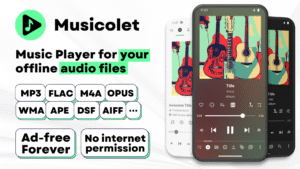
mp3, m4a, wma, flac, opus, aac, alac, ape, dsf and many more...
Features:
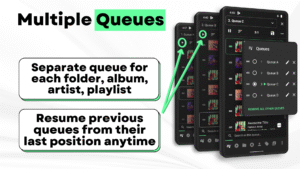
✅ Multiple Queues
Separate queue for each folder, album, artist, playlist. Resume previous queues from their last position anytime.
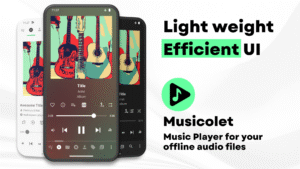
✅ Efficient UI, Easy navigation
For fast and easy navigation we placed all important components of the app (like Main player, Queues, Folders, Albums, Artists, Playlists) in just one row. So you can access them with just 1-Tap!
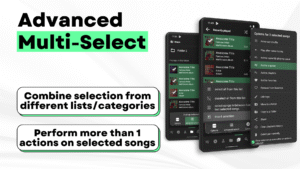
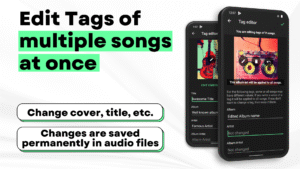
✅ Tag editor+: Can edit tags and album-arts of multiple songs at once.
✅ Move/Copy songs, Rename folders directly in app.
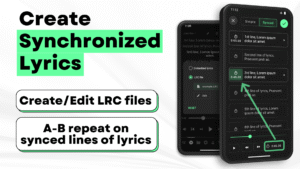
✅ Create Synchronized Lyrics.
✅ Save Bookmarks and Notes.
✅ Add/remove a song to >1 playlist, from notifications, widgets and even from lockscreen
✅ Folder browsing 📁
2-types of folder structures: 1) Linear (all folders at once) and 2) Hierarchical(folders within folders)
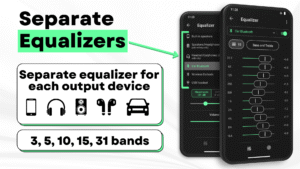
✅ Powerful Equalizer🎚🎚🎚: Separate presets and settings for Speakers🔊, Headphones🎧, Bluetooth etc.
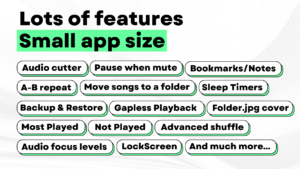
✅ Gapless playback
✅ 🎧Earphone controls🎧
Single click for pause/play. Double click for next and Triple click for previous song. On each press >=4 you can Fast-Forward the song.
✅ Embedded Lyrics + LRC support
Supports offline lyrics embedded in audio file as ID3 tag. You can edit embedded lyrics from tag editor. Musicolet also support .lrc files for synced lyrics.
(Note: Musicolet doesn't fetch lyrics automatically from internet. You have to manually write or paste lyrics in tag editor, if there is no embedded lyrics. It doesn't fetch lrc file automatically. For lrc files, You have to find lrc file from internet, put it in the same folder and rename to exactly match it with audio file name manually.)
✅ Sleep timers
2 types: 1) close app after hh:mm time or 2) close app after N songs.
✅ Add shortcuts of any album/artist/folder/playlist to your HomeScreen (Launcher) app.
✅ Stunning Widgets
✅ Lock Screen (with controls, Queue and Lyrics)
✅ 🚘 Android Auto support 🚘
From your 'Android Auto' enabled car, you can control music and access your playlists, queues, folders and whole music library.
✅🎉Change notifications appearance🎉
✅ You can also enable Fast-Forward and rewind buttons in notifications from settings.
✅ Light and dark themes
✅ Backup and Restore
Automatic and Manual backups. Restore settings, playlists, play-counts from any backup anytime on any device.
And much more...
🚫No Ads🚫
Ad-free forever, for all users. 🤩
No internet permission, Completely offline
Musicolet doesn't even use Internet permission (a.k.a. network access permission). (You can check this in 'App permissions' at the bottom of this description in Play Store.)
Dedicated to Music lovers 🎶 all around the world. 🌎
Created with love ❤, lots of code and sleepless nights. Hope you will like our work.
------------------
Our official website: krosbits.in/musicolet
krosbits.in/musicolet/download
------------------
To send feedback/suggestions, report bugs or for other queries...
Contact us: musicolet@krosbits.in
Musicolet Music Player 6.12.1 variants
This release comes in several variants (we currently have 2). Consult our handy FAQ to see which download is right for you.

Version:6.12.2(50900) for Android 7.0+ (Nougat, API 24)
Uploaded:August 21, 2025 at 3:23PM UTC
File size:16.69 MB
Downloads:3,626
Version:6.12.1(50700) for Android 7.0+ (Nougat, API 24)
Uploaded:June 23, 2025 at 7:23AM UTC
File size:16.59 MB
Downloads:797
Version:6.12.1(50500) for Android 7.0+ (Nougat, API 24)
Uploaded:June 15, 2025 at 12:42PM UTC
File size:16.60 MB
Downloads:617
Version:6.12(50100) for Android 7.0+ (Nougat, API 24)
Uploaded:August 1, 2024 at 9:27PM UTC
File size:14.73 MB
Downloads:3,919
Version:6.14
Uploaded:May 27, 2026 at 3:24AM UTC
File size:11.89 MB
Downloads:285
Version:6.13
Uploaded:March 26, 2026 at 5:07AM UTC
File size:11.47 MB
Downloads:1,776
Version:6.12.2
Uploaded:August 21, 2025 at 3:23PM UTC
File size:10.68 MB
Downloads:3,626
Version:6.12.1
Uploaded:June 23, 2025 at 7:23AM UTC
File size:10.64 MB
Downloads:1,414
Version:6.12
Uploaded:August 1, 2024 at 9:27PM UTC
File size:11.71 MB
Downloads:3,919
Version:6.11.3
Uploaded:June 27, 2024 at 4:27AM UTC
File size:12.19 MB
Downloads:1,098
Version:6.11.2
Uploaded:June 4, 2024 at 1:59PM UTC
File size:12.19 MB
Downloads:371
Version:6.11.1
Uploaded:May 3, 2024 at 7:10PM UTC
File size:11.91 MB
Downloads:713
Version:6.11
Uploaded:March 27, 2024 at 2:13PM UTC
File size:12.00 MB
Downloads:715
Version:6.10.2
Uploaded:January 22, 2024 at 9:53PM UTC
File size:6.10 MB
Downloads:1,481


