

 Premium
What's new in Lightroom Photo & Video Editor 2.2.1
Update: Bug Fixes
Raw support is here! With this Technology Preview you can import and edit the raw photos you take with your camera.
• Connect your camera directly to your Android device with a USB On-The-Go (OTG) cable.
• Select your photos, and import directly into Lightroom for Android.
• Then, easily sync your Lightroom photos with all of your other devices.
For a list of supported cameras, visit www.adobe.com/go/supported_cameras
About Lightroom Photo & Video Editor 2.2.1
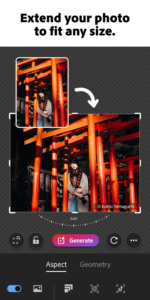
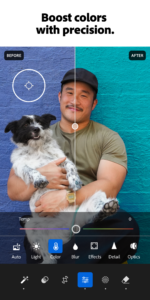
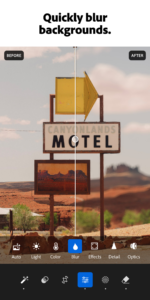
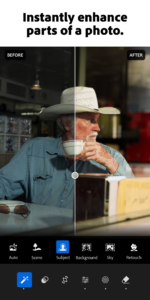
Bring beautiful images to light with Adobe Lightroom. Powered by the magic of Adobe Photoshop technology, Lightroom for mobile enables you to craft and share professional-quality images from your smartphone or tablet.
Premium
Winner of the 2015 Professional Photographer Hot One Awards in the Photo App category
The tools you need to tell your story.
• Create stunning images in seconds with tools that range from simple one-tap presets to powerful advanced adjustments.
• Experiment freely with edits, and revert to the original at any time, with just one tap.
• Capture amazing moments with the in-app Adobe camera, streamlining shoot to share. Apply Photoshop magic with five specially formulated shoot-through presets, which can be previewed and applied at capture, and adjusted afterward with full non-destructive capabilities. *
• Simplify your editing process and get consistent looks in your photos by copying your favorite edits across photos.
Stories need to be shared.
• Share photos any way you want: Instagram, Facebook, Twitter, Flickr, and more. Join the community by using #lightroom.
Ready to take your photos to the next level? Check out our time-limited trial of the Adobe Creative Cloud Photography plan.
Creative Cloud Photography plan member benefits:
Take your photography further.**
• Access your photos anywhere: Organize, edit and share Lightroom photos across mobile devices, desktop and the web.
• Transform photos beyond your imagination with Photoshop CC, the world’s best tool for combining multiple images, removing objects, and retouching your photos.
• Get precise control over the color and tone of your photos with selective local adjustments, and more, with the Lightroom desktop app.
• Seamlessly sync photo edits, metadata, and more—from smartphone photos or raw images from DSLRs—across Lightroom enabled devices.
• Share your photo collections in beautiful web galleries and get feedback from family and friends.
• Craft amazing video stories with your photos, with direct access to Adobe Premiere Clip.
*Shoot-through presets require OpenGL ES 3.0 and later support. The in-app camera is supported on Android smartphones.
**Available only as a time limited trial or with a Creative Cloud Photography plan subscription.




Download Lightroom Photo & Video Editor 2.2.1
This release may come in several variants. Consult our handy FAQ to see which download is right for you.

Version:11.5.31
Uploaded:September 18, 2026 at 4:59PM UTC
File size:104.29 MB
Downloads:1,113
Version:11.5.22
Uploaded:September 4, 2026 at 9:15AM UTC
File size:104.46 MB
Downloads:6,052
Version:11.5.21
Uploaded:September 2, 2026 at 8:45PM UTC
File size:104.78 MB
Downloads:427
Version:11.5.20
Uploaded:September 1, 2026 at 8:41AM UTC
File size:104.42 MB
Downloads:527
Version:11.5.10
Uploaded:August 26, 2026 at 4:20PM UTC
File size:100.81 MB
Downloads:1,252
Version:11.5.01
Uploaded:August 13, 2026 at 12:36PM UTC
File size:99.67 MB
Downloads:6,842
Version:11.5.0
Uploaded:August 6, 2026 at 3:21PM UTC
File size:101.00 MB
Downloads:2,232
Version:11.4.5
Uploaded:July 15, 2026 at 2:30PM UTC
File size:97.25 MB
Downloads:8,102
Version:11.4.4
Uploaded:July 9, 2026 at 7:03AM UTC
File size:99.06 MB
Downloads:1,060
Version:11.4.3
Uploaded:June 25, 2026 at 2:59PM UTC
File size:96.92 MB
Downloads:4,429
Follow APK Mirror


