

 Premium
What's new in MacroDroid - Device Automation 3.19.4
Launch Application action now supports exclude from recents option.
Fixed issue with text manipulation trigger not causing the Variable changed trigger to fire.
Fixed layout issues with the set variable action where on some languages the random values cannot be entered correctly.
Fixed issue with variable selection on Text Manipulation action displaying white text on Android 4.
Fixed issue with the local variable view showing non local variables when updating a value.
About MacroDroid - Device Automation 3.19.4
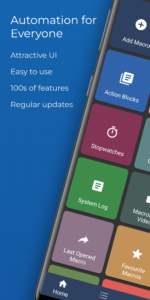
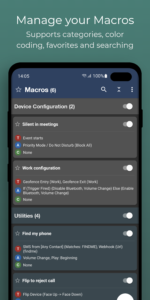
MacroDroid is a powerful task automation and configuration app that focuses heavily on usability with a simple UI and logical step by step process.
Premium
A few examples of what MacroDroid can automate:
Turn on the Wifi connection when you launch a particular app (and off again when closed).
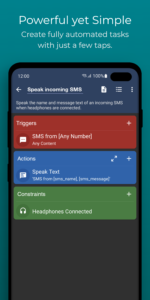
Auto respond to a specific incoming SMS by sending your current location.
Toggle the power button to tell you the time (without taking out of your pocket).
Use NFC tags to configure the device (turn on bluetooth, set volume etc).
Creating a custom macro is easy:
Click 'Add Macro'
Select a trigger from the list - (e.g. Battery Level).
Configure trigger specific settings (e.g. Battery Level < 10%)
Select an action from the list (e.g Configure Wifi)
Configure action specific setting (e.g. Disable Wifi)
Add more actions as required
(Optionally) add constraints from the list (e.g. Day of the Week)
Configure constraints as required (e.g. Saturday and Sunday)
Add more constraints as required
Choose a name and category for the macro
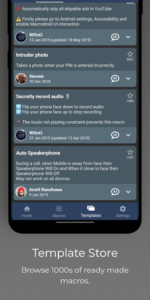
MacroDroid includes many built in and user shared templates to demonstrate the power and flexibility of the application and help you get started. These templates can be used as is, or easily customised to meet your needs.
This app uses the Device Administrator permission (BIND_DEVICE_ADMIN). This permission is used by the failed login trigger (nothing else) and will only be enabled if you explicitly give MacroDroid device admin access from within the app.
==========
Pro Version
==========
The free version of MacroDroid is limited to five macros and displays adverts. You can upgrade in the application to allow unlimited macros and remove all adverts. In addition Pro users can share their macros with the community using the built in template store.
=======
Support
=======
Please use the in-app forum for all usage questions and feature requests, or access the forums via www.macrodroid.com.
To report bugs or other issues please contact me at support@macrodroid.com with as much information as possible (including device and OS version).
Download MacroDroid - Device Automation 3.19.4
This release may come in several variants. Consult our handy FAQ to see which download is right for you.

Version:5.9
Uploaded:June 30, 2026 at 7:59AM UTC
File size:7.01 MB

Version:6.1.1
Uploaded:October 19, 2026 at 11:45PM UTC
File size:87.08 MB
Downloads:44
Version:6.1.0
Uploaded:October 16, 2026 at 6:48AM UTC
File size:87.07 MB
Downloads:66
Version:6.0.11
Uploaded:October 14, 2026 at 6:28AM UTC
File size:79.74 MB
Downloads:501
Version:6.0.10
Uploaded:October 4, 2026 at 6:41PM UTC
File size:85.69 MB
Downloads:39
Version:6.0.5
Uploaded:September 27, 2026 at 7:27AM UTC
File size:85.58 MB
Downloads:128
Version:6.0.4
Uploaded:September 25, 2026 at 8:55PM UTC
File size:85.59 MB
Downloads:34
Version:5.67.8
Uploaded:September 8, 2026 at 2:25PM UTC
File size:77.09 MB
Downloads:1,624
Version:5.67.7
Uploaded:September 8, 2026 at 12:23AM UTC
File size:77.09 MB
Downloads:182
Version:5.67.6
Uploaded:August 31, 2026 at 4:08PM UTC
File size:83.11 MB
Downloads:132
Version:5.67.5
Uploaded:August 28, 2026 at 9:06PM UTC
File size:83.10 MB
Downloads:63
Follow APK Mirror


