

 Premium
About Screen Recorder - AZ Recorder 5.9.0
Featured on Google Play Home Page, BusinessInsider, CNET, HuffPost, Android Police, Android Authority and many others.
Premium
AZ Screen Recorder is a stable, high-quality screen recorder that helps you create smooth & clear screen videos. With this screencast app, you can record gameplay or tutorial videos, save video calls, live streams or videos from the internet. On top of that, AZ Screen Recorder also lets you edit videos, capture screenshots and broadcast screen live to Youtube and Facebook.
ADVANTAGES
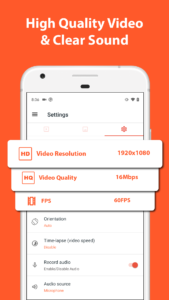
★ High-Quality Video: 1080p, 12Mbps, 60FPS
★ NO recording time limit
★ NO watermark
★ FREE to use
KEY FEATURES
★ Screen recording
AZ Screen Recorder provides stable and beautiful screen recording with many useful features including:
- Record screen with audio: you can record original sound from any games/apps or record your own voice from the mic.
- Record gameplay in high-quality: many resolutions, frame rates and bit rates are available to choose in this game recorder.
- Screen recorder with facecam: record your face and emotions in a small overlay window. This window can be adjusted in size and dragged to any position on the screen.
In addition, you can also do many things in this free screen recorder:
- Pause and resume recording
- Record screen to GIF (GIF maker)
- Intuitive controller UI with floating buttons and notification bar
- Shake the device to stop recording
- Draw on the screen while recording
- Transfer recorded videos to your computer through Wifi
- Record video calls
★ Video Editor
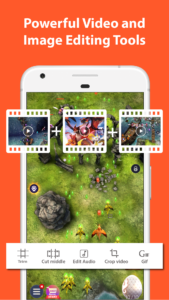
After recording device screen, you can edit your videos with these editing functions:
- Convert video to GIF
- Trim/clip video
- Merge videos: Combine multiple videos into one
- Add background music to video
- Add subtitles to video
- Extract image from video
- Crop video
- Rotate video
- Compress video
- Edit audio
★ Livestream
With the screen broadcast function, you can stream your screen to Youtube, Facebook or Twitch. You can stream gameplay, films, TV shows and sports events. AZ Screen Recorder provides the following features to help you livestream easily:
- Different broadcast resolutions: Stream with the quality you want.
- Facecam: Show your facial expressions to watchers.
★ Screenshots and Image Editing
AZ Screen Recorder is more than a screen video recorder. It can also capture screenshots and edit images. You can take a screenshot easily with one click, use the in-app image editing tools to fine-tune images and share your screenshots with your friends. Some top editing features are:
- Stitch images: Auto detect and combine several images into one.
- Crop images: Remove unwanted parts.
- Blur image: Pixelate areas you don’t want to show.
- Add text, stickers and draw on image…
Thanks for downloading AZ Screen Recorder. If you have any feedback, bug reports or suggestions, please contact us at az.screen.recorder@gmail.com
Subscribe to our Youtube channel:
www.youtube.com/channel/UClv3w8p-lJJYkCieeYeigbg
Follow us on Facebook:
www.facebook.com/az.screen.recorder



Download Screen Recorder - AZ Recorder 5.9.0
This release may come in several variants. Consult our handy FAQ to see which download is right for you.

Version:6.9.11
Uploaded:September 26, 2026 at 7:10AM UTC
File size:44.62 MB
Downloads:39
Version:6.9.10
Uploaded:August 22, 2026 at 5:42AM UTC
File size:47.17 MB
Downloads:244
Version:6.9.9
Uploaded:August 13, 2026 at 2:04PM UTC
File size:47.50 MB
Downloads:87
Version:6.9.8
Uploaded:August 5, 2026 at 2:44PM UTC
File size:47.01 MB
Downloads:79
Version:6.9.7
Uploaded:August 2, 2026 at 3:53AM UTC
File size:46.83 MB
Downloads:66
Version:6.9.6
Uploaded:July 15, 2026 at 5:23AM UTC
File size:46.18 MB
Downloads:156
Version:6.9.4
Uploaded:June 28, 2026 at 10:40AM UTC
File size:49.79 MB
Downloads:135
Version:6.9.3
Uploaded:June 17, 2026 at 10:57AM UTC
File size:49.79 MB
Downloads:102
Version:6.9.2
Uploaded:May 26, 2026 at 4:26AM UTC
File size:48.45 MB
Downloads:234
Version:6.8.7
Uploaded:April 17, 2026 at 5:29PM UTC
File size:47.38 MB
Downloads:408
Follow APK Mirror


