

 Premium
What's new in ALZip – File Manager & Unzip 1.8.0.5
### ALZip v1.8.0 ###
■ We’ve adjusted ad placement to ensure it doesn’t disrupt your experience.
■ Watch an ad and enjoy an ad-free experience for a set period!
■ Various improvements, bug fixes, and stability updates have been made.
About ALZip – File Manager & Unzip 1.8.0.5
[Overview]
File manager app with file compress & file extract features! ALZip on the Android is not only a tool to zip or unzip files, but also a file manager to open, copy, move, delete or rename files. ALZip includes every function of file managing app and file compression app.
Premium
[Features]
1. Zip & Unzip
ALZip can compress files into zip, egg and alz formats, and extract zip, rar, 7z, egg, alz, tar, tbz, tbz2, tgz, lzh, jar, gz, bz, bz2, lha files and split archive of alz, egg and rar.
You can also decompress files larger than 4GB.
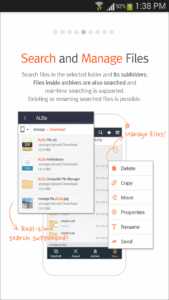
2. File Manager
ALZip can create folder, delete/copy/ move/rename files and use the properties function just like the PC.
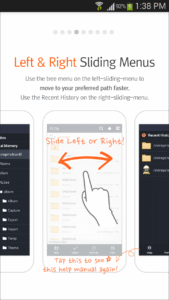
3. Convenient File Explorer
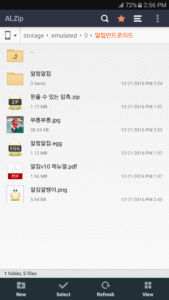
ALZip has a convenient file explorer interface to find local files without any difficulties.
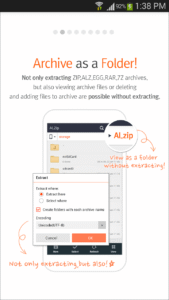
4. Archive Image Viewer
Image files inside the archive can be viewed without being extracted.
5. Searching Files
With ALZip file explorer, files or folders can be searched including which in subfolders. File manager function is available after searching.
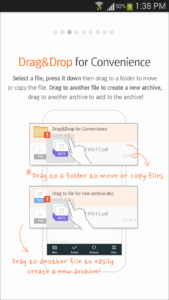
6. Drag&Drop Functions
When drag & dropped file or folder to:
- another folder in file explorer will move or copy it.
- a file will compress them to an archive.
- a compressed archive will add it to the archive.
Use the drag&drop function of ALZip for convenient file management!
7. Customize Background
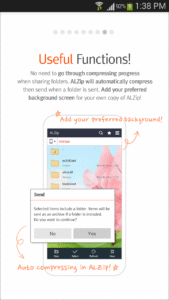
Customize your ALZip background to your favorite picture!
8. Archive As An Explorer
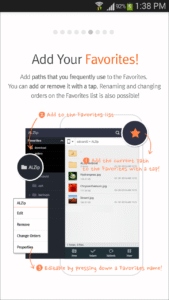
Open compressed archive like a folder and add files to Favorites, just like a file explorer. In addition, folders can be attached to email or uploaded to the cloud.
[FAQ]
1. Cannot compress because the file size is too large.
> Now you can unzip files larger than 4GB.
However, decompressing a file that is too large can put a strain on the system environment and cause a release error.
Please note that files larger than 4GB can not be released on external memory of 32GB or less using FAT32 format.
2. Cannot access the external memory in the explorer.
> Please check if you are using the KitKat version (4.4). KitKat limits the previledge to write to the external memory. If the problem happens in other versions, please contact us at m_altools@estsoft.com.
3. Characters in archive are broken.
Change the language by pressing the Encode button on the top-right.
[System Requirements]
Android Version 6.0~
Download ALZip – File Manager & Unzip 1.8.0.5
This release may come in several variants. Consult our handy FAQ to see which download is right for you.

Version:1.16.0.5
Uploaded:August 13, 2026 at 2:24AM UTC
File size:78.78 MB
Downloads:66
Version:1.15.0.3
Uploaded:June 24, 2026 at 2:33AM UTC
File size:76.06 MB
Downloads:43
Version:1.14.1.0
Uploaded:April 24, 2026 at 6:07AM UTC
File size:72.32 MB
Downloads:56
Version:1.14.0.1
Uploaded:April 20, 2026 at 1:59AM UTC
File size:72.32 MB
Downloads:14
Version:1.13.1.2
Uploaded:February 23, 2026 at 1:36AM UTC
File size:72.28 MB
Downloads:37
Version:1.13.0.3
Uploaded:February 2, 2026 at 6:51AM UTC
File size:72.28 MB
Downloads:31
Version:1.12.0.2
Uploaded:January 27, 2026 at 2:02AM UTC
File size:71.91 MB
Downloads:14
Version:1.11.0.2
Uploaded:December 1, 2025 at 2:44AM UTC
File size:71.91 MB
Downloads:47
Version:1.10.0.1
Uploaded:September 29, 2025 at 5:53AM UTC
File size:42.84 MB
Downloads:39
Version:1.9.0.6
Uploaded:September 18, 2025 at 3:53AM UTC
File size:42.83 MB
Downloads:25
Follow APK Mirror


