

 Premium
What's new in Filmora: AI Video Editor&Maker 14.4.36
What's new in our app?
1. New transformation effect in Image-to-Video: Create smooth transitions for more fun video creation.
2. Expanded Image-to-Video templates: Now with more interesting templates, continuously updated to boost creativity and visual appeal.
3. Bilingual subtitles launched, supporting 19 languages. Break language barriers and attract a global audience. Try it now!
About Filmora: AI Video Editor&Maker 14.4.36
It’s your turn to go viral now! Filmora AI Video Editor (formerly FilmoraGo video editor) is an AI-based video editor & movie maker, featuring Text to Video, AI Auto Cut, AI Remover, AI Voice Cloning, Dynamic Captions, Text to Speech, etc! 🔥Let Filmora help you to become the next star on Rednote, lemon8, TikTok, Clapper and Flip!
🤖Powerful Brand New AI Features
🎚️AI Beats
· AI seamlessly syncs your video highlights to the beats of rhythmic music.
🎥Text to Video
· Easily create an AI movie by simple prompts, visualize your great ideas!
🎞AI Auto Cut
· Seamlessly stitching highlight moments into cinematic tales!
🧽AI Remover
· Effortlessly erasing unwanted elements from videos.
🗣AI Voice Cloning
· No more Voice-Over! Easily copy your voice and generate any speech you wish! With customized emotions & in any language!
📜Dynamic Captions
· Auto speech to text into dynamic word-by-word captions.
🎙️Text to Speech
· Transform text into professional voiceovers for your videos.
🎵AI Music & Sound Effects
· Generate royalty-free, professional-quality music and soundscapes for your videos!
🔮Image to Video
· Type-in your creative ideas, then let AI magically bring life to your photos.
✨AI Video Effects
· AI Show - Transform your photos into stunning, stylized photos or videos with just one click!
· Infinite Zoom - Dive into the world of endless visual possibilities.
✂️AI Smart Cutout
· AI remove background with one click and replace sky of videos. Or you can separate any objects by setting strokes and easily edit green screen with chroma key by yourself.
🥁Rhythm Master
· Automatic beat-matching can sync rhythm videos to the perfect beat for a seamless creation experience.
🎬User-friendly video editing for beginners
- Stunning templates help create videos in one click.
- Trim, split, duplicate, or merge video clips without losing quality.
- Add text, emoji, and exclusive stickers.
- Add music, sound effects & voice-overs. Royal-free built-in music library and sound effects.
- Extract music from the video and split audio to remove unwanted parts.
- Rotate or crop: Adjust the orientation or size.
- Adjust video ratios for Instagram/TikTok/Youtube posts.
- Adjust speed for fast or slow motion.
🏆Full-featured video editing for professional
- All-in-one Keyframe: More adjustment items support keyframes, combined with color and special effects, you can create more cool animations.
- Speed Curve: Speed control with customizable & pre-set curves for various themes.
- PIP (Picture in Picture): add multiple layers of video, images, stickers, special effects, text, etc.
- Masking: Cover and mix video clips to get different video effects.
- Smart tracking: Support stickers, text, and PIP intelligent tracking targets, whether you need to track faces, objects, or anything else.
🌟Filmora Pro Subscription
- With Filmora Pro video editor unlimited subscription, you can access all features and paid editing materials including stickers, filter packages, etc. Watermark and Logo Roll will be removed automatically.
- With“Android Pro”, you can access all Pro features and paid editing materials on Android.
- With“All Platform Pro”, you can access all Filmora Pro on Android, iOS, Mac, and Windows.
- You can turn off auto-renewal at any time through your Account Settings.
- Any unused portion of a free trial period, if offered, will be forfeited when the user purchases a subscription.
📧Contact Us
Service Email: mailer@service.wondershare.com
💖Follow Us
YouTube: www.youtube.com/c/FilmoraWondershare
Facebook: www.facebook.com/filmoravideoeditor
Instagram: www.instagram.com/filmora_editor
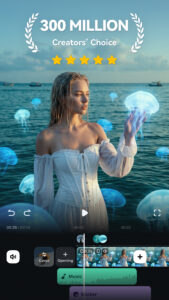
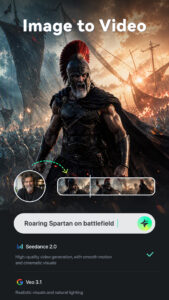


Filmora: AI Video Editor&Maker 14.4.36 Play Store trailer
Download Filmora: AI Video Editor&Maker 14.4.36
This release may come in several variants. Consult our handy FAQ to see which download is right for you.

Version:15.7.61
Uploaded:October 12, 2026 at 6:21PM UTC
File size:80.47 MB
Downloads:108
Version:15.7.60
Uploaded:October 11, 2026 at 11:06AM UTC
File size:80.47 MB
Downloads:36
Version:15.7.00
Uploaded:September 23, 2026 at 8:08AM UTC
File size:75.42 MB
Downloads:224
Version:15.6.99
Uploaded:September 17, 2026 at 2:22PM UTC
File size:70.89 MB
Downloads:103
Version:15.6.98
Uploaded:September 4, 2026 at 4:30PM UTC
File size:91.05 MB
Downloads:163
Version:15.6.97
Uploaded:August 31, 2026 at 3:39PM UTC
File size:87.03 MB
Downloads:101
Version:15.6.96
Uploaded:August 30, 2026 at 8:53AM UTC
File size:87.03 MB
Downloads:41
Version:15.6.90
Uploaded:August 24, 2026 at 2:55AM UTC
File size:87.00 MB
Downloads:104
Version:15.6.85
Uploaded:August 18, 2026 at 9:02AM UTC
File size:87.06 MB
Downloads:114
Version:15.6.80
Uploaded:August 17, 2026 at 2:09AM UTC
File size:87.05 MB
Downloads:42
Follow APK Mirror


