

 Premium
What's new in Shortcutter 2: Quick Settings 4.3.9
* Fix crash introduced in previous release
-- V4.3.7 --
* Make sidebar trigger size adjustable
* Add Screen Cast Tile
* Add Auto Brightness tile to Sidebar
* Chinese translations - Thanks @Majida Whale!
* All QS Tiles off as default (Please re-enable if required)
* Re-work Sidebar custom icon picker
* Theme adjustments
* Improve welcome screens
* Improve"How to add tiles guide"
* Add toggle to enable/disable installation from unknown sources
* Refresh services when accessibility service starts
About Shortcutter 2: Quick Settings 4.3.9
10% Off Shortcutter Premium keys for all new users!
Premium
Screen Record & Capture, Rounded Corners, Screen Filter/Night Mode with the ability to schedule start & stop, Night Light/Desk Clock, *Immersive Mode, *Monochrome, Countdown Timer, Data Usage, Battery Percentage, In Ear Audio, Brightness Presets, Weather, Location, WiFi, WiFi Hotspot, Custom Apps, Custom Activities, Shortcuts & MUCH MORE!
A multitude of options to access apps, activities, shortcuts, settings & services in an instant.
Compatible with Android 6.0+
English, German, Spanish, Polish, Portuguese, Russian, Turkish & Chinese.
The Sidebar may not function correctly on some older LG 6.0 devices, LG broke something.
Some functionality may be impacted by manufacturer changes & limitations
If you have any issues, suggestions or requests, please contact me via the link in the app, I will do all i can to help & all feedback is appreciated
Beta testing via Google+:
Opt In; plus.google.com/communities/103202615559649446993
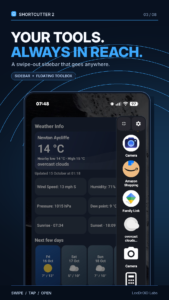
Sidebar / Floating Toolbox:
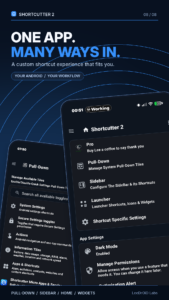
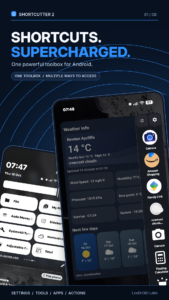
- A Floating Toolbox or Swipe out SideBar
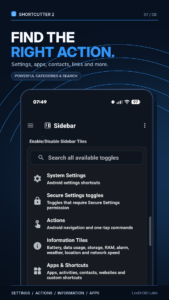
- Up to 85 Quick Shortcuts available including up to 30 Custom tiles (App, Activity, Shortcut & Web Link)!
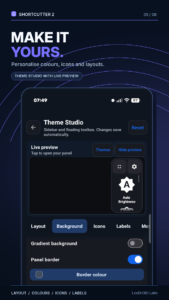
- Theme Customisations
- Custom Icons (Feel free to mail me with any of your own)
- Custom sizes
- Custom position
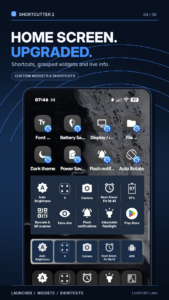
Up To 24 Exposed Launcher Shortcuts:
- Allows you to toggle Settings & Start/Stop Shortcutter services from your app drawer, home screen, Samsung SideBar, HTC Edge Sense, Tasker & more!
A number of tiles & services require elevated permissions:
* Admin - Screen Lock.
* Accessibility - Activity Detection, Power Menu, Recent Apps, Split Screen (N+).
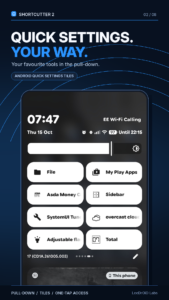
Quick Settings Tiles (Android N 7.0+ Only):
* 60 Additional Quick Settings Tiles available for the standard user (46 in the free version).
* +8 Tiles for Advanced users with a PC.
* +4 tiles for users with ROOT access.
That's 68 Quick Setting Tiles for the power users out there.
Available Tiles/Toggles:
- Auto Sync
- Bluetooth
- Battery Percentage
- Camera Launch
- Clicker - Counts total clicks
- Countdown Timer
- Dice
- Data Usage
- Flashlight
- File Browser
- Font Scale
- Keyboard / IME Selector
- Touch Vibration
- Location Mode: Toggle Off, Device Only, Battery Saving & High Accuracy.*
- In Ear Audio
- Play/Pause Music
- Multi Window
- Mute media volume
- New Tweet
- New Email
- Next Alarm
- Night Light/Desk Clock
- NFC*
- Power Menu
- Screen Filter AKA Night Mode
- Screen Lock - *Requires Device Admin*
- Screen Orientation
- Recent Apps
- Expand Quick Settings
- Expand Notifications
- RAM Usage
- Rounded Corners
- Quick SMS
- Volume Panel
- Screen Timeout
- Screen Brightness Mode
- Brightness Preset
- Ring Mode
- Power Saver*
- Screen Wake AKA Caffeine
- Screen Record (Premium)
-- Custom video profile - 1080p, 720p, 480p, HIGH or QVGA
- Screenshot (Premium) - High Res
-- Custom save location for screenshots & recordings.
- Notifications with View, Share & Delete actions
- Web Search
- WiFi - Displays connected SSID & toggles connection
- WiFi Hotspot
- Voice Search
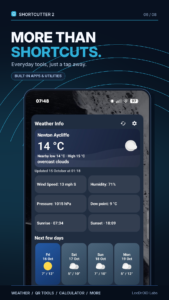
- Weather
- My Location
- SystemUI Tuner
- 14 Custom App/Activity/Shortcut Tiles (30 in the Sidebar/Toolbox) - Add a shortcut to any application, activity, shortcut on your device, assign a web address/search term or shell command. (Root)
*Shortcut to activity only if the app has no access to settings secure.
With Settings Secure Access (Enabled with a PC command):
- ADB
- Data Roaming
- Ambient/Doze Display
- Heads Up Notifications
- Immersive Mode/Expanded Desktop
(INCOMPATIBLE WITH MIUI)
- Keep Screen On While Charging
- Monochrome (B&W)
Additional ROOT Only Tiles:
- Mobile Network Mode
- Mobile Data
- Reboot
- Reboot Recovery
- One handed mode (Experimental)
- Assign shell commands to custom tiles
- Wi-Fi Calling (HTC Only)
This app does not store, retain or share any personal data, all toggles are subject to system availability.
Download Shortcutter 2: Quick Settings 4.3.9
This release may come in several variants. Consult our handy FAQ to see which download is right for you.

Version:9.1.13
Uploaded:October 19, 2026 at 8:36PM UTC
File size:20.25 MB
Downloads:6
Version:9.1.11
Uploaded:October 19, 2026 at 6:24PM UTC
File size:20.24 MB
Downloads:7
Version:9.1.04
Uploaded:October 17, 2026 at 7:28PM UTC
File size:20.19 MB
Downloads:16
Version:9.1.00
Uploaded:October 16, 2026 at 12:21PM UTC
File size:20.18 MB
Downloads:3
Version:9.0.98
Uploaded:October 16, 2026 at 7:19AM UTC
File size:20.18 MB
Downloads:3
Version:9.0.96
Uploaded:October 16, 2026 at 12:15AM UTC
File size:20.17 MB
Downloads:13
Version:9.0.94
Uploaded:October 15, 2026 at 1:48AM UTC
File size:22.15 MB
Downloads:8
Version:9.0.87
Uploaded:October 13, 2026 at 8:52PM UTC
File size:22.05 MB
Downloads:7
Version:9.0.82
Uploaded:October 12, 2026 at 4:56PM UTC
File size:22.00 MB
Downloads:11
Version:9.0.81
Uploaded:October 12, 2026 at 12:28AM UTC
File size:21.99 MB
Downloads:6
Follow APK Mirror


