

 Premium
Download Volume Panel - Volume Control 20.13 APK
Version: 20.13 (20013)
Languages: 75
Package: leedroiddevelopments.volumepanelads
Downloads: 41
Target: Android 10 (Q, API 29)

What's new in Volume Panel - Volume Control 20.13
V20.13:
* Make help text scroll-able & add links.
* Fix media icon with BT connected.
* Fix disabling usage access.
* Change panel scale labels to slider length and icon scale.
* Fix crash in panel start with first click enabled.
* Panel border layout corrections.
* Display individual slider colours in dialog.
* New dialog animations.
* Fix colour picker scaling on low res devices.
* Translation Updates.
* Bug fixes.
About Volume Panel - Volume Control 20.13
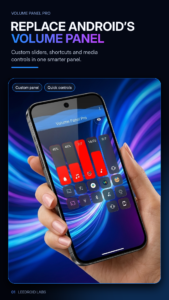
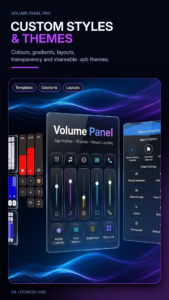
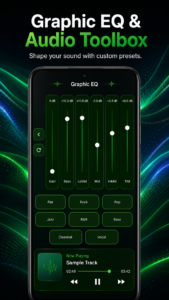
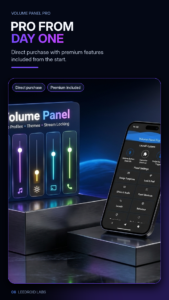
Forget those boring old OEM designs and create your own unique volume panel style with Volume Panel Free/Pro!
Premium
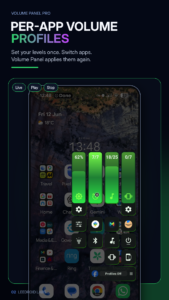
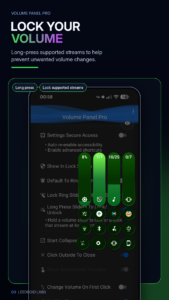
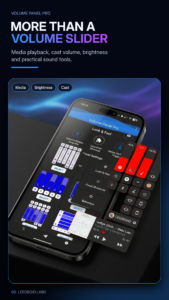
Volume Control Panel is designed to work as a replacement to the system volume control panel or along side it, with multiple customisation options and all 6 system volume controls instantly available at a click, with the extra added bonus of a screen brightness control, media control & additional shortcuts, the possibilities are endless!
Pro/Full Version: play.google.com/store/apps/details?id=leedroiddevelopments.volumepanel
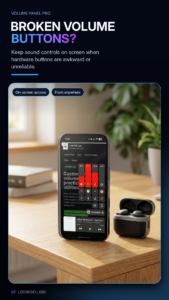
Replace the system panel with the Volume Button Override option or launch the panel from the non obtrusive floating trigger, extra handy if your volume keys are worn or damaged.
Key Features:
* An Android 9/10 inspired Volume Control Panel.
* Instant opening.
* Works in Lock Screen.
* Override volume keys.
* Optional Swipe Up/Down floating trigger.
* Open & control from launcher or other apps.
* Choose Media or Ring as the default button response.
* Configurable Dark/Light Modes.
* Auto Dark/Light Mode (Android 9+).
* Custom vibration intensity.
* Custom animation duration.
* Start collapsed or expanded.
* Left or Right handed mode.
* Left or Right handed in landscape.
* Left or right trigger.
-- The panel will open on the same side as the trigger when launched from the trigger.
* Custom vertical position.
* Custom panel timeout.
* Media control from your volume panel!
* Screen brightness control.
* Swap/Invert Buttons
* Force close system dialog.
* Custom background, slider & icon colours.
* Adjustable panel height & width.
* Adjustable panel margin.
* Option to exclude from certain applications.
* Volume streams: Cast, Media, Ring, Notification (If Supported), Call & Alarm.
* Bluetooth volume control.
* Quick Settings Pull-down Tiles.
* Pinned Launcher Shortcuts (Oreo+)
* Screen Shot button (Android 9+)
* Google Assistant Buttons.
* Bluetooth Toggle.
* Flashlight Toggle.
* Optional Audio Feedback
* 2 different slider styles.
Quick Access Icons (in the panel):
* Instant access to alarm clock & alarm status.
* Mute microphone in call.
* Mute media or casting streams.
* Switch between speaker/earpiece when in call.
* Toggle between Ring, Vibrate or do Not Disturb (Silent).
* Screen Shot (Android 9+).
Quick Settings Pull Down Tiles:
* Mute Media.
* Toggle Ring Mode.
* Launch Volume Panel.
Launcher Shortcuts:
* Mute Media.
* Toggle Ring Mode.
* Launch Volume Panel.
* Volume + / Volume-
Notification Volume
- If the Notification Panel is enabled and splitting ring & notification is supported by the system, ring & notification are independent, if the notification panel is hidden, both stream's are tied together and follow ring volume.
PLEASE NOTE: Button Mapping apps such as Button Mapper or Bixby Button Re-mapper may interfere if volume button customisation is enabled, you can negate this by launching volume panel from your button mapper and assigning the Vol+/- shortcuts.
Required Permissions (Feature Linked):
* Accessibility - Detect volume +/- key presses.
* Do Not Disturb Access.
* Notification Listener Access - Detect audio casting.
* Overlay Permissions - Show the panel as a system overlay.
* Usage Access: Detect the presence of excluded applications.
If you would like to contribute to translating the app, please drop me an email and fork my git: github.com/LeeDroid-/Volume_Panel_Translations
Despite the generic Android system warning for all accessibility services, The Volume Control Panel Accessibility service does not capture or store any information, it simply listens for volume +/- button presses.
Volume Control Panel does not collect, store or share any personal information, nor does it have any of the permissions required to do so, it doesn't even connect to the Internet!.

Version:35.306
Uploaded:July 10, 2026 at 2:26PM UTC
File size:11.01 MB
Downloads:10
Version:35.302
Uploaded:July 5, 2026 at 7:44PM UTC
File size:10.98 MB
Downloads:26
Version:35.269
Uploaded:June 30, 2026 at 4:34PM UTC
File size:6.05 MB
Downloads:19
Version:35.254
Uploaded:June 29, 2026 at 12:14PM UTC
File size:5.94 MB
Downloads:12
Version:35.251
Uploaded:June 29, 2026 at 10:03AM UTC
File size:5.93 MB
Downloads:0
Version:35.212
Uploaded:June 21, 2026 at 11:19AM UTC
File size:5.59 MB
Downloads:48
Version:35.198
Uploaded:June 17, 2026 at 10:01PM UTC
File size:5.43 MB
Downloads:18
Version:35.194
Uploaded:June 17, 2026 at 4:36PM UTC
File size:5.36 MB
Downloads:6
Version:35.192
Uploaded:June 16, 2026 at 5:07PM UTC
File size:5.36 MB
Downloads:9
Version:35.189
Uploaded:June 16, 2026 at 1:53PM UTC
File size:5.35 MB
Downloads:6


