

 Premium
What's new in Microsoft Edge 42.0.4.3928
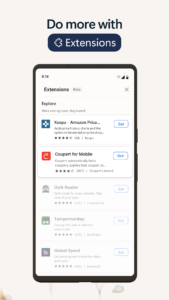
Thanks for using Microsoft Edge! Try the new Honey extension and save money when you shop. It automatically applies coupons at checkout for thousands of stores. Plus, Read Aloud (English pages only) is available with this update. This release also includes general bug fixes and performance improvements.
About Microsoft Edge 42.0.4.3928
Microsoft Edge is the fast, safe web browser that gives you one continuous browsing experience from your Android phone to your Windows 10 device. Once you’ve linked your phone, your stuff will sync in the background, so you can browse wherever you like without skipping a beat.
Premium
Personalize Microsoft Edge for safe and fast web browsing
• Microsoft Edge uses AdBlock Plus to help block unwanted ads. Visit Settings > Content blockers to turn on.
• With Reading view you can reorganize content on a webpage to make it easier to focus.
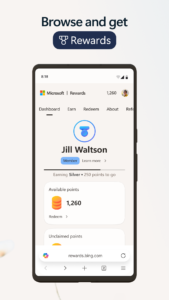
• Try out Microsoft Rewards. Sign in with your Microsoft account, and search on Bing to rack up points and redeem them.
Save your passwords and save time
• Your passwords are safer with Microsoft Edge. Allow the browser to remember passwords, and you'll save time when you revisit Favorites.
• With Microsoft Edge, it’s easy to find and manage your content with Favorites. Plus, you’ll find Reading list, History, and Books all in one place.
• Search fast and type less. Take a photo (or use an image on your camera roll) and try Camera search for fast results. Or, try Voice search to search the web. With Voice search you can ask a question or speak a prompt to search the web in more natural, familiar ways.
• Link your Android phone with your Windows 10 device and then >seamlessly sync content (like webpages) between devices.
Keep your browsing secure and private
• Your favorites, reading list and passwords are safely and securely synced across your devices, for a personalized browsing experience.
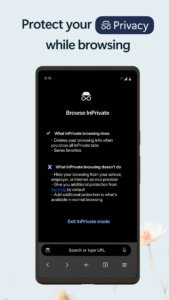
• When you use InPrivate tabs, your browsing data (like cookies, history, autofill information, or temporary files) isn't saved on your device after you close all your InPrivate tabs.
What do you think about Microsoft Edge?
Send feedback in the app. We want to hear from you!
Download Microsoft Edge 42.0.4.3928
This release may come in several variants. Consult our handy FAQ to see which download is right for you.
Known valid signatures: 3f64 2459.

Version:154.0.4258.38
Uploaded:September 28, 2026 at 9:03PM UTC
File size:298.79 MB
Downloads:232
Version:153.0.4234.49
Uploaded:September 28, 2026 at 6:54PM UTC
File size:217.78 MB
Downloads:1,150
Version:153.0.4234.32
Uploaded:September 16, 2026 at 2:35PM UTC
File size:217.75 MB
Downloads:939
Version:152.0.4191.65
Uploaded:September 11, 2026 at 10:16PM UTC
File size:218.73 MB
Downloads:1,126
Version:152.0.4191.53
Uploaded:September 4, 2026 at 2:49AM UTC
File size:218.27 MB
Downloads:1,048
Version:151.0.4129.101
Uploaded:August 28, 2026 at 7:41PM UTC
File size:217.04 MB
Downloads:1,396
Version:151.0.4129.96
Uploaded:August 22, 2026 at 12:38AM UTC
File size:217.01 MB
Downloads:452
Version:151.0.4129.86
Uploaded:August 17, 2026 at 6:22PM UTC
File size:300.68 MB
Downloads:26
Version:151.0.4129.70
Uploaded:August 10, 2026 at 10:52AM UTC
File size:216.71 MB
Downloads:1,811
Version:151.0.4129.59
Uploaded:August 4, 2026 at 5:42AM UTC
File size:216.56 MB
Downloads:881
Follow APK Mirror


