

 Premium
What's new in Microsoft Outlook 1.3.17
This week was all about improvements.
We started with battery usage. Because nobody wants a turned-off phone at 4 o'clock in the afternoon, we've optimised Outlook's battery-power usage to keep you going all day long.
We've also worked on the quality of the Contact Sync, improving the way it works and making sure that only the right contacts are finding their way into your address book.
Finally, we've added support for IRM. You can now safely open all protected messages.
About Microsoft Outlook 1.3.17
The official Microsoft Outlook app for Android phones and tablets.
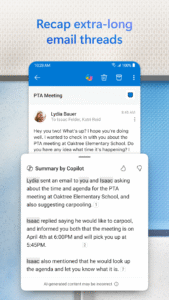
Outlook is a free email app that helps you get more done from anywhere with one unified view of your email, calendar, contacts, and attachments. Outlook automatically surfaces your most important messages – across all your email accounts. Swipe to quickly delete, archive, or schedule messages you want to handle later. Easily view your calendar, share available times, and schedule meetings. And attach files from your email, OneDrive, or Dropbox with just a few taps.
Premium
Outlook works with Microsoft Exchange, Office 365, Outlook.com (including Hotmail, MSN), Gmail, Yahoo Mail, and iCloud.
------------------------------
Why use Outlook?
Manage your inbox
• Outlook automatically triages your inbox for you, surfacing your most important email. Less relevant email is placed in your “Other” inbox.
• Swipe to quickly delete, archive, or schedule messages.
• Schedule emails and they will return to your inbox at a later time.
Your calendar built-in
• Switching between your email and calendar apps is a thing of the past. Outlook includes your calendar and notifies you with appointment reminders.
• Find available meeting times and share them in email or schedule a meeting.
Attachments made easy
• View and attach any file from your email, OneDrive, Dropbox, and other accounts with just a few taps.
• Send large files even if you haven’t downloaded them to your phone.
Find anything fast
• Filter your inbox to only show messages that are unread, flagged, or have attachments, with a single tap.
• Quickly find the right messages, people and files by typing just a few letters.
• Outlook shows people you communicate with most often, and lets you conveniently drill down to see all related emails, meetings and files.
------------------------------
Feedback or questions?
• We want your feedback to make Outlook better! Please share your comments within the app by going to Settings>Help>Contact Support. We read all feedback.
• See the answers to frequently asked questions by going to Settings>Help>FAQs.
------------------------------
Like Outlook?
Try our other Microsoft apps for Android tablets: Word, Excel, PowerPoint, OneNote, OneDrive, and Skype.




Download Microsoft Outlook 1.3.17
This release may come in several variants. Consult our handy FAQ to see which download is right for you.

Version:5.2548.3
Uploaded:December 19, 2025 at 11:36PM UTC
File size:10.88 MB
Version:5.2548.3
Uploaded:December 21, 2025 at 2:36AM UTC
File size:112.46 MB
Downloads:355
Version:5.2548.2
Uploaded:December 18, 2025 at 7:24PM UTC
File size:112.45 MB
Downloads:57
Version:5.2548.1
Uploaded:December 14, 2025 at 5:15PM UTC
File size:112.45 MB
Downloads:380
Version:5.2547.0
Uploaded:December 10, 2025 at 12:28AM UTC
File size:112.23 MB
Downloads:406
Version:5.2546.1
Uploaded:November 27, 2025 at 10:43PM UTC
File size:112.12 MB
Downloads:300
Version:5.2545.0
Uploaded:November 21, 2025 at 5:33PM UTC
File size:113.59 MB
Downloads:510
Version:5.2544.1
Uploaded:November 17, 2025 at 7:14AM UTC
File size:111.81 MB
Downloads:378
Version:5.2543.1
Uploaded:November 8, 2025 at 5:24AM UTC
File size:111.73 MB
Downloads:443
Version:5.2541.1
Uploaded:November 1, 2025 at 2:25AM UTC
File size:109.52 MB
Downloads:372
Version:5.2542.0
Uploaded:October 30, 2025 at 4:15PM UTC
File size:110.24 MB
Downloads:482
Follow APK Mirror


