

 Premium
What's new in Microsoft Outlook 4.2207.2
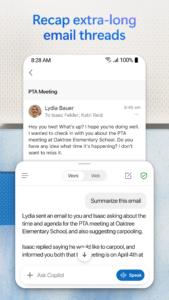
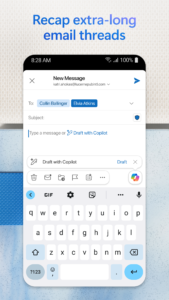
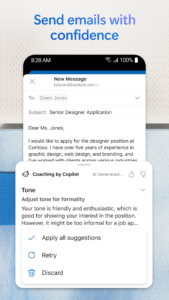
As you type, Outlook Mobile can help you save time and reduce spelling and grammar errors by making suggestions that you can easily accept and insert into your email.
About Microsoft Outlook 4.2207.2
Microsoft Outlook keeps you connected and protected with your secure email, calendar and files all in one app. With intelligent email, a task organizer, spam email protection, calendar reminders and contacts, Outlook lets you do more from one powerful inbox. Connect. Organize. Get things done.
Premium
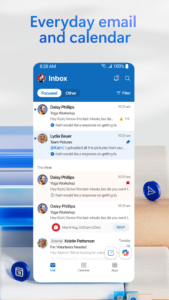
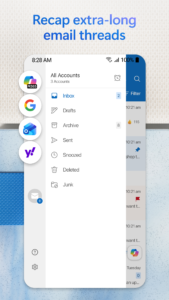
Outlook’s secure email service works with Microsoft Exchange, Microsoft 365, Outlook.com, Gmail and Yahoo Mail online from your phone, giving you flexibility to stay connected on the go. Read email, email friends and colleagues and see what matters most with Focused Inbox. Switch between emails and a calendar organizer to schedule the next meeting or share availability with just a few taps. Organize your email and send documents from your Files list or photos from your Gallery and attach it easily.
Microsoft Outlook provides secure and seamless inbox management that enables you to stay connected, anywhere. Outlook includes Office, Word, Excel, PowerPoint and OneDrive integrations to help you manage and send files and connect with Teams, Zoom and other video calling providers without hassle. Task planner tools and full integration mean that you will never miss a deadline again.
Customize email and calendars so you can stay on top of your busy day. Organize your email with tags, folders and more. Outlook’s calendar organizer has intelligent tools to make your day easier. Listen to what’s new in your inbox, organize schedules and more. Find what you need with Search with a tap or your voice.
OUTLOOK FEATURES:
Secure Email, Calendar, Contacts & Files – All In One Place
• Secure access to everything you need in one app with Outlook’s email service.
• Calendar organizer & file access right from your inbox.
• Connected experiences with Office, Word, Excel, PowerPoint & OneNote.
• Microsoft Office documents are accessible from Outlook, stored locally, or on OneDrive or other cloud storage.
• Create and join your online video calls and meetings with Teams, Zoom, BlueJeans & Webex.
Email & Calendar Planner Management – Everything Organized
• Organize your email with tags, folders & more.
• Automatic inbox management: display the most important messages first with swipe gestures & smart filters.
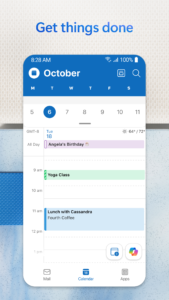
• Business calendar & personal agenda – keep all of your plans organized easily
• Weekly planner tools allow you to see your week ahead.
• RSVP to invites from your inbox & send personalized comments.
• Check messages from other email clients like Gmail and Yahoo Mail online from your phone
• Use the calendar organizer & share calendars to coordinate schedules.
• Keep your weekly calendar and daily tasks organized with Outlook
Task Organizer & Productivity Solutions - Intelligence Everywhere
• Task planner tools: Never miss a deadline again.
• Use your voice to find people, contacts, emails, events & attachments with Search.
• Use suggested replies to respond quickly.
• Email organizer groups same subject emails & conversations for easier tracking.
• Listen to emails with Play My Emails & catch up hands-free.
• Calendar automatically updates with travel & delivery information.
• Leverage task organizer tools & stay on top of your workload.
Email Management & Spam Email Protection – Safe & Secure
• Microsoft Outlook protects your information with security you can trust.
• Simple, secure sign-on to authenticate & protect your identity.
• Built-in protection against viruses & spam email.
• Spam email detection sends all potential threats to the folder.
• Advanced protection to keep your messages safe from phishing attacks & other online threats.
• Microsoft security & privacy keeps your email, calendar, contacts & files safe.
Microsoft Outlook is compatible with:
• Microsoft Exchange
• Microsoft 365
• Outlook.com
• Gmail
• Yahoo Mail
Management for contacts, email, work schedule, files & more with Microsoft Outlook.
See your emails and events at a glance with the Outlook companion app for Wear OS.
Download Microsoft Outlook 4.2207.2
This release comes in several variants (we currently have 2). Consult our handy FAQ to see which download is right for you.
Known valid signatures: 7dc8 a20c.

Version:5.2638.0
Uploaded:September 29, 2026 at 1:39PM UTC
File size:11.89 MB
Version:5.2637.3
Uploaded:September 27, 2026 at 2:28AM UTC
File size:126.88 MB
Downloads:339
Version:5.2637.2
Uploaded:September 25, 2026 at 2:27AM UTC
File size:126.88 MB
Downloads:185
Version:5.2635.3
Uploaded:September 20, 2026 at 3:11AM UTC
File size:124.73 MB
Downloads:562
Version:5.2635.2
Uploaded:September 20, 2026 at 3:11AM UTC
File size:124.76 MB
Downloads:204
Version:5.2635.1
Uploaded:September 14, 2026 at 5:33PM UTC
File size:124.75 MB
Downloads:424
Version:5.2634.1
Uploaded:September 9, 2026 at 6:29PM UTC
File size:124.18 MB
Downloads:230
Version:5.2634.2
Uploaded:September 5, 2026 at 4:13AM UTC
File size:124.19 MB
Downloads:525

Version:5.2633.1
Uploaded:August 28, 2026 at 5:06PM UTC
File size:125.59 MB
Downloads:598
Version:5.2632.1
Uploaded:August 22, 2026 at 9:18PM UTC
File size:125.38 MB
Downloads:448
Version:5.2631.0
Uploaded:August 11, 2026 at 5:33PM UTC
File size:122.04 MB
Downloads:716
Follow APK Mirror


