

 Premium
What's new in DROFUS - ISO 2 USB 9.20.0
*Improve App Performance*
*New*
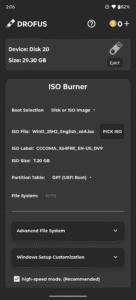
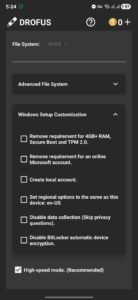
Iso Burner Support : Automated Windows Setup Customization.
Iso Burner Support : Support split .wim file for fat32.
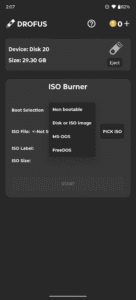
Iso Burner Support : FreeDOS, MS-DOS, Non Bootable Format.
Reduce Coins Cost For non bootable Format to 1 Coin only.
*Bug Fixes*
- UI Bug Fixed.
- All Reported Bugs Fixed.
About DROFUS - ISO 2 USB 9.20.0
🔥 DROFUS — ISO Burner for Android
(Also known as ISO 2 USB or ISO to USB)
Premium
Burn full operating system images directly to USB—no PC required.
DROFUS is a standalone ISO burning utility built for Android. Whether you're preparing a bootable Windows installer or flashing a Raspberry Pi image, DROFUS gives you full control over partition schemes, file systems, and image handling. Designed for speed, precision, and manual configuration.
🧨 Core Features
Supported Image Types
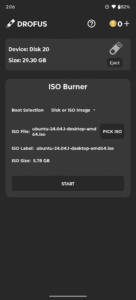
• Burn ISO, DMG, and IMG files directly to USB
• Compatible with:
– Windows 7, 8, 8.1, 10, 11
– FreeDOS / MS-DOS
– Non-bootable formats
– Modern GNU/Linux distributions released after 2010 (e.g., Ubuntu, Fedora, Debian, Arch, etc.)
– macOS DMG (Intel-based only)
– Raspberry Pi OS and other ARM-based images
Windows ISO Handling
• Manual selection of partition scheme and file system
– GPT (UEFI) or MBR (Legacy BIOS)
– NTFS or FAT32
• Bypass Windows 11 minimum requirements
• Automated Windows setup customization (Win10/11)
• Split large install.wim files for FAT32 compatibility
• Compatible with official Microsoft ISOs—no modification needed
Other Image Types
• Linux, macOS DMG, and Raspberry Pi images are written as raw blocks
– No customization or partition changes
– Preserves original layout and boot structure
USB Compatibility
• Works with USB flash drives, SD card adapters and external SSDs
• OTG support required
• Root access only needed for internal SD slot
💰 Coin Usage
Coins are used for advanced image types and formats. You can earn coins by watching rewarded ads or buy them directly.
Coin-required actions:
• Burn Windows ISO → 2 coins
• FreeDOS / MS-DOS → 1 coin
• Non-bootable formats → 1 coin
Free actions:
• Burn Linux ISOs, Raspberry Pi images, and macOS DMG
• Write raw blocks without customization
• Use all manual configuration tools for supported formats
📢 Ad-Supported Experience
DROFUS includes banner ads and rewarded video ads to keep core features free.
Upgrade to Pro to:
• Remove all ads
• Unlock unlimited access
• Disable the coin system
• Use offline or with ad blockers
⚠️ Technical Notes
• Internet required unless using Pro
• Disable ad blockers unless using Pro
• Keep the app in the foreground during USB operations
Download DROFUS now and burn smarter—right from your Android device.
Download DROFUS - ISO 2 USB 9.20.0
This release comes in several variants (we currently have 2). Consult our handy FAQ to see which download is right for you.

Version:12.3.2
Uploaded:August 19, 2026 at 1:17AM UTC
File size:116.01 MB
Downloads:159
Version:12.3.0
Uploaded:August 18, 2026 at 1:39AM UTC
File size:116.02 MB
Downloads:13
Version:12.2.0
Uploaded:August 14, 2026 at 3:00AM UTC
File size:114.39 MB
Downloads:40
Version:12.1.1
Uploaded:August 10, 2026 at 4:26AM UTC
File size:114.17 MB
Downloads:69
Version:12.0.1
Uploaded:August 6, 2026 at 7:19PM UTC
File size:99.50 MB
Downloads:52
Version:10.2.3
Uploaded:July 5, 2026 at 8:09AM UTC
File size:89.27 MB
Downloads:498
Version:10.2.1
Uploaded:July 2, 2026 at 11:09PM UTC
File size:89.27 MB
Downloads:43
Version:10.1.10
Uploaded:June 11, 2026 at 10:39PM UTC
File size:113.85 MB
Downloads:240
Version:10.1.9
Uploaded:June 5, 2026 at 6:52PM UTC
File size:114.01 MB
Downloads:70
Version:10.1.8
Uploaded:June 5, 2026 at 6:29AM UTC
File size:114.00 MB
Downloads:46
Follow APK Mirror


