

 Premium
What's new in PDF Viewer Pro 2026.1.0
2026.1.0
• New "Close all documents" option for easier tab management.
• Improved note annotation editing and deletion.
• Fixed rare crash when saving redacted documents.
• Better handling of PDF annotations and text extraction.
Feel free to share your feedback. You can contact us via support@nutrient.io.
About PDF Viewer Pro 2026.1.0
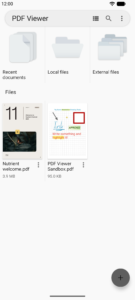
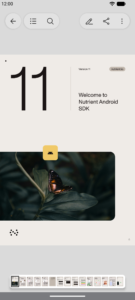
Whether you're working on your own or collaborating with a team, PDF Viewer maximizes productivity, allowing you to view, search, and annotate PDF documents with ease on your Android phone, tablet, or Chromebook.
Premium
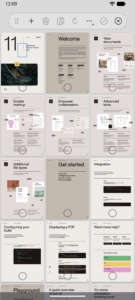
VIEW DOCUMENTS ON THE GO
• Easily open a PDF from your favorite cloud service provider, email, or directly off a website you're browsing.
• Search for the exact text you are looking for within the document.
• Double tap on the screen to Smart Zoom directly to the text you want to read.
• Make PDF Viewer your own by choosing from 12 beautifully crafted themes (*PRO).
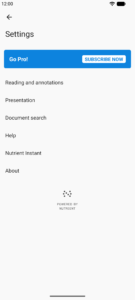
• Configure every inch of the app with our advanced PDF Viewer settings (*PRO).
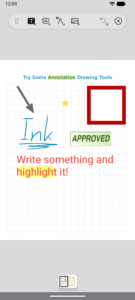
ANNOTATE WITH EASE
• While reviewing a document, use your finger or stylus to highlight and markup text.
• Leave comments by adding a note, text, or drawing directly on the PDF.
• Quickly undo changes for hassle-free editing.
• Rotate stamps and text annotations to create sophisticated reviews (*PRO).
• Annotate JPEGs and PNGs and share the editable images with your collaborators (*PRO).
CREATE AND EDIT PDFs
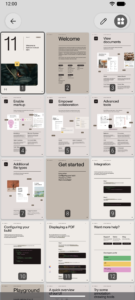
• Create new documents from existing documents by moving, rotating, deleting, or adding new pages to your existing document.
• Mark important pages by adding bookmarks to your document.
• Merge multiple documents into a single PDF (*PRO).
STORE, ORGANIZE AND SHARE
• Open documents from your device, your browser, or any other app.
• Share documents by printing, emailing or saving your edits back to Google Drive, Dropbox, Box, OneDrive or any other cloud service.
• Quickly review important document information or edit document metadata (*PRO).
TRUSTED BY COMPANIES YOU KNOW
• PDF Viewer is built on top of and powered by PSPDFKit, the industry leading PDF engine trusted by thousands of companies and developers throughout the world.
(*PRO): The basic functionality of PDF Viewer is free of any charges. You can unlock the full feature set by purchasing PDF Viewer Pro with a yearly or three-monthly subscription.
Be part of the PDF Viewer community:
Web: PDFViewer.io
Facebook: www.facebook.com/PDFViewer
Twitter: twitter.com/pdfviewerapp
Download PDF Viewer Pro 2026.1.0
This release may come in several variants. Consult our handy FAQ to see which download is right for you.

Version:2026.16
Uploaded:September 18, 2026 at 7:41PM UTC
File size:22.14 MB
Downloads:19

Version:2026.15
Uploaded:September 1, 2026 at 11:07AM UTC
File size:22.16 MB
Downloads:46
Version:2026.13
Uploaded:July 22, 2026 at 9:41AM UTC
File size:19.72 MB
Downloads:61
Version:2026.12
Uploaded:July 20, 2026 at 8:39AM UTC
File size:19.63 MB
Downloads:17
Version:2026.11
Uploaded:July 2, 2026 at 10:08AM UTC
File size:19.92 MB
Downloads:41
Version:2026.10
Uploaded:June 22, 2026 at 8:52AM UTC
File size:19.90 MB
Downloads:24
Version:2026.9
Uploaded:June 12, 2026 at 1:28PM UTC
File size:10.69 MB
Downloads:23

Version:2026.8
Uploaded:June 2, 2026 at 12:54PM UTC
File size:10.67 MB
Downloads:47

Version:2026.7
Uploaded:May 21, 2026 at 9:58AM UTC
File size:27.46 MB
Downloads:37
Version:2026.6
Uploaded:April 27, 2026 at 10:13AM UTC
File size:18.02 MB
Downloads:74
Follow APK Mirror


