

 Premium
What's new in The Roku App (Official) 3.3.0.2188632
• A new Home that gives users easy access to Roku Search, Play on Roku, My Feed, and the Remote Control.
• Zoom into photos in Play on Roku using a two-finger pinch or double-tap gesture.
• Pan around zoomed-in photos in Play on Roku using a single finger drag gesture.
• Broader device support for Play on Roku video playback. Requires Android OS version 4.3 or greater.
• Create a screensaver for your Roku player using photos from your mobile devices (Available on Roku 4 only).
• Bug fixes.
About The Roku App (Official) 3.3.0.2188632
The free Roku Android application allows you to:
Premium
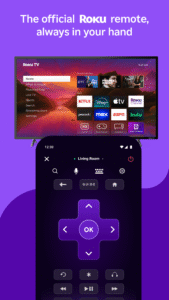
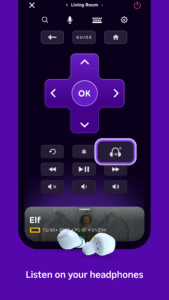
· Control your Roku player or Roku TV from your mobile device.
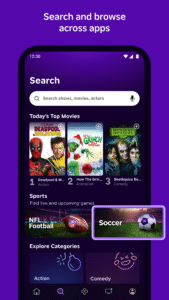
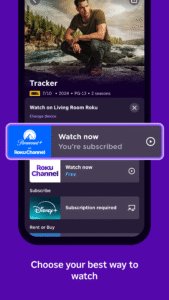
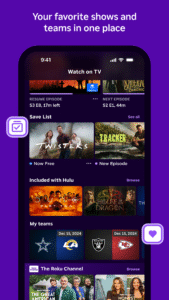
· Use Roku Search with your mobile device. See what’s on, where you can watch it for free, with a subscription, or how much the different channels charge to rent or buy.
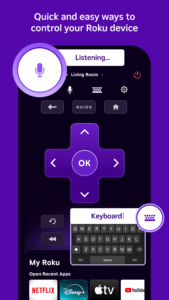
· Use your voice to search for movies, TV shows, actors, and directors as well as for streaming channels by name.
· Follow "Movies Coming Soon” within My Feed and get updates when new movies are ready to stream – on what channel and at what price.
· Browse, add, and rate Channels from more than 2,000 streaming channels offered in the Roku Channel Store.*
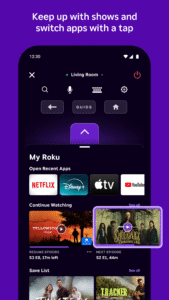
· Quickly launch your favorite Roku Channels on your Roku player or Roku TV from your mobile device.
· Enter text in your Roku player on-screen interface using your device's keyboard instead of the included remote.
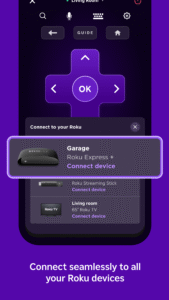
· Name and switch between multiple Roku players and Roku TVs.
· Enjoy your Android device's photos, music, and video on your Roku player or Roku TV using the “Play on Roku” feature.
* Subscription or other payment may be required to access certain channel content. Channel availability subject to change and not all content is available in the countries in which Roku devices are sold.
THIS APP REQUIRES A ROKU PLAYER OR ROKU TV
To use this app, you must connect your Android device to the same network as your Roku player or Roku TV. Certain features require compatible Roku players/Roku TVs or may require logging in to your Roku account.
HAVING TROUBLE FINDING YOUR ROKU PLAYER OR ROKU TV?
Note: If the app does not recognize your Roku player or Roku TV (you see a “No Roku Devices Found” message after you sign in), try going to network setup again on your Roku player or Roku TV. This will wake your Roku player or Roku TV on your home network. Then, select “Try Again” in the Roku app.
FEATURE AVAILABILITY
· Roku Search is available when your connected Roku player or Roku TV supports this functionality.
· Searching by voice is available in English in the US and Canada only and elsewhere when updates make voice search available. This feature requires permission to access your Android device's microphone.
Go to support.roku.com for FAQs or to get help.
The Roku App (Official) 3.3.0.2188632 Play Store screenshots (8)
Screenshots from version 14.1.0.10098392
Download The Roku App (Official) 3.3.0.2188632
This release may come in several variants. Consult our handy FAQ to see which download is right for you.

Version:14.1.0.10098392
Uploaded:August 31, 2026 at 1:31AM UTC
File size:67.13 MB
Downloads:401
Version:14.0.0.9462138
Uploaded:July 21, 2026 at 4:39PM UTC
File size:65.11 MB
Downloads:777
Version:13.9.2.9196900
Uploaded:June 25, 2026 at 7:00AM UTC
File size:61.72 MB
Downloads:493
Version:13.9.1.9060305
Uploaded:June 11, 2026 at 5:18PM UTC
File size:61.72 MB
Downloads:302
Version:13.8.0.8594117
Uploaded:May 17, 2026 at 11:05PM UTC
File size:61.30 MB
Downloads:445
Version:13.7.1.8472934
Uploaded:April 28, 2026 at 2:55PM UTC
File size:59.30 MB
Downloads:320
Version:13.7.0.8240800
Uploaded:April 19, 2026 at 7:41AM UTC
File size:59.29 MB
Downloads:219
Version:13.6.2.8064897
Uploaded:March 25, 2026 at 7:31PM UTC
File size:58.78 MB
Downloads:415
Version:13.6.1.7957207
Uploaded:March 23, 2026 at 1:30AM UTC
File size:58.77 MB
Downloads:78
Version:13.6.0.7848503
Uploaded:March 9, 2026 at 1:31AM UTC
File size:58.76 MB
Downloads:204
Follow APK Mirror


