

 Premium
What's new in Samsung One Hand Operation + 2.5.41.0
New actions are added and also bugs are resolved.
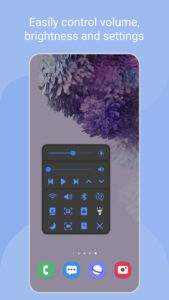
- Added new functions on "Quick tools". ( Bluetooth, Wifi , Rotation, etc )
- Added "Start application" feature.
- Added "Hide on lock screen" setting.
- Enhanced "Quick tools" as GUI version.
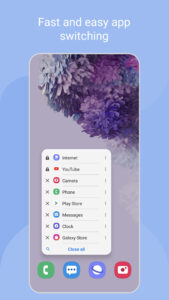
- Enhanced "Task switcher" by adding "starred app" feature. ( by long press app item )
- Modified to set size/position of left/right handle separately
- Fixed some bugs.
About Samsung One Hand Operation + 2.5.41.0
With this app, you can use your device easily with only thumb.
Premium
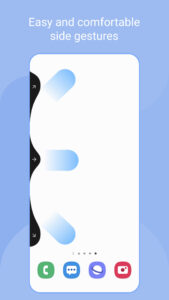
When the function is set, thin gesture handles are added to the left / right side of the screen.
By swiping this handle, defined functions will be executed. the default function is the Back button which most frequently used.
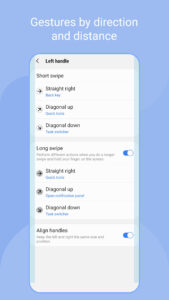
You can set various functions on horizontal / diagonal up / diagonal down direction gestures. As you become accustomed to using short gestures, you can set up more functions on long gestures.
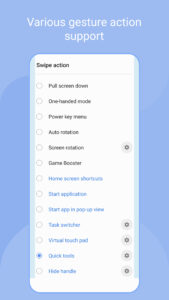
Currently available functions are as follows, and we plan to provide additional function upgrades.
- Back key
- Home key
- Recent key
- Menu key
- Previous app
- Forward ( web browser )
- Open notification panel
- Open quick panel
- Screen off
- Flashlight
- Assistance app
- Screenshot
- Floating navigation buttons
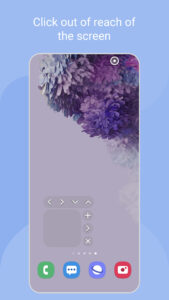
- Pull screen down
- One-handed mode
- Start application
- Task switcher
- Quick tools
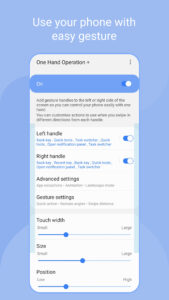
Depending on the size of hand, the thickness of thumb, or the shape of the bumper case being used, various handle settings are provided to optimize gesture recognition.
The handle will receive user's touch above the running app. So, as long as the gesture recognition is possible, it is recommended to set handle to be thin.
And once you are fully familiar with the use of gestures, It is recommended that set max transparency.
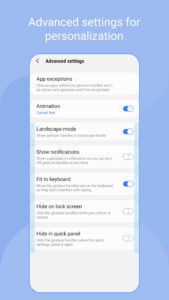
In addition, when the touch interference is severe with running application such as game, you can set [App exceptions] in [Advanced Settings], then the gesture handles will not work when the app is running.
Experience the convenience of gestures on your phone and tablet with One Hand Operation +.
Thank you.
Download Samsung One Hand Operation + 2.5.41.0
This release may come in several variants. Consult our handy FAQ to see which download is right for you.

Version:9.2.21.0
Uploaded:August 11, 2026 at 10:59AM UTC
File size:8.41 MB
Downloads:2,166
Version:9.2.19.0
Uploaded:June 25, 2026 at 12:49PM UTC
File size:8.40 MB
Downloads:3,969
Version:8.8.11.0
Uploaded:March 20, 2026 at 12:29AM UTC
File size:8.00 MB
Downloads:26,775
Version:8.7.11.0
Uploaded:March 4, 2026 at 12:25AM UTC
File size:8.00 MB
Downloads:1,185
Version:8.6.17.0
Uploaded:December 16, 2025 at 10:24PM UTC
File size:8.11 MB
Downloads:4,100
Version:8.5.11.0
Uploaded:September 16, 2025 at 9:01AM UTC
File size:8.00 MB
Downloads:54,143
Version:8.4.11.0
Uploaded:September 11, 2025 at 12:32PM UTC
File size:8.00 MB
Downloads:550
Version:8.3.19.0
Uploaded:September 10, 2025 at 8:51AM UTC
File size:8.00 MB
Downloads:72
Version:8.2.17.0
Uploaded:July 20, 2025 at 10:51PM UTC
File size:7.90 MB
Downloads:82,825
Version:8.1.29.0
Uploaded:June 10, 2025 at 1:20AM UTC
File size:7.90 MB
Downloads:2,081
Follow APK Mirror


