

 Premium
What's new in Samsung Browser 16.0.4.22
v16.0.2.19
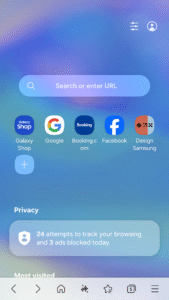
* Move URL bar to the bottom (optional)
* HTTPS priority connection (Labs feature)
* Block tracking by invisible image ("Tracking Pixel")
* Enhanced Search Experience in URL bar
※ You can also install Samsung Internet browser on WearOS-based watches (Galaxy Watch4, Galaxy Watch4 Classic)
About Samsung Browser 16.0.4.22
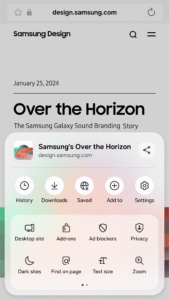
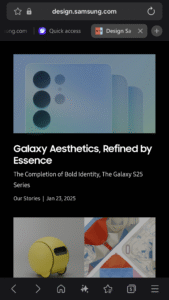
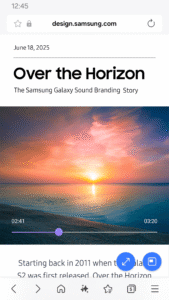
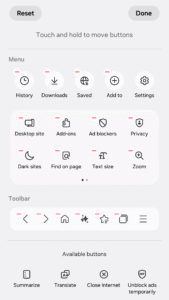
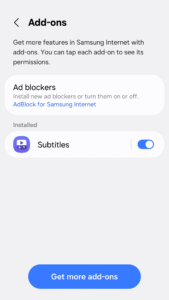
Samsung Internet provides the best web browsing experience for you with Video Assistant, Dark Mode, Customize menu, Extensions such as Translator, and by protecting your privacy with Secret mode, Smart Anti-Tracking and Smart Protection.
Premium
You can also install Samsung Internet browser on WearOS-based watches (Galaxy Watch4, Galaxy Watch4 Classic)
■ New Features for you
* Move URL bar to the bottom (optional)
The URL bar can be moved to the bottom for better one-handed usability.
* HTTPS priority connection (Labs feature)
When accessing a web page, this feature prioritizes secure connection and attempts to connect.
* Block tracking by invisible image ("Tracking Pixel")
Smart Anti-Tracking has evolved to block tracking by using small pixel images.
* Enhanced Search Experience in URL bar
You can now experience superior and well-organized search suggestions while you are entering search keywords into the URL bar.
■ Security & Privacy
Samsung Internet helps you protect your security and privacy while browsing the Internet.
* Smart Anti-Tracking
Intelligently identify domains which have cross-site tracking ability and block storage (cookie) access.
* Protected Browsing
We will warn you before you can view known malicious sites to prevent you from visiting web sites which may try to steal your data.
* Content Blockers
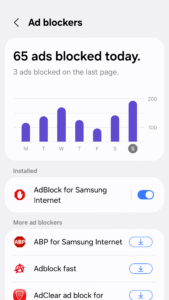
Samsung Internet for Android allows 3rd party apps to provide filters for content blocking, making browsing safer and more streamlined.
The following permissions are required for the app service.
For optional permissions, the default functionality of the service is turned on, but not allowed.
[Required permissions]
none
[Optional permissions]
Location: Used to provide location-based content requested by the user or location information requested by the webpage in use
Camera: Used to provide webpage shooting function and QR code shooting function
Microphone: Used to provide recording function on webpage
Storage: Used to store files when downloading from webpages
Download Samsung Browser 16.0.4.22
This release may come in several variants. Consult our handy FAQ to see which download is right for you.
Known valid signatures: 9ca5 29c6.

Version:5.2.00.8
Uploaded:July 10, 2026 at 9:38AM UTC
File size:138.05 MB

Version:30.0.5.24
Uploaded:October 1, 2026 at 12:04AM UTC
File size:225.23 MB
Downloads:1,758
Version:31.0.0.64
Uploaded:September 29, 2026 at 1:25AM UTC
File size:316.98 MB
Downloads:2,436
Version:30.0.2.61
Uploaded:July 24, 2026 at 8:04PM UTC
File size:300.46 MB
Downloads:9,019
Version:30.0.0.67
Uploaded:June 17, 2026 at 1:02PM UTC
File size:217.62 MB
Downloads:1,844
Version:30.0.2.45
Uploaded:June 14, 2026 at 10:09PM UTC
File size:300.80 MB
Downloads:3,724
Version:30.0.0.63
Uploaded:May 23, 2026 at 1:16PM UTC
File size:217.62 MB
Downloads:3,091
Version:30.0.2.30
Uploaded:May 11, 2026 at 12:11PM UTC
File size:300.53 MB
Downloads:4,784
Version:29.0.5.3
Uploaded:April 12, 2026 at 4:58AM UTC
File size:213.35 MB
Downloads:7,316
Version:29.0.4.46
Uploaded:March 29, 2026 at 9:16PM UTC
File size:284.78 MB
Downloads:9,408
Version:29.0.4.45
Uploaded:March 5, 2026 at 6:29PM UTC
File size:284.79 MB
Downloads:2,176
Follow APK Mirror


