

 Premium
What's new in CodeAssist - Android IDE 3.0.1
CodeAssist 3.0.1
* Your project files now show up in Android's file manager (Documents Provider)
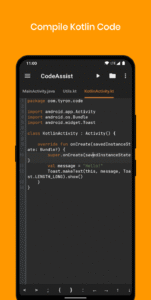
* Kotlin completion, type resolution and diagnostics — built from scratch, running on-device.
* Compose @Composable preview, rendered live by our own on-device Kotlin interpreter.
* XML layout preview
Heads-up: this release breaks older projects — fast iteration over backwards-compatibility.
Full changelog: github.com/tyron12233/CodeAssist/releases/tag/v3.0.1
About CodeAssist - Android IDE 3.0.1
CodeAssist is an integrated development environment (IDE) that allows you to create your own android application with real programming (Java, Kotlin, XML).
Premium
Summary of all features:
- Easy-to-use: We know that it is hard to do coding on small screens, but through the app, it makes your job easier than ever before! (Just like Android Studio)
- Smooth Code Editor: Adjust your code editor with ease by zooming in or out, shortcut bar, undo-redo, indent and many more!
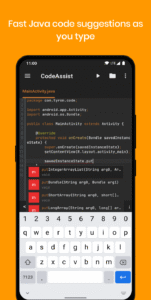
- Auto Code Completions: Just focus on coding, not writing. The intelligent code completion efficiently suggests what to write next without lagging your device! (Currently for Java only)
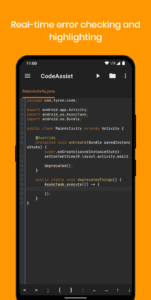
- Real-time error highlighting: Know right away when you have errors in your code.
- Design: Design is an important part of making apps, this IDE allows you to preview layouts without compiling every time!
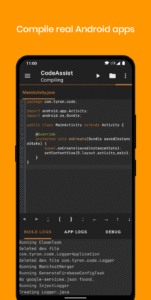
- Compile: Compile your project and build APK or AAB with just a single click! Since it is background compiling, you can do other things while your project is compiling.
- Manage Projects: You can manage multiple projects without finding your device directories multiple times.
- Library Manager: No need to deal with build.gradle for managing multiple dependencies for your project, integrated library manager allows you to easily manage all dependencies and automatically adds sub-imports.
- AAB file: AAB is needed for publishing your app on Play store, hence you can prepare your apps for production in Code Assist
- R8/ProGuard: It allows you to obfuscate your application, making it difficult to mod/crack.
- Debug: Everything at your disposal, live build logs, app logs and debugger. No chance for a bug to survive!
- Java 8 Support: Use lambdas and other newer language features.
- Open source: The source code is available at github.com/tyron12233/CodeAssist
Upcoming features:
• Layout Editor/Preview
• Git integration
Have some problems? Ask us or the community on our discord server. discord.gg/pffnyE6prs
Download CodeAssist - Android IDE 3.0.1
This release comes in several variants (we currently have 3). Consult our handy FAQ to see which download is right for you.

Version:3.31.0
Uploaded:October 18, 2026 at 10:18PM UTC
File size:256.01 MB
Downloads:39
Version:3.30.2
Uploaded:October 17, 2026 at 2:01PM UTC
File size:255.78 MB
Downloads:27
Version:3.30.0
Uploaded:October 15, 2026 at 10:36PM UTC
File size:255.69 MB
Downloads:15
Version:3.29.0
Uploaded:October 13, 2026 at 10:07PM UTC
File size:255.56 MB
Downloads:32
Version:3.28.0
Uploaded:October 13, 2026 at 12:57PM UTC
File size:146.16 MB
Downloads:16
Version:3.27.1
Uploaded:October 12, 2026 at 12:30AM UTC
File size:254.21 MB
Downloads:17
Version:3.27.0
Uploaded:October 11, 2026 at 11:08AM UTC
File size:254.21 MB
Downloads:23
Version:3.25.0
Uploaded:October 8, 2026 at 9:09PM UTC
File size:241.40 MB
Downloads:18
Version:3.24.0
Uploaded:October 6, 2026 at 3:56AM UTC
File size:241.34 MB
Downloads:22
Version:3.23.0
Uploaded:October 2, 2026 at 10:15PM UTC
File size:241.13 MB
Downloads:32
Follow APK Mirror


