

 Premium
What's new in EPIK - AI Photo & Video Editor 4.4.3
[Main screen] The main screen has been redone! Set frequently used features as convenient shortcuts.
[EPIK AI] View all of the AI features in one place.
[Video Auto Skin] Retouch skin to look more natural, even in videos.
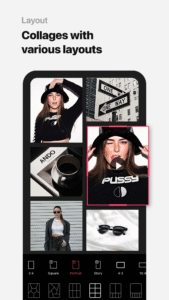
[Layout] Set a layout using videos.
[Proportions] Adjust not only Height but also face size and waist thickness.
[Batch] Edit up to 15 effects, text, and backgrounds all at once.
[Adjust] Dehaze has been added!
[Filter] Apply two filters at the same time.
About EPIK - AI Photo & Video Editor 4.4.3
Use professional editing tools and powerful AI technology to easily and conveniently edit photos.
Premium
[AI tool]
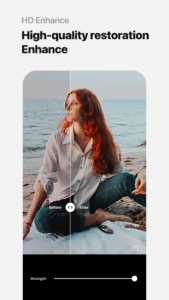
・ Enhance: Improve clarity and resolution! Create high-quality photos
・ AI skin: Perfect your skin by AI correcting blemishes
・ Smart AI cutout: Carefully separate figures, objects, and even animals
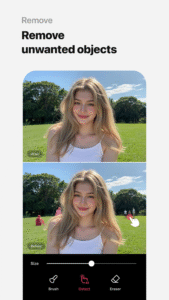
・ Remove: Easily remove unwanted parts
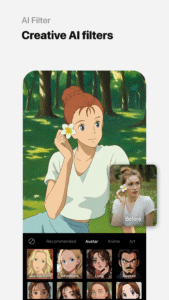
・ AI filter: Create your own characters in different styles
・ Hairstyle and Expression: Create a new look
[Professional photo editing tools]
・ HSL, Curves, Split Tone, Selective: Precise color adjustments
・ Lux, Texture, Grain, Brilliance, Vignette: Create different moods
・ Crop, Rotate, Mirror, Flip, Perspective, Adjust resolution: Set the composition you want
・ Batch: Edit multiple photos at once
・ Patch, Clone: Naturally edit or copy a specific part
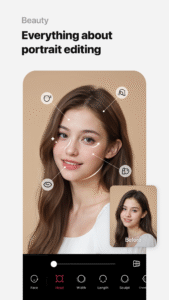
[Perfect portraits]
・ Looks: Experience the magic of one-tap beauty with skin retouch, makeup, face tuner, and filters all at once
・ Erase wrinkles, AI Skin, Blemishes : Smooth skin without blemishes
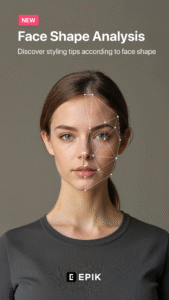
・ Reshape, 3D Face, Mirror correction Individual Left-Right Adjustment, Preset, Perspective: Natural and detailed face correction
・ Style, Paint, Fine tune: Stylish makeup perfect for your face
・ Body,Length: Take perfect full-body photos! Create the body you want
・ Hair Color, Hairstyle: Transform with different hairstyles
[Trendy content]
・ Filters, Effects, Relight: Create a trendy feel
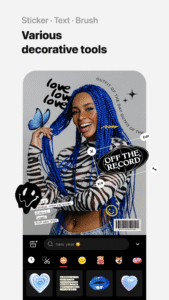
・ Stickers, Text, Paint, Draw shapes: Make your photos more unique
・ Time stamp: Record your special moments
・ Template: Thousands of customizable templates
[Creative Tools]
・ AI Collage: Create unique collages with different photos
・ Spot color: Highlight the color you want
・ Mosaic: Try various mosaic and blur effects
・ Cutout, Separate: Smart cropping
・ Layout: Combine photos in cool arrangements
・ Background, Pattern: Create your own unique backgrounds
・ Custom stickers, create one-of-a-kind filters
[Movie feature]
・ Video mosaic: Easy mosaics with automatic figure tracking
・ Retro Clip: Create vintage videos easily
・ Video Face Edit: Retouch faces naturally in videos
For inquiries about subscriptions,
contact [EPIK > Profile > Settings > Contact].

Download EPIK - AI Photo & Video Editor 4.4.3
This release comes in several variants (we currently have 2). Consult our handy FAQ to see which download is right for you.

Version:7.3.3
Uploaded:August 4, 2026 at 9:34AM UTC
File size:208.95 MB
Downloads:16
Version:7.3.2
Uploaded:July 30, 2026 at 10:55AM UTC
File size:208.48 MB
Downloads:38
Version:7.3.1
Uploaded:July 29, 2026 at 10:20AM UTC
File size:208.51 MB
Downloads:14
Version:7.3.0
Uploaded:July 27, 2026 at 2:16PM UTC
File size:206.75 MB
Downloads:18
Version:7.2.2
Uploaded:July 7, 2026 at 4:07PM UTC
File size:210.86 MB
Downloads:83
Version:7.2.1
Uploaded:July 3, 2026 at 12:14PM UTC
File size:211.35 MB
Downloads:27
Version:7.2.0
Uploaded:July 2, 2026 at 3:20PM UTC
File size:210.73 MB
Downloads:14
Version:7.1.41
Uploaded:June 12, 2026 at 7:38AM UTC
File size:203.42 MB
Downloads:76
Version:7.1.40
Uploaded:June 10, 2026 at 10:15AM UTC
File size:203.58 MB
Downloads:12
Version:7.1.21
Uploaded:May 18, 2026 at 10:10AM UTC
File size:203.03 MB
Downloads:108
Follow APK Mirror


