

 Premium
What's new in SMS Backup & Restore 10.07.103
v10.06.120
- Fix for Dropbox login crashing the app on some devices
- Minor update to Dark Theme for Samsung devices
About SMS Backup & Restore 10.07.103
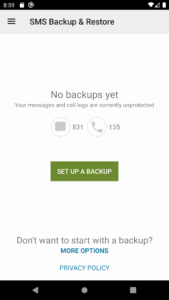
SMS Backup & Restore is a simple Android app that backs up and restores your phone's SMS and MMS messages and call logs.
Note: This app requires existing backups to be able to restore call logs and messages. It cannot recover anything without existing backups. Advanced messaging (RCS) is currently only supported with Google Messages.
For questions or issues please visit our FAQ at: synctech.com.au/sms-faqs/
APP FEATURES:
- Backup SMS (text) messages, MMS and call logs in XML format.
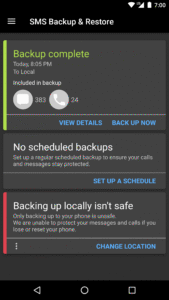
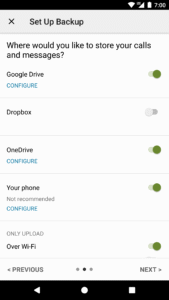
- Local device backup with options to automatically upload to Google Drive, Dropbox and OneDrive
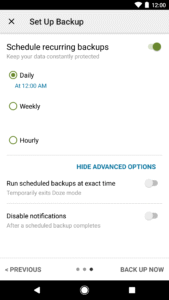
- Choose a recurring scheduled time to automatically backup
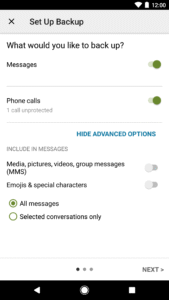
- Option to select which conversations to backup or restore
- View and drill into your local and cloud backups
- Search your backups
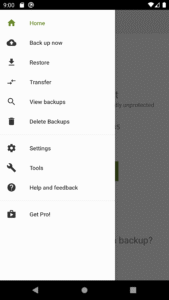
- Restore/transfer backup to another phone. Backup format is independent of the Android version so the messages and logs can be easily transferred from one phone to another, irrespective of the version.
- Fast Transfer between 2 phones over WiFi direct
- Ability to restore all messages or only selected conversations.
- Free up space on your phone. Delete all SMS messages or call logs on the Phone.
- Email a backup file.
- The XML backup can be converted to other formats, and can also be viewed on a computer.
Notes:
- Tested on Android 5.0 and higher
- App only restores backups made by this app
- Please start the app at least once after updates so that the scheduled backups start working.
- Backup is created locally on the phone by default, but you have the option to upload to Google Drive, Dropbox, OneDrive or Email. You are responsible for backup files. At no time are the files sent to the developer.
- If you intend to do a factory reset on the phone, please make sure you save/email a copy of the backup outside the phone before doing it.
- If you have performed the Restore and the messages don't appear in your messaging app then:
- Open your messaging app and disable SMS from Settings.
- Exit the app
- Open the app again and enable SMS from Settings.
This App needs access to the following:
* Your messages: Backup and Restore messages. Receive SMS permission needed to properly handle messages received while the app is the default messaging app.
* Your Calls and Contact information: Backup and Restore Call Logs.
* Storage: To create the Backup file on the SD card.
* Network view and communication: Allows the app to connect to wifi for backup
* Your social information: To display and store the contact names in the Backup file.
* Run at start-up: Start scheduled Backups.
* Prevent Phone from Sleeping: To prevent the phone from going to sleep/suspended state while a Backup or Restore operation is in progress.
* Test access to Protected Storage: To create the Backup file on the SD card.
* Account Information: To authenticate with Google Drive and Gmail for cloud uploads.
Download SMS Backup & Restore 10.07.103
This release may come in several variants. Consult our handy FAQ to see which download is right for you.

Version:10.26.007
Uploaded:August 18, 2026 at 5:14AM UTC
File size:20.44 MB
Downloads:544
Version:10.26.004
Uploaded:July 10, 2026 at 7:20PM UTC
File size:20.27 MB
Downloads:440
Version:10.26.003
Uploaded:July 10, 2026 at 7:20PM UTC
File size:19.59 MB
Downloads:14
Version:10.25.004
Uploaded:June 1, 2026 at 4:03AM UTC
File size:19.52 MB
Downloads:365
Version:10.25.003
Uploaded:June 1, 2026 at 4:03AM UTC
File size:19.56 MB
Downloads:23
Version:10.24.003
Uploaded:November 30, 2025 at 4:17AM UTC
File size:19.03 MB
Downloads:1,359
Version:10.24.001
Uploaded:November 18, 2025 at 11:48AM UTC
File size:18.10 MB
Downloads:8
Version:10.23.002
Uploaded:October 31, 2025 at 7:14AM UTC
File size:17.39 MB
Downloads:554
Version:10.23.001
Uploaded:September 8, 2025 at 3:56AM UTC
File size:17.39 MB
Downloads:402
Version:10.22.001
Uploaded:July 29, 2025 at 7:19AM UTC
File size:17.38 MB
Downloads:355
Follow APK Mirror


