

 Premium
What's new in WPS Office-PDF, Word, Sheet 13.11.0
WPS Office V14.5 is available now, including:
1. Optimized the experience of starring files
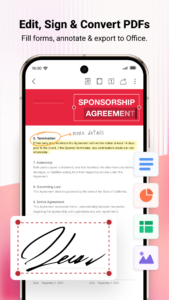
2. Signature is now supported in Document
3. Improved the frequently-used sharing settings
About WPS Office-PDF, Word, Sheet 13.11.0
WPS Office-Free Office suite for Word, PDF, Excel, is a all-in-one office suite combines Word, PDF, Excel, PowerPoint, Forms, Cloud Storage, Online Editing, Template library and Sharing. In addition, WPS Office can work perfectly with Google Classroom, Zoom, Slack and Google Drive.
Premium
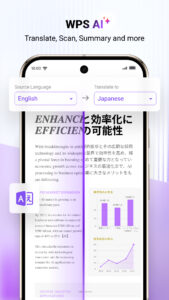
Access various WPS Office functions through mobile devices, such as scanning PDF files, edit slides, convert spreadsheets, or view documents anytime, anywhere.
「Features of WPS Office 」
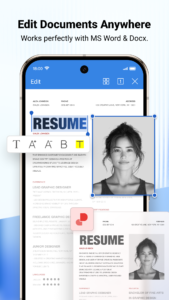
1. View and process documents in multiple formats
• Using templates to start editing your budget, presentations, resumes, documents and other files.
•Using tools to convert and process Document, PDF and images.
•Easy to create, edit, share word documents and collaborated on with others in real-time.
• Compatible with MS Office 365 (Word, PowerPoint, Excel,), Google Docs, Google Sheets, Google Slides, Adobe PDF, PDF Reader, Xodo PDF, Foxit PDF, Smallpdf, OfficeSuite, Polaris Office, OpenOffice, LibreOffice and FreeOffice.
• WPS Office supports 51 languages and all Office file formats: doc, docx, wpt, dotm, docm, dot, dotx / xls, xlsx, xlt, xltx, csv, xml, et, ett / PDF / ppt, pot, dps , dpt, pptx, potx, ppsx / txt / log, lrc, c, cpp, h, asm, s, java, asp, bat, bas, prg, cmd, Zip
2. Scan, view, edit, convert PDF on your Android device
• Free PDF reader that can open, view, share and comment on PDFs anywhere and on any device
• Convert all Office documents (Word, Text, Excel, PowerPoint, doc) to PDF
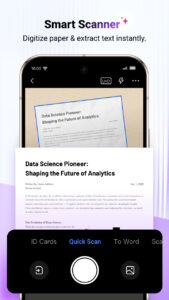
• Scan paper documents/convert images to PDF
• Support PDF annotation
• Signature is now supported in Document
• Support PDF extraction/split, PDF merge, PDF to Word/Excel/PPT
• Easily add and delete watermarks in PDF
3. Create Memo on Android device
• Use Memo to quickly extract and save important content and text from Chrome and Gmail. Compared with Microsoft Notes, Evernote, google keep, Notion, Onenote, it is more convenient and fast.
4. Powerful cloud storage function, you are not afraid of losing documents
• Use WPS Cloud to manage all documents, synchronize in real time on mobile phones and computers, and easily and directly access and edit office documents
• Save documents to third-party clouds: Dropbox, Google Drive, Box, Evernote and OneDrive.
5. Solutions for working remotely on Android devices
• 1G free cloud storage, support online editing and sharing of files, easy to build and join the cloud team
• Easy to share office documents via WIFI, NFC, DLNA, email, instant messaging, WhatsApp, Telegram, Facebook and Twitter
Now available PC and Mac for free , please visit the following link: d.wps.com
Support page: help.wps.com/Android-Office/





Download WPS Office-PDF, Word, Sheet 13.11.0
This release may come in several variants. Consult our handy FAQ to see which download is right for you.

Version:26.8.1
Uploaded:August 28, 2026 at 7:06AM UTC
File size:260.68 MB
Downloads:96
Version:26.8.0
Uploaded:August 10, 2026 at 3:06AM UTC
File size:260.62 MB
Downloads:493
Version:26.7.3
Uploaded:August 4, 2026 at 3:00AM UTC
File size:258.07 MB
Downloads:197
Version:26.7.2
Uploaded:July 21, 2026 at 10:07AM UTC
File size:126.60 MB
Downloads:515
Version:26.6.4
Uploaded:June 30, 2026 at 4:28AM UTC
File size:249.43 MB
Downloads:560
Version:26.6.3
Uploaded:June 10, 2026 at 2:11AM UTC
File size:124.82 MB
Downloads:607
Version:26.4.3
Uploaded:May 27, 2026 at 12:29PM UTC
File size:250.20 MB
Downloads:465
Version:18.25.2
Uploaded:May 7, 2026 at 3:15AM UTC
File size:166.94 MB
Downloads:1,108
Version:18.25.1
Uploaded:April 7, 2026 at 3:13PM UTC
File size:166.92 MB
Downloads:892
Version:18.24
Uploaded:March 18, 2026 at 1:33AM UTC
File size:170.17 MB
Downloads:12,280
Follow APK Mirror


