

 Premium
What's new in StandBy Mode: Clock & Widgets 1.8.5.470
NEW
• New Christmas and New Year's Eve vibes and GIFs
FIXES & IMPROVEMENTS
• Duo: Enhanced scrolling - interact with widgets using slow scroll, navigate pages with fast scroll
• Fix Sleep Timer waking device when Turn Off Screen option is enabled
• Fix missing colors in Pomodoro theme
About StandBy Mode: Clock & Widgets 1.8.5.470
Transform your device into the ultimate desk or bedside display with StandBy Mode Pro. Use it as a smart clock, widget dashboard, photo frame, or screen saver - all crafted with Material Design 3, fluid animations, burn-in protection and deep customization options.
Premium
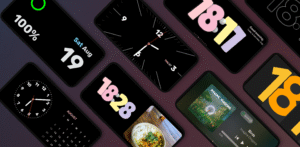
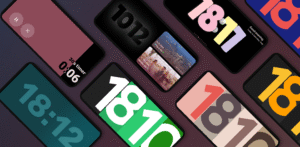
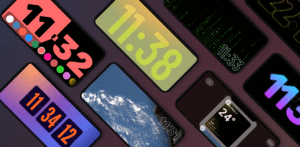
🕰️ Beautiful & Customizable Clocks
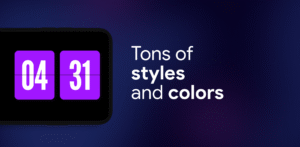
Choose from a wide range of fullscreen digital and analog clocks:
• Flip Clock (Retroflip)
• Neon, Solar & Matrix Watch
• Big Crop Clock (Pixel-style)
• Radial Inverter (burn-in safe)
• Dementia Clock, Segmented Clock, Analog + Digital combo
Each clock offers detailed customization, giving you hundreds of unique layouts.
📷 Photo Slide & Frame Mode
Display curated photos while showing time and date.
AI auto-detects faces to avoid awkward cropping.
🛠️ Tools That Matter
• Timer
• Schedule with calendar sync
• Experimental notification display
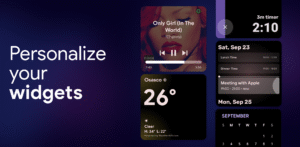
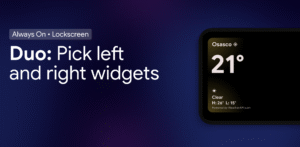
📅 Duo Mode & Widgets
Add two widgets side by side: clocks, calendars, music players, or any third-party widget.
Resize, rearrange, and personalize.
🌤️ Smart Weather Clocks
Get real-time weather integrated with elegant clock displays — fullscreen, edge, or bottom layouts.
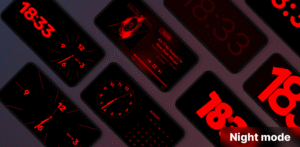
🛏️ Night Mode
Reduce screen brightness and tint widgets to minimize eye strain.
Works automatically based on time or light sensor.
🔋 Quick Launch
Automatically start StandBy Mode when your device starts charging — or only when it’s in landscape mode.
🕹️ Vibes Radio
Lo-fi, ambient, or study-friendly radios and visuals to set the mood — or link any YouTube video as a Premium User.
🎵 Player Control
Control playback from Spotify, YouTube Music, Apple Music, and more, directly from the home screen.
📱 Portrait Mode Support
Optimized layout for vertical use, especially on phones or narrow screens.
🧩 Aesthetic Widgets & Edge-to-Edge Customization
Create a fully personalized screen using clocks, calendars, weather, and productivity tools — all beautifully styled.
🧲 Screen Saver Mode (alpha)
New experimental screen saver mode that activates while idle — an aesthetic and practical upgrade for long-use setups.
🔥 Burn-in Protection
Advanced chessboard pixel shifting protects your display without compromising visuals.
Unlock your Android's full potential.
Whether at your desk, nightstand, or docked at work = StandBy Mode Pro makes your screen useful and beautiful.
Download StandBy Mode: Clock & Widgets 1.8.5.470
This release may come in several variants. Consult our handy FAQ to see which download is right for you.

Version:2.1.28.567
Uploaded:September 27, 2026 at 1:04PM UTC
File size:29.39 MB
Downloads:106
Version:2.1.27.566
Uploaded:September 18, 2026 at 3:07AM UTC
File size:29.36 MB
Downloads:103
Version:2.1.26.565
Uploaded:September 16, 2026 at 5:10AM UTC
File size:29.39 MB
Downloads:39
Version:2.1.24.563
Uploaded:September 16, 2026 at 12:51AM UTC
File size:29.39 MB
Downloads:6
Version:2.1.23.562
Uploaded:September 8, 2026 at 12:31AM UTC
File size:29.26 MB
Downloads:118
Version:2.1.22.561
Uploaded:August 29, 2026 at 2:59AM UTC
File size:29.27 MB
Downloads:331

Version:2.1.21.560
Uploaded:August 21, 2026 at 12:38AM UTC
File size:29.15 MB
Downloads:125
Version:2.1.20.559
Uploaded:August 19, 2026 at 2:26AM UTC
File size:26.76 MB
Downloads:32
Version:2.1.19.558
Uploaded:August 11, 2026 at 3:54AM UTC
File size:26.62 MB
Downloads:251
Version:2.1.18.557
Uploaded:August 5, 2026 at 9:47PM UTC
File size:16.84 MB
Downloads:85
Follow APK Mirror


