

 Premium
What's new in AT&T ActiveArmor® 8.1-bb220a4
We are constantly working on updates to keep AT&T ActiveArmor running smoothly. This release includes performance improvements and bug fixes to enhance your experience.
About AT&T ActiveArmor® 8.1-bb220a4
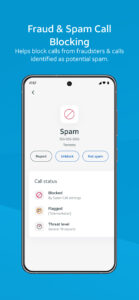
AT&T ActiveArmor mobile security helps keep your phone and personal data safe from cyber threats. Get spam blocking, fraud detection, identity and financial protection in one powerful solution with AT&T ActiveArmor.
Premium
AT&T ActiveArmor mobile security (FREE) service includes: *
• Auto Fraud & Spam Call Blocking
• Call Routing Settings
• My Block List
• My Contacts
• Device Security Alerts
• Data Breach Alerts
The following free AT&T ActiveArmor mobile security features are only available to AT&T wireless customers: Auto Fraud Call Blocking, Spam Call Blocking, Call Routing Settings, My Block List, My Contacts, and Caller ID.
If you upgrade to ActiveArmor Advanced Mobile Security, you get all the free features plus these additional features: **
• Caller ID
• Reverse Number Lookup
• Device Theft Alerts
• Privacy Advisor
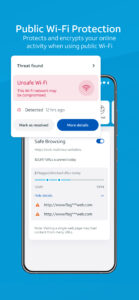
• Public Wi-Fi Protection (VPN & Wi-Fi Alerts)
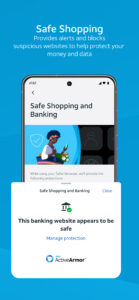
• Safe Browsing/Banking/Shopping
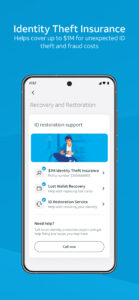
• $1M Identity Theft Insurance
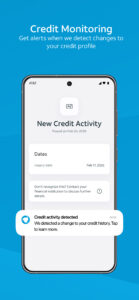
• Credit Monitoring
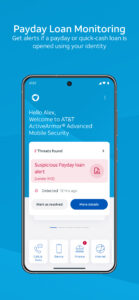
• Payday Loan Monitoring
• Identity Monitoring
• Social media ID Protection
• Lost Wallet Recovery
• ID Restoration
• Password Manager
This app uses Accessibility services and respective permissions after active consent is given from the end user. This optional functionality is only used for the Safe Shopping & Banking feature.
*Requires compatible device/service and download of ActiveArmor app. Other terms and restr’s apply. May not detect all threats and may inadvertently block wanted calls. Visit att.com/activearmorapp for details. Data charges may apply. Some features may not work while roaming internationally.
**The AT&T Advanced Mobile Security subscription is $7/month per line and auto-renews unless canceled.
• To avoid being charged again, cancel at least 24 hours before your next payment date or before your current billing period ends.
• If you pay for your subscription on your AT&T wireless bill you can manage or cancel your service in the ActiveArmor app in the Settings menu > Change subscription. Or you can manage or cancel in the AT&T app (myAT&T) under “Active add-ons".
• If you pay through your Google, go to your Google account > select your Profile icon > Select Wallet & subscriptions account > Select AT&T ActiveArmor and follow the prompts to confirm cancelation.
• After you cancel Advanced, you can still use the free ActiveArmor mobile security features.
• Payments are non-refundable, except as required by law. For details, visit www.att.com/support/article/wireless/KM1252909/
Visit www.att.com/activearmorapp for details. Visit www.att.com/legal/terms.activeArmorMobileSecurity.html for the full AT&T ActiveArmor mobile security Terms of Service.

 Premium

Version:8.1-bb220a4
Uploaded:September 10, 2026 at 7:52PM UTC
File size:64.75 MB
Downloads:19
Version:8.0-3c955b7
Uploaded:August 25, 2026 at 6:45PM UTC
File size:64.68 MB
Downloads:21
Version:7.9-2ed544d
Uploaded:July 23, 2026 at 5:48PM UTC
File size:64.55 MB
Downloads:25
Version:7.8.1-e14a471
Uploaded:April 30, 2026 at 5:30PM UTC
File size:63.78 MB
Downloads:71
Version:7.7.1-85e1eee
Uploaded:March 17, 2026 at 7:35AM UTC
File size:63.66 MB
Downloads:33
Version:7.7-74845f8
Uploaded:December 8, 2025 at 12:00AM UTC
File size:64.13 MB
Downloads:21
Version:7.6.1-b8be8cb
Uploaded:November 13, 2025 at 6:20PM UTC
File size:59.96 MB
Downloads:72
Version:7.6-6b1ead0
Uploaded:October 16, 2025 at 5:38PM UTC
File size:59.96 MB
Downloads:33
Version:7.5-33aec4f
Uploaded:July 24, 2025 at 4:07PM UTC
File size:59.31 MB
Downloads:71
Version:7.4-9a222a8
Uploaded:June 13, 2025 at 3:07PM UTC
File size:59.60 MB
Downloads:40


