

 Premium
What's new in UniPatcher 0.18
- Support for Android 16
- Minimum supported Android version raised from 5.0 to 7.0 (Nougat)
- BPS patching rewritten, lower memory usage
- Tamil translation (thanks to TamilNeram)
About UniPatcher 0.18
UniPatcher allows you to apply patches to game ROMs.
What is a patch?
A file with the modified data of the game. For example, a game translated from Japanese to English. You download the patch containing the translation. It must be applied to the Japanese version to make an English version of it.
This program will not help you hack native Android games, it was created for the old console games (SNES, PS1, GBA, N64, SMDGenesis etc.)
Features:
* Supported formats of patches: IPS, IPS32, UPS, BPS, APS (GBA), APS (N64), PPF, DPS, EBP, XDelta3
* Create XDelta patches
* Fix the checksum in SMDGenesis ROMs
* Remove the SMC header from SNES ROMs
How to use?
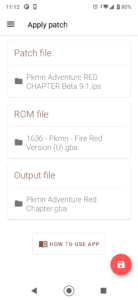
You have to select a ROM file, a patch and choose which file to save, then click on the red round button. Files are selected through the standard Files application (or through one of the file managers you have installed). The application will show a message when the file is patched. Do not close the application until the file is patched.
Very important:
If the game and patch is compressed (ZIP, RAR, 7z or other), they first need to be unzipped.


UniPatcher 0.18 Play Store trailer
Download UniPatcher 0.18
This release comes in several variants (we currently have 4). Consult our handy FAQ to see which download is right for you.

Follow APK Mirror


