

 Premium
What's new in Speech Recognition and Synthesis from Google (Android TV) googletts.google-speech-apk_20261026.00_p0-tv.1007071969
Your app has a new name: “Speech Recognition and Synthesis from Google”. The Speech Recognition and Synthesis from Google app not only provides text-to-speech but also empowers applications with speech-to-text functionality to convert your voice to text. Read more in the “About this app” section.
About Speech Recognition and Synthesis from Google (Android TV) googletts.google-speech-apk_20261026.00_p0-tv.1007071969
Power your device with the magic of Google’s text-to-speech and speech-to-text technology. Google Speech-to-Text functionality
Speech Recognition provides speech-to-text functionality to Google and other third party apps to convert what you say to text. For example, it can be used by:
• Google Maps when you use your voice to search places
• Recorder App to transcribe your recordings on device
• Phone App Call Screen feature to get a real-time transcription of your caller
• Accessibility apps like Voice Access for operating your device through voice
• Dictation or keyboard apps you might use to dictate text messages through voice
• Apps that contain a search by voice feature so that you can quickly search for your favorite shows or songs
• Language learning apps that recognize what you say as you practice a new language
• …and many other applications in Play Store
To use Google Speech-to-Text functionality on your Android device, go to Settings > Apps & notifications > Default apps > Assist App. Select Speech Recognition and Synthesis from Google as your preferred voice input engine.
Google Text-to-Speech functionality
Speech Services powers applications to read the text on your screen aloud. For example, it can be used by:
• Google Play Books to “Read Aloud” your favorite book
• Google Translate to speak translations aloud so you can hear the pronunciation of a word
• Talkback and accessibility applications for spoken feedback across your device
• …and many other applications in Play Store
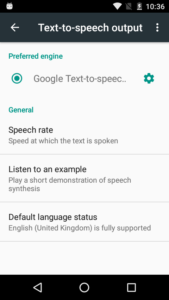
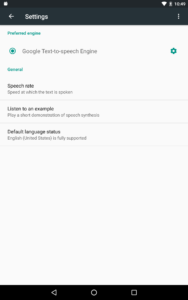
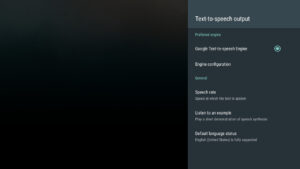
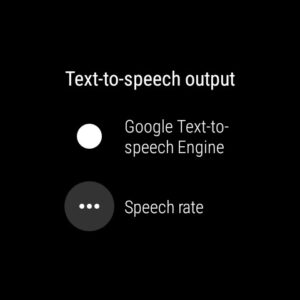
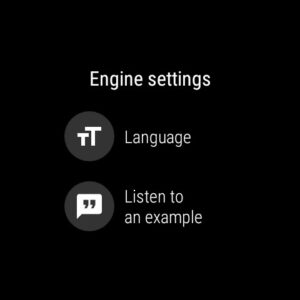
To use Google Text-to-Speech functionality on your Android device, go to Settings > Languages & Input > Text-to-Speech output. Select Speech Recognition and Synthesis from Google as your preferred engine.
Note, on many Android devices, Speech Recognition and Synthesis from Google is already available, but you can update to the latest version here.

Version:googletts.google-speech-apk_20261109.02_p0.1017739697
Uploaded:November 24, 2026 at 10:22PM UTC
File size:27.74 MB
Version:googletts.google-speech-apk_20261026.00_p0-wear.1007071969
Uploaded:November 20, 2026 at 12:07AM UTC
File size:26.07 MB
Premium
Version:googletts.google-speech-apk_20261026.00_p0-tv.1007071969
Uploaded:November 20, 2026 at 12:07AM UTC
File size:27.22 MB
Downloads:25
Version:googletts.google-speech-apk_20261014.00_p1-tv.1014955254
Uploaded:November 11, 2026 at 3:42PM UTC
File size:25.68 MB
Downloads:66
Version:googletts.google-speech-apk_20261014.00_p0-tv.999754440
Uploaded:October 31, 2026 at 8:59PM UTC
File size:25.68 MB
Downloads:104
Version:googletts.google-speech-apk_20260928.02_p1-tv.1007389991
Uploaded:October 31, 2026 at 8:59PM UTC
File size:25.64 MB
Downloads:11
Version:googletts.google-speech-apk_20260928.02_p0-tv.989914902
Uploaded:October 17, 2026 at 3:57PM UTC
File size:25.64 MB
Downloads:86
Version:googletts.google-speech-apk_20260914.02_p2-tv.986315744
Uploaded:October 17, 2026 at 3:57PM UTC
File size:25.60 MB
Downloads:59
Version:googletts.google-speech-apk_20260914.02_p3-tv.996616351
Uploaded:October 16, 2026 at 6:54PM UTC
File size:25.60 MB
Downloads:32
Version:googletts.google-speech-apk_20260817.01_p2-tv.979487077
Uploaded:October 13, 2026 at 8:56PM UTC
File size:25.76 MB
Downloads:22
Version:googletts.google-speech-apk_20260831.02_p1-tv.975501659
Uploaded:October 13, 2026 at 8:56PM UTC
File size:25.68 MB
Downloads:29
Version:googletts.google-speech-apk_20260817.01_p0-tv.966249458
Uploaded:September 10, 2026 at 10:01PM UTC
File size:25.36 MB
Downloads:71


