

 Premium
Download Shortcutter 2: Quick Settings 9.0.48 APK
Version: 9.0.48 (948)
Languages: 74
Package: com.leedroid.shortcutter
Downloads: 10
Target: Android 16 (API 36)
nodpi

What's new in Shortcutter 2: Quick Settings 9.0.48
October 8th 2026
* Shortcutter 2 - The Revival - yes, its been 6 years!
* New app theme.
* New sidebar designer.
* Compatible legacy toggles and services retained where possible.
* Micro App upgrades.
* Lots of new toggles and services!
* New QR Code Generator.
* Barcode/QR Code Reader.
* Screen magnifier.
And more....
About Shortcutter 2: Quick Settings 9.0.48
Shortcutter is back.
Premium
After six years, Shortcutter is back in active development.
With 500,000+ downloads, Shortcutter is built for one thing: getting you to more of Android, faster.
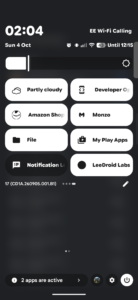
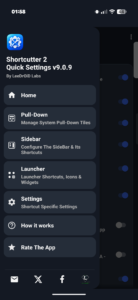
Use Shortcutter as a shortcut creator, add Quick Settings tiles, build home screen widgets, launch apps and activities, open Android settings, or keep favourite tools in a Sidebar or Floating Toolbox.
An abundance of Quick Settings tiles
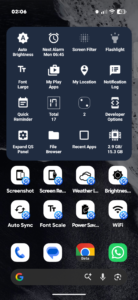
Add custom Quick Settings tiles for apps, shortcuts, activities, Android actions and built-in Shortcutter tools.
Choose what you use and add it through Android's Quick Settings editor, alongside your normal system tiles.
Far more than app shortcuts
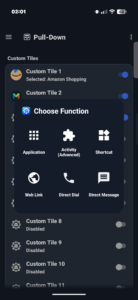
Create and launch shortcuts for:
• Apps and app shortcuts
• Activities exposed by installed apps
• Websites and web links
• Contacts, direct dial and direct message
• Android settings and system panels
• Shortcutter tools and actions
• Advanced custom actions
Use them from Quick Settings, your home screen, widgets, the Sidebar or Floating Toolbox.
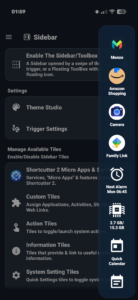
Sidebar and Floating Toolbox
Keep favourite apps, shortcuts and tools in a swipe-out Sidebar from the left, right or bottom, or use the movable Floating Toolbox.
Choose what appears, arrange it how you want and keep your most-used actions close by.
Built-in tools and quick actions
Shortcutter includes:
• Home screen shortcuts and widgets
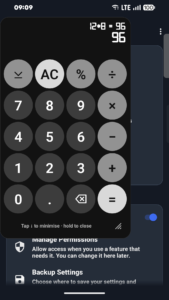
• Floating calculator
• Stopwatch, countdown timer, counter and dice
• Clipboard tools
• Weather and forecasts
• Location tools
• Quick reminders
• File browser shortcuts
• Notification tools
• Brightness, display and font controls
• Flashlight
• Screen capture and screen recording
• Battery and power tools
• Next alarm information
• Developer options
• Back, Home and Recent Apps actions
• Media and system shortcuts
• Wi-Fi and connectivity tools
• Android settings shortcuts
• And plenty more
Some controls vary by Android version, device and permissions.
System settings without the digging
Jump straight to useful Android settings and system panels for display, sound, notifications, battery, apps, accessibility, VPN, data usage, keyboard and more.
Where Android prevents direct control, Shortcutter can still take you to the right system screen quickly.
More control if you want it
Launch supported activities from other apps, create custom tiles and jump directly to parts of Android that normally take several taps.
Extra controls can use ADB / Secure Settings access, while some specialist actions require root.
Root is not required for normal Shortcutter features.
Customise the Sidebar and Toolbox
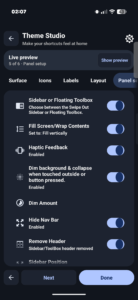
Theme Studio brings Sidebar and Floating Toolbox styling together with a live preview.
Customise colours, backgrounds, gradients, borders, corners, icon shapes, labels, spacing and layout.
Weather, location and useful extras
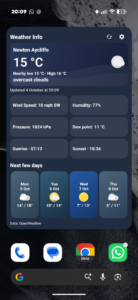
Check current weather and forecasts, use location tools, add weather and location widgets, or keep the floating calculator and other everyday utilities ready when you need them.
Free to use
Shortcutter is free to use, with an optional Premium unlock for additional features and customisation.
Accessibility Service disclosure
Shortcutter uses Android's AccessibilityService only for features that require it, including supported system actions such as Back, Home, Recent Apps and screen lock, plus some floating tools.
Accessibility access is optional. Shortcutter explains when it is needed before you enable it.
Shortcutter does not use AccessibilityService for advertising or user profiling.
Permissions & privacy
Shortcutter requests permissions only when needed by features you choose. Location may be needed for weather or location tools, contacts for communication shortcuts, and overlay access for floating tools.
Where Android restricts direct control, Shortcutter may open the appropriate system settings panel instead.
Support: leedroid.apps@gmail.com
Shortcutter 2: Quick Settings 9.0.48 variants
This release may come in several variants. Consult our handy FAQ to see which download is right for you.

Version:9.0.52(952) for Android 10+ (Q, API 29)
Uploaded:October 8, 2026 at 8:24PM UTC
File size:21.89 MB
Downloads:0
Version:9.0.48(948) for Android 10+ (Q, API 29)
Uploaded:October 8, 2026 at 1:19AM UTC
File size:21.88 MB
Downloads:10
Version:9.0.52
Uploaded:October 8, 2026 at 8:24PM UTC
File size:21.89 MB
Downloads:0
Version:9.0.48
Uploaded:October 8, 2026 at 1:19AM UTC
File size:21.88 MB
Downloads:10
Version:9.0.41
Uploaded:October 7, 2026 at 5:02PM UTC
File size:20.06 MB
Downloads:1

Version:7.8.0
Uploaded:July 30, 2020 at 8:45PM UTC
File size:11.79 MB
Downloads:5,518
Version:7.7.9
Uploaded:July 17, 2020 at 6:22PM UTC
File size:11.79 MB
Downloads:291
Version:7.7.6
Uploaded:July 17, 2020 at 4:22PM UTC
File size:11.89 MB
Downloads:122
Version:7.7.5
Uploaded:March 7, 2020 at 5:06AM UTC
File size:11.84 MB
Downloads:1,026
Version:7.7.3
Uploaded:March 4, 2020 at 6:55AM UTC
File size:11.85 MB
Downloads:130
Version:7.7.1
Uploaded:March 2, 2020 at 10:20PM UTC
File size:11.91 MB
Downloads:197
Version:7.6.9
Uploaded:March 2, 2020 at 3:10PM UTC
File size:11.90 MB
Downloads:60


