

 Premium
What's new in Shortcutter 2: Quick Settings 9.1.74
• Save and switch panel setups with Pro.
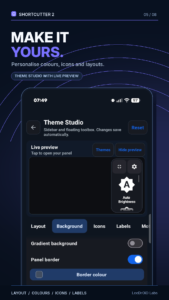
• Preview panel themes with your own shortcuts.
• Rename built-in sidebar tools.
• Get floating calculator answers as you type.
• Keep the stopwatch running when minimised.
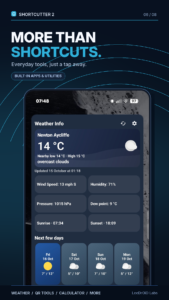
• Choose a location for each weather widget.
• Improved sidebar positioning and closing.
• Fixed the QR scanner staying paused after closing Gallery.
• Fixed a crash when opening Night Light.
About Shortcutter 2: Quick Settings 9.1.74
Put your favourite apps, Android settings and everyday tools one swipe away.
Premium
Shortcutter 2 brings custom Quick Settings tiles, home screen shortcuts, widgets and a floating sidebar together in one app. Build a setup around the things you use most, from launching apps to opening a calculator without leaving what you're doing.
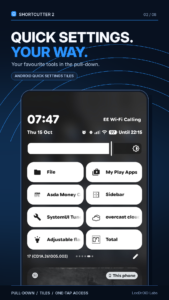
Quick Settings, your way
Add your own tiles alongside Android's built-in controls:
• Open apps, websites and supported app activities
• Reach contacts, shortcuts and Android settings
• Launch built-in tools and useful system actions
• Rename custom tiles to make them easy to recognise
Choose your tiles in Shortcutter, then add them using Android's Quick Settings editor.
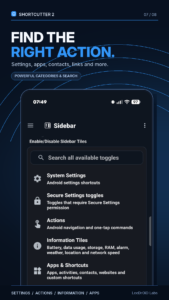
Android shortcut maker
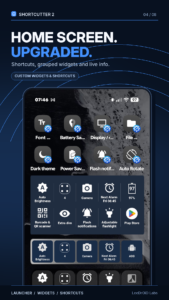
Create shortcuts for apps, activities, contacts, calls, messages, links and supported settings. Pin them to your home screen or use them in widgets, Quick Settings, the Sidebar or Floating Toolbox.
Shortcutter also works with compatible automation apps such as Tasker.
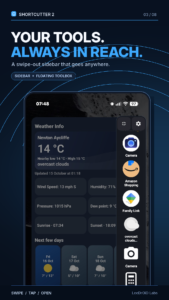
Sidebar & Floating Toolbox
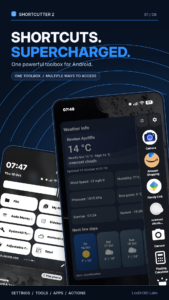
Keep your favourite shortcuts close while using other apps. Swipe from the left, right or bottom of your screen to open the Sidebar, or use a floating toolbox.
Choose the position, layout and icon styles. Pro adds panel themes with live previews, colours, gradients, borders and backgrounds.
Home screen widgets
Group shortcuts in a widget or add weather and location widgets. Choose saved weather locations for individual widgets, and launch supported tools from your app drawer.
More room to customise with Pro
Start with 4 custom Quick Settings tiles. A one-time Pro purchase gives you:
• 20 custom tiles and more panel rows and columns
• Panel themes and saved setups for work, home or travel
• Floating calculator, screen recorder and app drawer without trial limits
• Graphic EQ, QR tools and adjustable flashlight
Save your shortcuts, folders, layout and appearance, then switch between setups when you need them. Pay once, with no subscription.
Built-in tools & Android controls
• Floating calculator with answers as you type
• Stopwatch and countdown timer you can minimise
• QR and barcode scanner, including gallery scanning
• QR code generator, counter and dice
• Weather, next alarm, battery and device information
• Flashlight, brightness and screen orientation controls
• Screenshots, screen recording and media controls
• Clipboard tools, reminders and file shortcuts
• Audio tools, Graphic EQ and Volume Panel integration
Some tools require Pro or offer a limited trial.
Advanced Android controls
Root isn't needed for everyday features. Some advanced actions use Shizuku, ADB / Secure Settings permissions or root.
Available actions vary by Android version, device and permissions. When direct control is restricted, a shortcut may open the relevant Android settings screen instead.
Accessibility service disclosure
Shortcutter uses Android's AccessibilityService for optional features that require it, including supported Back, Home, Recent Apps and screen-lock actions and certain floating controls. Access is requested when needed and is not used for advertising or user profiling.
Other permissions support the features you choose: location for weather, contacts for communication shortcuts and overlay access for floating panels.
Support: leedroid.apps@gmail.com

Download Shortcutter 2: Quick Settings 9.1.74
This release may come in several variants. Consult our handy FAQ to see which download is right for you.

Version:9.1.74
Uploaded:November 19, 2026 at 4:18PM UTC
File size:21.45 MB
Downloads:0
Version:9.1.71
Uploaded:November 3, 2026 at 11:09AM UTC
File size:21.39 MB
Downloads:33
Version:9.1.70
Uploaded:November 2, 2026 at 11:47PM UTC
File size:21.28 MB
Downloads:8
Version:9.1.66
Uploaded:November 2, 2026 at 6:04PM UTC
File size:21.26 MB
Downloads:5
Version:9.1.62
Uploaded:November 1, 2026 at 11:14PM UTC
File size:21.22 MB
Downloads:14
Version:9.1.59
Uploaded:October 29, 2026 at 1:31PM UTC
File size:21.11 MB
Downloads:28
Version:9.1.58
Uploaded:October 29, 2026 at 10:06AM UTC
File size:21.11 MB
Downloads:7
Version:9.1.55
Uploaded:October 25, 2026 at 8:06PM UTC
File size:21.10 MB
Downloads:26
Version:9.1.54
Uploaded:October 24, 2026 at 8:38PM UTC
File size:21.05 MB
Downloads:17
Version:9.1.38
Uploaded:October 23, 2026 at 8:28AM UTC
File size:20.37 MB
Downloads:10
Follow APK Mirror


