

 Premium
Download WiFi FTP Server 2.2.3 APK
Target: Android 12L (API 32)

About WiFi FTP Server 2.2.3
****
On Android 5.0 & higher, to access external SD card, in app settings, click mount folder, select "custom" and then select the external SD card in the next screen.
Premium
www.youtube.com/watch?v=Xaqc11qq-Uw
****
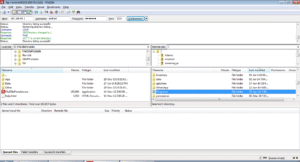
Convert your android phone/tablet into a FTP Server! Use this free app to host your own FTP Server on your phone/tablet. Use the FTP Server to transfer files, photos, movies, songs etc...to/from your android device using a FTP client like FileZilla.
Key features:
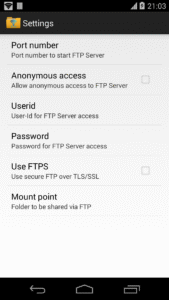
★Complete FTP server with configurable port number
★Supports FTP over TLS/SSL (FTPS)
★Configurable anonymous access
★Configurable home folder (mount point)
★Configurable user-name/password
★Avoid using USB cables for file transfer and copy/backup files over Wifi
★Works over Wifi and Wifi tethering mode (hotspot mode)
Steps to use the app:
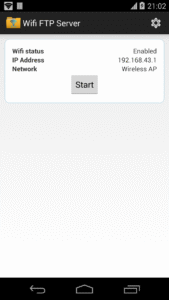
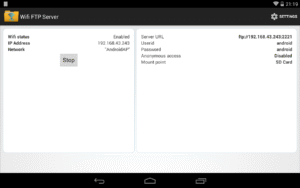
1. Connect to WiFi network and open app.
2. Click the start button
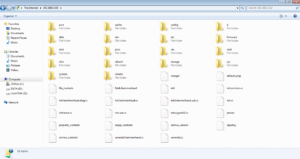
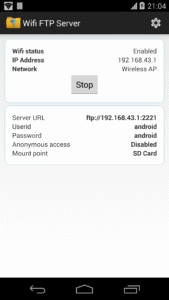
3. Key in the server URL in a FTP client or windows explorer and transfer files
Like this app? Try our ad-free version: play.google.com/store/apps/details?id=com.medhaapps.wififtpserver.pro
SFTP support will be added soon
Please email feedback/bugs to the support email-id. If you want to use FTPS (FTP over TLS/SSL), please note that the server URL would be ftps:// and not ftp://
Please note that FTPS and SFTP are not the same. SFTP is not supported by this app.
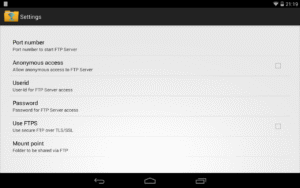
Port number should be greater than 1024 as binding to ports like 21 will not be possible on non-rooted phones. The default port number is configured to 2221 and can be changed from settings screen. For security reasons, anonymous access is not enabled by default. It can be enabled from settings screen.
If you dont have a FTP client, you could download Filezilla from filezilla-project.org/download.php?type=client You can also access the ftp server from windows file explorer.
Follow us on twitter: twitter.com/medhaapps
WiFi FTP Server 2.2.3 Play Store trailer
WiFi FTP Server 2.2.3 variants
This release may come in several variants. Consult our handy FAQ to see which download is right for you.

Version:2.2.4(100) for Android 5.0+ (Lollipop, API 21)
Uploaded:September 25, 2023 at 12:31PM UTC
File size:4.98 MB
Downloads:8,104
Version:2.2.3(99) for Android 5.0+ (Lollipop, API 21)
Uploaded:March 8, 2023 at 5:43AM UTC
File size:4.81 MB
Downloads:505
Version:2.2.2(98) for Android 5.0+ (Lollipop, API 21)
Uploaded:March 7, 2023 at 5:47AM UTC
File size:4.81 MB
Downloads:39
Version:2.2.1(97) for Android 5.0+ (Lollipop, API 21)
Uploaded:March 6, 2023 at 7:19PM UTC
File size:4.81 MB
Downloads:71
Version:2.2.0(96) for Android 5.0+ (Lollipop, API 21)
Uploaded:March 4, 2023 at 3:56PM UTC
File size:4.81 MB
Downloads:61
Version:2.1.9(95) for Android 5.0+ (Lollipop, API 21)
Uploaded:February 27, 2023 at 7:05AM UTC
File size:4.81 MB
Downloads:143
Version:2.1.8(94) for Android 5.0+ (Lollipop, API 21)
Uploaded:January 4, 2023 at 8:47PM UTC
File size:4.78 MB
Downloads:435

Version:2.4.0
Uploaded:September 3, 2026 at 6:11AM UTC
File size:9.93 MB
Downloads:114
Version:2.4.3
Uploaded:January 6, 2026 at 7:14PM UTC
File size:10.17 MB
Downloads:937
Version:2.4.2
Uploaded:December 29, 2025 at 7:01PM UTC
File size:9.93 MB
Downloads:107
Version:2.4.1
Uploaded:December 25, 2025 at 7:59AM UTC
File size:9.93 MB
Downloads:46
Version:2.3.9
Uploaded:December 19, 2025 at 11:07PM UTC
File size:9.93 MB
Downloads:22
Version:2.3.8
Uploaded:December 6, 2025 at 8:59AM UTC
File size:9.67 MB
Downloads:68
Version:2.3.7
Uploaded:December 4, 2025 at 4:48PM UTC
File size:9.67 MB
Downloads:15
Version:2.3.6
Uploaded:December 2, 2025 at 4:49PM UTC
File size:9.67 MB
Downloads:23
Version:2.3.5
Uploaded:December 1, 2025 at 7:21AM UTC
File size:9.91 MB
Downloads:20
Version:2.3.4
Uploaded:October 11, 2025 at 2:14PM UTC
File size:9.76 MB
Downloads:164


