Premium


GPSLogger is an Android app that logs GPS information to various formats (GPX, KML, CSV, NMEA, Custom URL) and has options for uploading (SFTP, OpenStreetMap, Google Drive, Dropbox, Email). This app aims to be as battery efficient as possible.
Read about GPSLogger's features here
You can find it on F-Droid
You can download directly from the releases.
You can help with translations on Weblate.
You can also submit pull requests for bug fixes and new features.
I'm not very good at UIs, so any work with the layouts would be appreciated!
Licensed under GPL v2 | Third party licenses | Privacy policy
It's good practice to verify downloads. A PGP signature, Cosign bundle, and an SHA256 checksum will accompany each .apk.
To verify the PGP integrity and signature:
gpg --recv-key 6989CF77490369CFFDCBCD8995E7D75C76CBE9A9 gpg --verify gpslogger-132.apk.asc
(Experimental) To verify with Sigstore Cosign, the command should be in the releases notes, it will look like this:
cosign verify-blob gpslogger-132.apk --bundle gpslogger-132.apk.cosign.bundle --new-bundle-format --cert-oidc-issuer token.actions.githubusercontent.com --cert-identity github.com/mendhak/gpslogger/.github/workflows/generate-release-apk.yml@refs/head/master
To verify the checksum:
sha256sum -c gpslogger-132.apk.SHA256
The project is based on the Android build system plugin for Gradle. These instructions are for Ubuntu Linux with Android Studio, but for other OSes, it should be roughly similar.
Follow the instructions on the Android Developer Website to set up your computer for development.
Download and install Android Studio (there's also a snap)
git clone git://github.com/mendhak/gpslogger.git This project uses certain Android libraries, you can install them using Google's poorly implemented sdkmanager:
echo y | $HOME/android-sdk/tools/bin/sdkmanager 'tools' echo y | $HOME/android-sdk/tools/bin/sdkmanager 'platform-tools' echo y | $HOME/android-sdk/tools/bin/sdkmanager 'build-tools;26.0.2' echo y | $HOME/android-sdk/tools/bin/sdkmanager 'platforms;android-27' echo y | $HOME/android-sdk/tools/bin/sdkmanager 'platforms;android-25' echo y | $HOME/android-sdk/tools/bin/sdkmanager 'extras;google;m2repository' echo y | $HOME/android-sdk/tools/bin/sdkmanager 'extras;android;m2repository' echo y | $HOME/android-sdk/tools/bin/sdkmanager 'extras;google;google_play_services' Create a file called local.properties, pointing at your Android SDK directory.
cd gpslogger echo "sdk.dir=/home/mendhak/Programs/Android" > local.properties Open up Android Studio and choose to import a project. Select the topmost build.gradle file under GPSLogger.
If you get an Import dialog, choose to Import project from external model
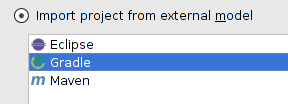
On the next screen, choose the defaults and proceed (default gradle wrapper)
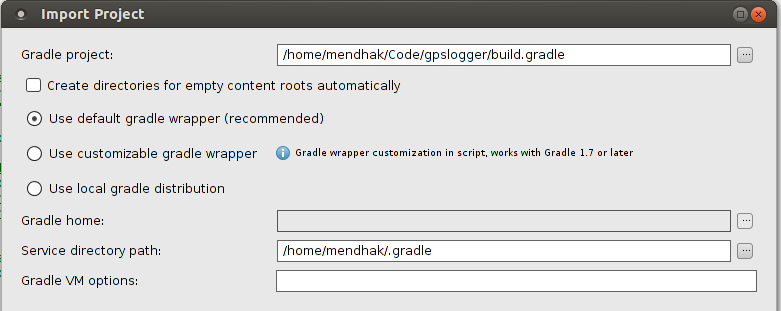
Give it a minute and Android Studio will configure the projects and download the various libraries.
Sign up for an account with OpenStreetMap and log in.
Click on 'My Settings', then 'OAuth2 Applications'
Click on 'Register your application'
Fill in the form with these details. Remember to uncheck the 'Confidential Application' checkbox, since this is a mobile app.
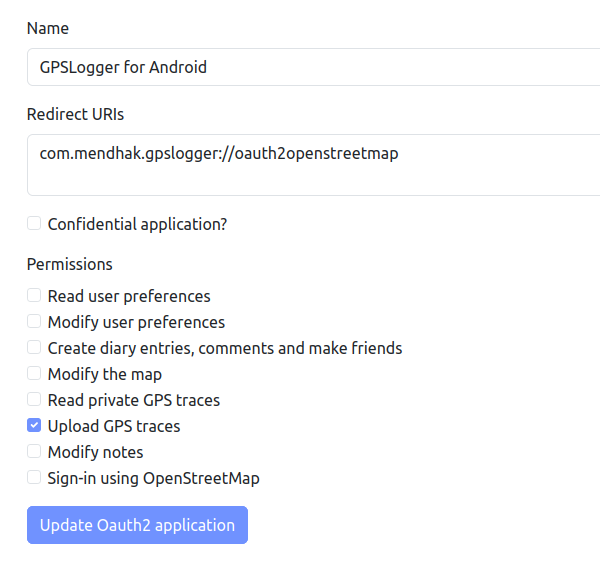
After registering the application, you will receive a Client ID.
Place the Client ID in OpenStreetMapManager#getOpenStreetMapClientID().
If you used your own custom scheme, replace the value in AndroidManifest.xml and OpenStreetMapManager#getOpenStreetMapRedirect()
Sign up for an account with Dropbox.com
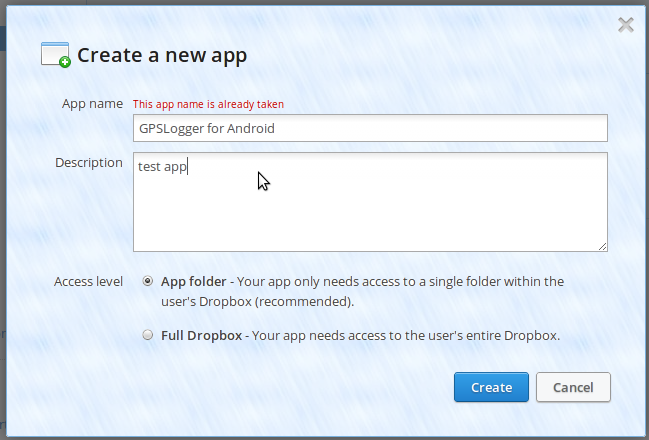
Go to the Dropbox Developers page and click on 'Create an App'
Use these settings, but choose a unique name
After creating the app, you will receive an app key and secret (the ones in the screenshot are fake)
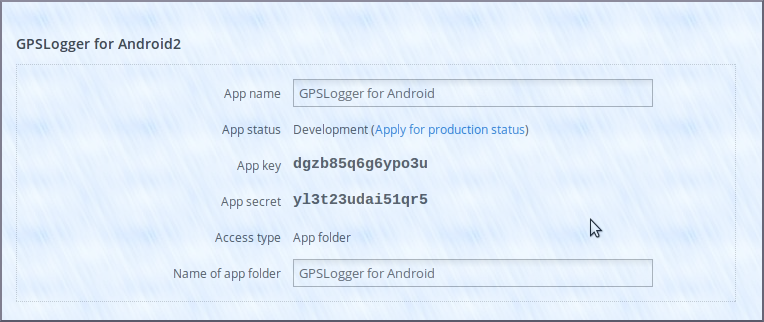
Place the keys in your ~/.gradle/gradle.properties like this:
GPSLOGGER_DROPBOX_APPKEY=abcdefgh GPSLOGGER_DROPBOX_APPSECRET=1234123456 Replace the Dropbox app key to your AndroidManifest.xml file
<div class="snippet-clipboard-content notranslate position-relative overflow-auto" data-snippet-clipboard-copy-content="
">