

 Premium
Download Microsoft Authenticator 6.2012.8446 APK
Version: 6.2012.8446 (202084461)
Languages: 79
Package: com.azure.authenticator
Downloads: 357
Target: Android 10 (Q, API 29)
nodpi

What's new in Microsoft Authenticator 6.2012.8446
We're always working on new features, bug fixes, and performance improvements. Make sure you stay updated with the latest version for the best authentication experience.
About Microsoft Authenticator 6.2012.8446
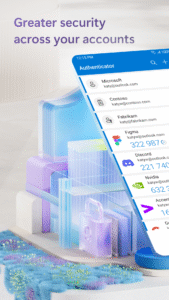
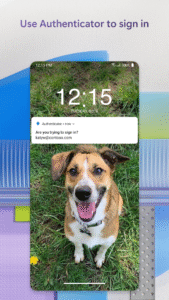
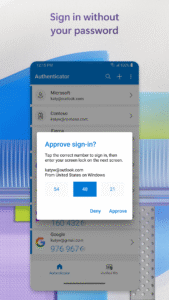
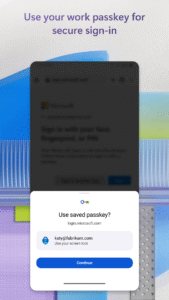
Two factor authentication (2FA) is easy, convenient, and secure when you use Microsoft Authenticator. Use your phone, not your password, to log into your Microsoft account. Just enter your username, then approve the notification sent to your phone. Your fingerprint, face ID, or PIN will provide a second layer of security in this two step verification process. After you’ve signed in with two factor authentication (2FA), you’ll have access to all your Microsoft products and services, such as Outlook, OneDrive, Office, and more.
Microsoft Authenticator also supports multi factor authentication (MFA) even if you still use a password, by providing a second layer of security after you type your password. When logging in with two factor authentication (2FA), you’ll enter your password, and then you’ll be asked for an additional way to prove it’s really you. Either approve the notification sent to the Microsoft Authenticator, or enter the one time password (OTP) generated by the app. The one time passwords (OTP codes) have a 30 second timer counting down. This timer is so you never have to use the same time based one time password (TOTP) twice and you don’t have to remember the number. The one time password (OTP) doesn’t require you to be connected to a network, and it won’t drain your battery.
You can add multiple accounts to your app, including non-Microsoft accounts like LinkedIn, Github, Amazon, Dropbox, Google, Facebook, and more. Since the app supports the industry standard for time based one time passwords (TOTP), you can secure all your online accounts. Simply enable two factor authentication (2FA) on all your accounts. Then, when you sign in, you’ll provide your username and password as usual. Finally, you’ll enter the one time password (OTP) provided by the Microsoft Authenticator app.
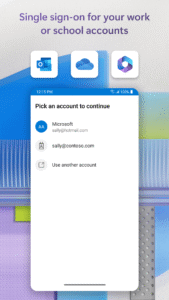
Sometimes your work or school might ask you to install the Microsoft Authenticator when accessing certain files, emails, or apps. You will need to register your device to your organization through the app and add your work or school account. Microsoft Authenticator also supports cert-based authentication by issuing a certificate on your device. This will let your organization know that the sign-in request is coming from a trusted device and help you seamlessly and securely access additional Microsoft apps and services without needing to log into each. Because Microsoft Authenticator supports single sign-on, once you have proven your identity once, you will not need to log in again to other Microsoft apps on your device.
Enroll in our beta program! Follow this link for an early preview of our latest updates: play.google.com/apps/testing/com.azure.authenticator
Microsoft Authenticator 6.2012.8446 variants
This release comes in several variants (we currently have 4). Consult our handy FAQ to see which download is right for you.

Version:6.2208.5677(202256771) for Android 6.0+ (Marshmallow, API 23)
Uploaded:September 5, 2022 at 11:22AM UTC
File size:77.44 MB
Downloads:5,827
Version:6.2208.5297(202252971) for Android 6.0+ (Marshmallow, API 23)
Uploaded:August 17, 2022 at 8:45AM UTC
File size:77.05 MB
Downloads:372
Version:6.2207.4624(202246241) for Android 6.0+ (Marshmallow, API 23)
Uploaded:July 20, 2022 at 9:09AM UTC
File size:73.48 MB
Downloads:245
Version:6.2206.3973(202239731) for Android 6.0+ (Marshmallow, API 23)
Uploaded:June 22, 2022 at 9:10PM UTC
File size:73.60 MB
Downloads:394
Version:6.2205.3302(202233021) for Android 6.0+ (Marshmallow, API 23)
Uploaded:May 23, 2022 at 2:59PM UTC
File size:73.42 MB
Downloads:321
Version:6.2204.2757(202227571) for Android 6.0+ (Marshmallow, API 23)
Uploaded:May 4, 2022 at 7:27PM UTC
File size:67.90 MB
Downloads:191
Version:6.2204.2416(202224161) for Android 6.0+ (Marshmallow, API 23)
Uploaded:April 24, 2022 at 3:35AM UTC
File size:67.89 MB
Downloads:130
Version:6.2203.1651(202216511) for Android 6.0+ (Marshmallow, API 23)
Uploaded:March 15, 2022 at 5:05PM UTC
File size:63.42 MB
Downloads:237
Version:6.2202.0982(202209821) for Android 6.0+ (Marshmallow, API 23)
Uploaded:March 3, 2022 at 2:12AM UTC
File size:60.20 MB
Downloads:105
Version:6.2202.0924(202209241) for Android 6.0+ (Marshmallow, API 23)
Uploaded:February 11, 2022 at 1:05PM UTC
File size:60.84 MB
Downloads:230
Version:6.2609.6214
Uploaded:September 23, 2026 at 12:21AM UTC
File size:56.26 MB
Downloads:1,086
Version:6.2608.5658
Uploaded:September 11, 2026 at 10:21PM UTC
File size:55.90 MB
Downloads:829
Version:6.2607.4697
Uploaded:July 29, 2026 at 12:18AM UTC
File size:55.65 MB
Downloads:1,009
Version:6.2606.4246
Uploaded:July 2, 2026 at 7:01AM UTC
File size:54.89 MB
Downloads:1,206
Version:6.2606.3817
Uploaded:June 15, 2026 at 7:32AM UTC
File size:54.74 MB
Downloads:713
Version:6.2606.3713
Uploaded:June 5, 2026 at 6:29AM UTC
File size:59.71 MB
Downloads:309
Version:6.2605.3042
Uploaded:May 19, 2026 at 10:25PM UTC
File size:53.60 MB
Downloads:761
Version:6.2605.2973
Uploaded:May 16, 2026 at 10:25PM UTC
File size:53.33 MB
Downloads:426
Version:6.2604.2550
Uploaded:May 3, 2026 at 4:52PM UTC
File size:100.70 MB
Downloads:752
Version:6.2603.2041
Uploaded:April 13, 2026 at 9:04PM UTC
File size:53.33 MB
Downloads:515


