

 Premium
What's new in NUI: Reachability Cursor 2.0.3
2.0.1–2.0.3
• Smoother Tracker animations
• A smoother onboarding experience
• Better handling of rare edge cases
2.0.0
Life doesn't always go to plan. Reachability Cursor went quiet, and I'm sorry it took so long.
• Rebuilt from the ground up around the original one-handed cursor concept
About NUI: Reachability Cursor 2.0.3
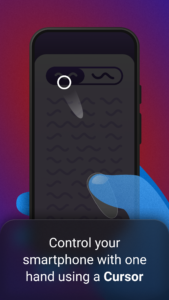
Use your smartphone with one hand, without finger acrobatics or balancing acts. Interact with the entire screen using a pointer, much like using a trackpad on a laptop. Reachability Cursor integrates seamlessly with Android's system navigation. It gives you the precision of a computer mouse whenever you need it.
Premium
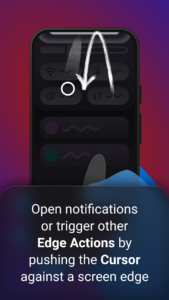
Check and handle notifications in a few smooth movements, rather than wrestling with your phone over a simple task.
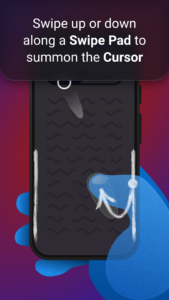
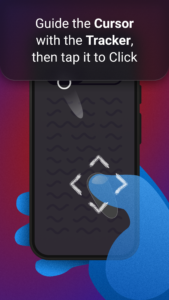
Like Android's modern gesture navigation, Reachability Cursor starts with an edge swipe from a Swipe Pad. The Cursor and Tracker appear together as an on-screen pointer and a touchpad beneath your fingertip. Move the Tracker to guide the Cursor, tap it to Click, or touch and hold it to Long Click.
Reachability Cursor adapts to you, not the other way around. A simple guided setup creates a personalized fit for your hand, your device, and the way you hold it, without tedious trial and error. If you enjoy tinkering, Advanced Setup still gives you the freedom to fine-tune that fit yourself.
All of this is free forever. Reachability Cursor works offline, shows no ads, and never sells or otherwise monetizes your data. The app is funded entirely by the optional PRO upgrade.
PRO lets you use your phone faster with one hand than with two.
• Keep more actions right at the screen's edges. Add more Edge Actions, choose what they do, and extend them into the corners.
• Control your phone in a whole new way. Tilt Actions put Text Selection, Magnification, Screen Clipping, and Web Image Search just a tilt away.
• Quick straight swipes from the Swipe Pads can take you Home, open Recents, or even switch straight back to the previous app in just two movements. Naturally, you can replace the defaults with the actions that suit you best.
• Go beyond Clicks with the Cursor. Fling Gestures dismiss notifications and other swipeable content, while precise Swipe Gestures adjust sliders and handle drag and drop.
• Make the experience yours. Customize colors and sizes, let the controls follow your system theme, and fine-tune Cursor behavior, action assignments, haptic feedback, Click and gesture timing, and tilt sensitivity.
Try every PRO feature on your terms, without payment details or a subscription to cancel. Restart the 30-minute trial whenever you want more time with PRO. Upgrade when PRO has proven its value to you.
Reachability Cursor is for anyone who wants or needs to use a large Android phone with one hand—such as people with disabilities affecting reach or dexterity.
Android's Accessibility Service powers every free and PRO feature. It enables the Cursor and Swipe Pads and performs the Clicks, gestures, and system actions you trigger. It also keeps the app's controls in sync with what is on screen and can use relevant on-device screen content for features such as Text Selection.
Download NUI: Reachability Cursor 2.0.3
This release may come in several variants. Consult our handy FAQ to see which download is right for you.

Version:2.0.3
Uploaded:August 31, 2026 at 9:11PM UTC
File size:59.45 MB
Downloads:0
Version:2.0.2
Uploaded:August 31, 2026 at 5:17PM UTC
File size:59.42 MB
Downloads:1

Version:2.0.1
Uploaded:August 15, 2026 at 12:07PM UTC
File size:59.01 MB
Downloads:9
Version:2.0.0
Uploaded:August 14, 2026 at 6:06AM UTC
File size:58.99 MB
Downloads:6

Version:1.1.2
Uploaded:November 6, 2018 at 8:25AM UTC
File size:3.18 MB
Downloads:21,888
Follow APK Mirror


