

 Premium
What's new in Notewise - AI Notes, PDF, Docs 2.15.13
🎉 Notewise wins Google Play's Best of 2024!
• Introducing marketplace. Get free templates as Notewise Cloud members.
• Supports 12 new shapes, including pie, heart, callouts, curly brackets, and 3D shapes.
• Supports customising stylus button shortcuts.
• Supports quick navigation to easily go back to the previous page after tapping a page link.
• General bug fixes and performance improvements.
About Notewise - AI Notes, PDF, Docs 2.15.13
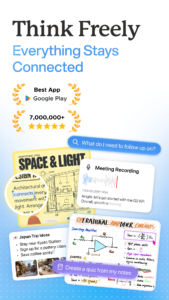
Unlock the power of note-taking with Notewise on Android! Whether you're capturing ideas, sketching on a freeform canvas, organizing good notes, or annotating PDFs, Notewise brings an iPad-like experience to your Android device, combining creativity and productivity in a seamless app. Designed for Android, it’s the perfect tool for students, professionals, and creatives to capture good notes, collaborate, and stay organized anytime, anywhere.
Premium
Next Level Handwriting and Note-Taking Experience
• Experience a natural, iPad-like handwriting experience with low-latency responsiveness.
• Write effortlessly with your finger or stylus on Android devices, featuring palm rejection technology for smooth, uninterrupted note-taking.
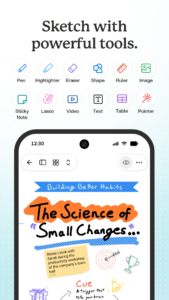
• Customize your writing tools with a variety of pens, highlighters, and line styles, supporting pressure sensitivity for precise control.
• Use Notewise as your digital notebook or canvas, ideal for both creative and professional projects, offering the same precision and flow as on an iPad.
Collaborate, Sync, and Share Notes with Ease
• Collaborate on good notes in real-time, perfect for brainstorming or sharing ideas with friends, teammates, or classmates.
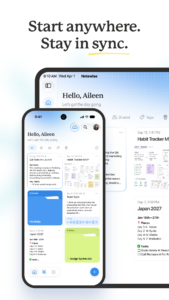
• Automatically sync your notes across Android devices with the secure Notewise Cloud or Google Drive.
• Share your note-taking creations using URLs, QR codes, or export them as PDFs, images, or Notewise files.
• Work offline on your notes, with automatic syncing once you reconnect.
Powerful Tools to Enhance Your Notes
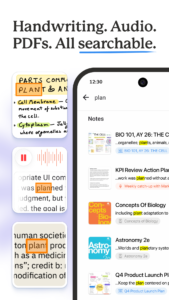
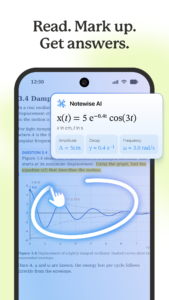
• Import PDFs of any size for annotation and markup, perfect for class or meetings.
• Use the lasso tool to move, crop, or resize any part of your good notes on the canvas.
• Add shapes, text boxes, and images to create professional-grade notes, journals, or presentations.
• Choose from a variety of pre-made templates, including engineering grids, music scores, and blank canvases for brainstorming.
Organize Your Notes Like a Pro
• Create unlimited folders to organize your good notes, memos, and plans across work, school, or personal projects.
• Duplicate, reorder, or merge pages to customize the structure of your good notes.
• Personalize folders with colors and labels for quick and easy access.
Advanced PDF Annotation
• Annotate and mark up PDFs with highlighters, text, or signatures.
• Reorganize, duplicate, or resize pages within your PDFs for efficient note-taking.
• Open external links or websites directly from your annotated PDFs to expand your research.
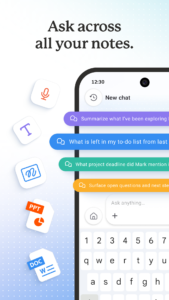
AI-Powered Note-Taking Tools
• Hold to Draw Shapes: Instantly create perfect circles, squares, and more with AI assistance.
• Handwriting-to-Text Conversion: Transform your handwritten notes into text for easy editing and sharing.
Your Digital Freeform Canvas
• Combine handwriting, images, and text to create unique designs on a limitless canvas.
• Journal, sketch, or brainstorm freely with customizable templates and backgrounds.
• Turn your note-taking sessions into creative masterpieces with endless possibilities.
Your Notes, Anytime, Anywhere
• Fully optimized for Android, with compatibility across phones, tablets, and other devices.
• Perfect for journaling, organizing PDFs, brainstorming on a freeform canvas, or managing your good notes with ease.
• Designed for productivity and creativity, making it your go-to note-taking app on Android, delivering an iPad-like experience for all your good notes.
Download Notewise for Free and Revolutionize Your Note-Taking Today!
Start creating, organizing, and sharing your ideas with the most versatile note-taking app on the market.


Download Notewise - AI Notes, PDF, Docs 2.15.13
This release may come in several variants. Consult our handy FAQ to see which download is right for you.

Version:4.2.0
Uploaded:November 15, 2026 at 5:34PM UTC
File size:188.44 MB
Downloads:4
Version:4.1.11
Uploaded:November 4, 2026 at 5:20PM UTC
File size:244.54 MB
Downloads:187
Version:4.1.9
Uploaded:November 1, 2026 at 5:40PM UTC
File size:259.16 MB
Downloads:83
Version:4.1.8
Uploaded:October 29, 2026 at 8:45AM UTC
File size:259.14 MB
Downloads:79
Version:4.1.7
Uploaded:October 22, 2026 at 9:47PM UTC
File size:246.95 MB
Downloads:192
Version:4.1.6
Uploaded:October 20, 2026 at 10:33AM UTC
File size:257.89 MB
Downloads:71
Version:4.1.5
Uploaded:October 15, 2026 at 9:19AM UTC
File size:245.17 MB
Downloads:204
Version:4.1.4
Uploaded:October 7, 2026 at 10:04PM UTC
File size:249.68 MB
Downloads:198
Version:4.1.3
Uploaded:October 4, 2026 at 5:07PM UTC
File size:233.24 MB
Downloads:86
Version:4.1.2
Uploaded:October 3, 2026 at 9:49AM UTC
File size:233.47 MB
Downloads:33
Follow APK Mirror


