

 Premium
What's new in Video Splitter for WhatsApp 3.31
• Fixed WhatsApp splits that came out one clip short, or with a first clip twice as long
• Added French
• WhatsApp Statuses: one-step setup and smoother browsing
• Ads now appear at natural moments instead of interrupting you
• Smaller download, faster start-up
• Crash and stability fixes
About Video Splitter for WhatsApp 3.31
Video Splitter is the fastest way to split long videos into parts for WhatsApp
Status, Instagram Stories & Reels, Facebook, and any social media – with no
watermark and no quality loss.
Premium
Easily split, cut, and trim long videos to the exact length you need. Post
status videos longer than 30, 60, or 90 seconds by splitting them into perfect
parts and sharing with a single tap. Whether you need a video splitter, a video
cutter, or a simple trimmer, Video Splitter does it all offline – no internet,
no data, no watermark.
Why Choose Video Splitter?
➤ No Watermark: Keep your content clean and professional.
➤ No Quality Loss: High-definition output with perfect audio-video sync.
➤ High Speed: Optimized processing – the fastest video splitter in its category.
➤ Works Offline: Split and cut videos anytime, anywhere, without using your data.
Split a long video 3 ways:
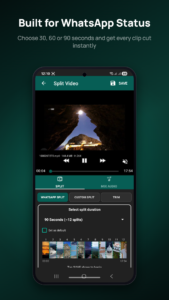
1. WhatsApp Split – Automatically split long videos into 15 / 30 / 60 / 90-second
parts for WhatsApp Status and Stories.
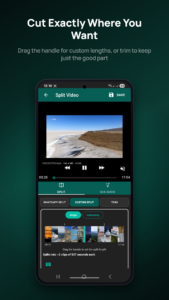
2. Custom Split – Split any video into parts of your own custom duration.
3. Trim & Cut – Cut a video from a start time to an end time as a video trimmer.
More than a video splitter:
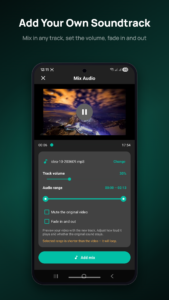
★ Add background music to your video status before splitting – make your WhatsApp
Status or Instagram Story more effective and beautiful.
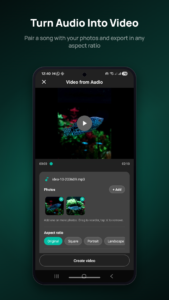
★ Convert audio to video – turn an audio clip and a photo into a video status,
then save it or split it for status. A simple status video maker.
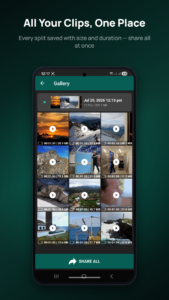
★ Gallery viewer – view, share, or delete all your split videos inside the app.
Perfect for:
• Splitting long videos for WhatsApp Status
• Story splitter for Instagram Stories & Reels
• Video cutter and trimmer for social media
• Sharing long videos on TikTok, Facebook & more
• Status video maker with music
Video Splitter uses the FFmpeg open-source library with carefully tuned
commands, so every part plays perfectly with audio-video sync and no freezing.
Video Splitter is the fastest in its category.
Features:
★ Split long videos into parts for WhatsApp Status & Stories
★ Video cutter and trimmer with custom length
★ Upload status videos longer than 30 / 60 / 90 seconds
★ Share videos in one tap after the split
★ Custom video chunk size
★ Add background audio / music to video
★ Convert audio to video with a background image
★ Gallery viewer – view, share, and manage all your files
★ Works fully offline – no watermark, no quality loss
How To Use:
➤ Open Video Splitter and choose Import Video.
➤ Select the video from your gallery or file manager.
➤ Choose WhatsApp Split to cut it for WhatsApp Status, and pick the length
(30, 60, or 90 seconds – set a default so you don't repeat it each time).
➤ Tap SAVE, pick an output quality if needed, then START to begin splitting.
➤ For any other length, choose Custom Split, move the slider to set a chunk
size, and tap SAVE.

Video Splitter for WhatsApp 3.31 Play Store trailer
Premium

Version:3.31
Uploaded:September 24, 2026 at 6:36AM UTC
File size:19.41 MB
Downloads:9
Version:3.30
Uploaded:September 18, 2026 at 12:59PM UTC
File size:19.35 MB
Downloads:26
Version:3.12
Uploaded:August 31, 2026 at 7:37AM UTC
File size:19.82 MB
Downloads:20
Version:3.11
Uploaded:August 21, 2026 at 8:04AM UTC
File size:19.64 MB
Downloads:25
Version:3.10
Uploaded:August 19, 2026 at 10:11AM UTC
File size:19.62 MB
Downloads:16

Version:3.04
Uploaded:July 23, 2026 at 10:10AM UTC
File size:23.29 MB
Downloads:39
Version:3.02
Uploaded:July 17, 2026 at 2:45AM UTC
File size:23.27 MB
Downloads:51
Version:2.48
Uploaded:December 30, 2025 at 11:57PM UTC
File size:21.26 MB
Downloads:223

Version:2.42
Uploaded:November 4, 2025 at 10:27AM UTC
File size:8.63 MB
Downloads:71
Version:2.38
Uploaded:June 30, 2025 at 7:44AM UTC
File size:15.95 MB
Downloads:223


