

 Premium
About Mileage Tracker App by TripLog 5.11.27
Track your miles automatically completely free with TripLog! Whether you’re a gig worker, freelancer, employee, or a manager of a team or company of any size, TripLog saves you time, helps maximize your tax deductions, and makes employee mileage reimbursement easier.
Premium
Unlike other mileage trackers, TripLog gives individual users truly unlimited automatic trip detection at no cost. Once you’re set up, our app runs seamlessly in the background and captures every drive for you. Just drive and let TripLog do the work!
► Start Tracking Automatically For Free
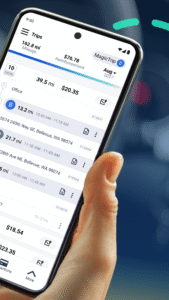
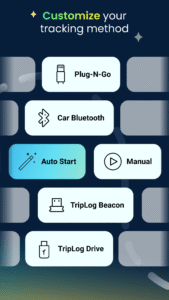
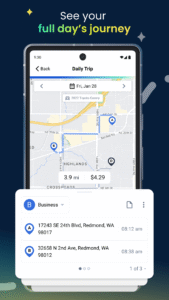
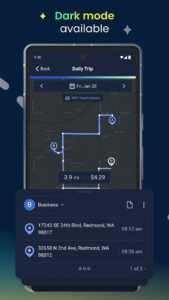
• Free unlimited automatic tracking - TripLog starts tracking when you start driving and stops when you stop
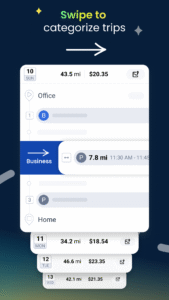
• Smart trip classification - Swipe to classify drives as business or personal, or set up auto-classification hours to automatically classify trips depending on when you drive
• Expense tracking included - Track income, fuel, parking, tolls, and other deductible/reimbursable business expenses
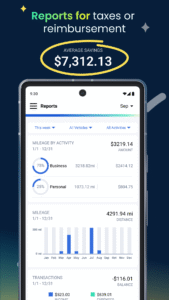
• Annual reporting access - All TripLog users get one free 7-day Premium Pass each year to create and download annual mileage reports
• Perfect for individual tax deductions
► Power Up With Premium
• Unlimited reporting - Create detailed, tax-compliant mileage and expense reports in PDF or CSV formats
• Web dashboard access - Review and manage your mileage, expenses, and reports from your computer
• Enhanced expense tracking - Enjoy OCR receipt capture, bank and credit card feeds, and more
• Additional trip auto-classification options - Set custom work schedules, frequent trip rules, and other automatic classifications
• More ways to stay organized - Create custom activities and mileage rates, plan routes, and more
• Software integrations - Connect TripLog with QuickBooks Online, SAP Concur, and other tools
• Great for individual employee reimbursement
► Enterprise & Business Solutions
Have employees who drive for work? TripLog makes it easy to manage mileage, expenses, time, and reimbursements all in one place.
• Manage all of your employees’ mileage and expenses from one centralized dashboard
• Create custom mileage rates, commute deductions, and reimbursement policies
• Set up approval hierarchies to review and approve employee mileage and expense reports
• Support both cents-per-mile and FAVR reimbursement programs
• Keep employees’ personal trip details private
• Connect with ADP, SAP Concur, UKG, QuickBooks, and more
Whether you’re tracking mileage for tax deductions, submitting miles for reimbursement, or managing an entire team of drivers, TripLog keeps your records accurate and makes mileage tracking a breeze.
Note: TripLog uses a foreground service to collect location data for real-time, automatic mileage tracking, which is essential for accurate record-keeping. This ensures that trips are accurately recorded even when the app is running in the background or the screen is off, as any interruption would result in missing mileage data. The foreground service runs with a persistent notification to keep you informed while TripLog tracks your mileage.
For those using our optional TripLog Drive device, TripLog uses a foreground service to enable continuous data transfer between the device and your phone. This ensures that your mileage data is accurately synced even when your phone is locked or the app is in the background, as any interruption would result in missing trip data. The foreground service runs with a persistent notification to keep you informed while TripLog syncs with your device.
Download TripLog today and start tracking automatically for free!

 Premium

Version:5.11.27
Uploaded:November 10, 2026 at 10:34PM UTC
File size:86.16 MB
Downloads:11
Version:5.11.26
Uploaded:September 25, 2026 at 6:58PM UTC
File size:86.28 MB
Downloads:22
Version:5.11.25
Uploaded:September 4, 2026 at 5:01PM UTC
File size:86.18 MB
Downloads:6
Version:5.11.24
Uploaded:September 1, 2026 at 3:20AM UTC
File size:86.16 MB
Downloads:5
Version:5.11.23
Uploaded:August 13, 2026 at 3:48AM UTC
File size:106.91 MB
Downloads:9
Version:5.11.21
Uploaded:June 22, 2026 at 3:18AM UTC
File size:108.01 MB
Downloads:11
Version:5.11.19
Uploaded:April 22, 2026 at 12:49AM UTC
File size:87.74 MB
Downloads:14
Version:5.11.18
Uploaded:March 25, 2026 at 1:28AM UTC
File size:87.73 MB
Downloads:8
Version:5.11.17
Uploaded:March 12, 2026 at 4:12AM UTC
File size:87.51 MB
Downloads:3
Version:5.11.16
Uploaded:February 6, 2026 at 6:21PM UTC
File size:87.49 MB
Downloads:12


