

 Premium
Download Clock & Glow: Night Light 79.0 APK
Version: 79.0 (79)
Languages: 74
Package: leedroiddevelopments.nightclock
Downloads: 2
Target: Android 16 (API 36)

What's new in Clock & Glow: Night Light 79.0
v79.0 19th Nov 26
• New sunrise alarm! The screen gradually brightens to help you wake up gently.
• Choose and preview alarm sounds from your device.
• Snooze during sunrise to delay your alarm.
• Finer brightness control for dark rooms.
• Day and night modes now remember separate brightness levels.
• Easier access to screensaver setup, with a selection status.
• Sleep timer controls are now together at the top of Settings.
About Clock & Glow: Night Light 79.0
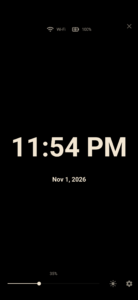
Turn your phone into a bedside clock at night, a clear digital desk clock while you work, or a soft night light when you need one. Add a clock widget to your home screen and use the built-in alarm clock.
Premium
Clock & Glow, formerly Night Light Clock, brings your clock, colours, weather and calendar together in a layout you can make your own.
A bedside clock that suits your room
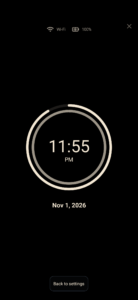
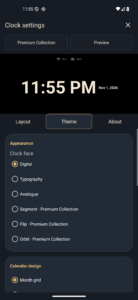
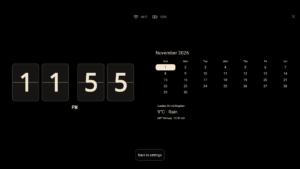
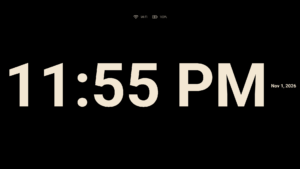
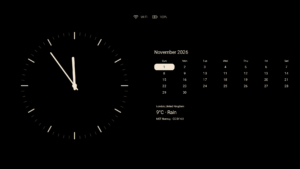
Keep a simple digital clock on screen, choose an analogue face, or explore flip clock and glowing digital designs in the Premium Collection.
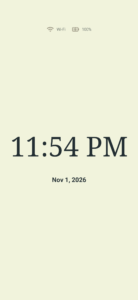
• Customise background, clock, text, icon and highlight colours
• Set separate colours and brightness levels for day and night
• Fine-tune low brightness for a dark bedroom
• Tap to show or hide controls
• Move and resize elements to arrange your desk clock
• Save favourite setups and preview changes
• Enable subtle display movement to help reduce screen burn-in
Alarms for your routine
Create multiple alarms with Once, Every day, Weekdays, Weekends or custom repeat days. Choose built-in tones or alarm sounds from your device, preview the sound and set your preferred volume, vibration and snooze duration.
Choose whether tapping the clock's alarm row opens Clock & Glow alarms or an alarm app on your device.
A gentle sunrise alarm
With Premium, let your screen brighten gradually before your alarm. The sunrise starts 30 minutes before wake-up by default, with a choice of 5–60 minutes.
Soft tones fade in during the final five minutes. Use Snooze to delay the wake-up time, or swipe left or right to dismiss, even while the screen is dim.
Customisable home-screen clock widgets
Keep the time, date and optional weather on your home screen. Choose a clock face and colours for each widget, follow the app's appearance or give individual widgets their own look.
Tap the clock for alarms or the weather for a fuller forecast. Some clock styles need Android's Alarms & reminders permission for precise updates.
Weather, calendar and the day ahead
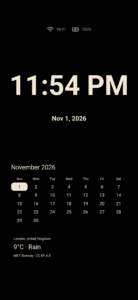
• View current weather and daily forecasts for a place you choose
• Open a detailed forecast with hourly weather
• See saved forecasts when a fresh update is unavailable
• Show a Month calendar or Premium Week and Date designs
• Add events from your selected calendars, with available details
• Keep battery level, connection indicators and optional notification icons in view
Weather and calendar displays start switched off, so you choose what appears.
A night light with a sleep timer
Choose a colour and adjust the screen brightness for a little light beside the bed. Start a sleep timer to dim or close the app clock, or choose to close it when you unplug the charger.
Desk clock layouts for phones and foldables
Use portrait or landscape layouts on regular phones. On supported foldables, a half-open laptop posture keeps the clock on the upright screen, while an unfolded layout gives your clock and calendar more space.
Foldable layouts depend on device support. You can also arrange the display yourself.
Android screensaver
Use Clock & Glow as your Android screensaver, with its own brightness control. Setup is available in the app; selection and automatic activation depend on your device's screensaver and charging settings.
Optional access, clear choices
Search for weather without location permission, or optionally use approximate location. Weather forecasts come from MET Norway.
Calendar access is only needed to show personal events. Notification access is optional; message text is not displayed.
Free essentials, optional Premium
The original clock, night light, regular alarms, colour customisation, Month calendar and Android screensaver stay free.
One optional purchase adds six extra clock faces, Week and Date calendar styles and sunrise alarms. Preview Premium designs before deciding. No subscription.
Clock & Glow by LeeDrOiD Labs.
Privacy policy:
www.leedroid.co.uk/privacy-policy.html

Version:79.0
Uploaded:November 19, 2026 at 9:34PM UTC
File size:20.40 MB
Downloads:2
Version:77.0
Uploaded:November 19, 2026 at 6:13PM UTC
File size:20.40 MB
Downloads:3
Version:53.0
Uploaded:November 3, 2026 at 10:48PM UTC
File size:2.15 MB
Downloads:22
Version:52.0
Uploaded:November 3, 2026 at 8:35PM UTC
File size:2.11 MB
Downloads:8
Version:50.0
Uploaded:November 3, 2026 at 1:13AM UTC
File size:1.79 MB
Downloads:8
Version:47.0
Uploaded:November 2, 2026 at 11:58PM UTC
File size:1.79 MB
Downloads:12
Version:38.0
Uploaded:November 2, 2026 at 2:33PM UTC
File size:1.62 MB
Downloads:12

Version:16.0
Uploaded:October 31, 2025 at 12:00AM UTC
File size:912.28 KB
Downloads:30
Version:15.0
Uploaded:August 20, 2024 at 8:43PM UTC
File size:979.89 KB
Downloads:95
Version:14.0
Uploaded:July 4, 2023 at 4:42PM UTC
File size:979.92 KB
Downloads:74
Follow APK Mirror


