

 Premium
What's new in Ultimate USB 10.2.4
*Improve App Performance*
*New*
New USB Connection System
Update Ventoy Version to 1.1.16
More Windows Cutomization for ISO Burner
Fat32/Exfat Defragmenter
ISO to ZSO Converter
ISO to VCD Converter
BIN to ISO Converter
BIN to VCD Converter
VCD to ISO Converter
ZSO to ISO Converter
ISO to CSO Converter
CSO to ISO Converter
PS2 Option To Regenrate .ul file
PS2 Import .ul Games
PS2 Download Games ARTS
And More...
*Bug Fixes*
- All Reported Bugs Fixed.
About Ultimate USB 10.2.4
🔌 Ultimate USB – USB Manager & Bootable Creator
Transform your Android device into a powerful PC replacement! Create bootable USB drives, format disks, manage partitions, and organize retro console games (PS2/PS3) directly from your phone.
Premium
Ultimate USB is an essential toolkit designed to manage USB drives on the go. Most features work perfectly without root access (root is only required for the internal SD card slot).
🌟 WHY CHOOSE ULTIMATE USB?
Repair PCs, install operating systems, and set up gaming consoles using just your Android phone and a USB OTG cable. It is fast, reliable, and packed with desktop-level features.
🛠️ BOOTABLE USB CREATOR & IMAGE WRITING
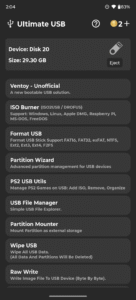
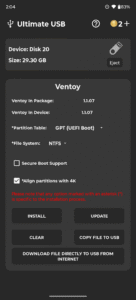
• Ventoy (Unofficial): Multi-boot USB solution. Install Windows 7–11 and major Linux distros. Supports GPT/MBR and NTFS/FAT32/EXFAT. Copy/download ISOs directly to USB.
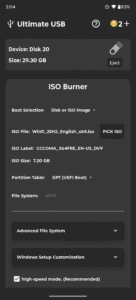
• ISO Burner (ISO2USB / DROFUS): Burn OS images (Windows, Linux, Apple DMG, Raspberry Pi, DOS). Includes Windows 11 bypass, auto-setup customization, and .wim file splitting for FAT32.
• RAW Write: Write raw image files to your USB devices byte by byte with absolute precision.
🧹 ADVANCED DISK MANAGEMENT
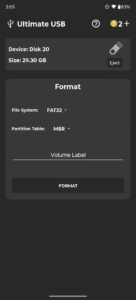
• Format USB: Quickly format to FAT16, FAT32, EXFAT, NTFS, EXT2, EXT3, and EXT4.
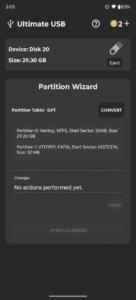
• Partition Wizard: Advanced tools to create, delete, and manage GPT/MBR partitions.
• USB Defragmenter: Optimize your FAT32 and EXFAT drives to improve read/write performance.
• Wipe USB: Securely and permanently wipe all data and partitions from your USB drive.
• Backup & Restore: Create full, byte-by-byte image backups of your USB device.
🎮 RETRO GAMING TOOLS (PS2 & PS3)
• PS2 USB Utils: Manage PS2 games (Add ISO, Remove, Organize). Fully supports >4GB ISOs, generates OPL playlists, regenerates corrupted .ul files, imports split games, and downloads Game ARTs.
• PS3 ISO TOOLS: Create ISOs from folders, extract, patch Target CFW versions, split large ISOs for FAT32, join file segments, Auto-rename, and extract SFO/Icons.
• Game Converter: Instantly convert between ISO, ZSO, CSO, BIN/CUE, and VCD formats.
📁 FILE MANAGEMENT & STORAGE
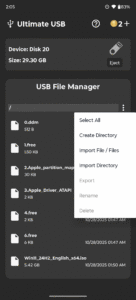
• USB File Manager: A simple, fast USB file explorer to browse, copy, delete, and move files.
• Partition Mounter: Mount unallocated or hidden partitions as external storage.
• Archive Extractor: Extract popular formats including 7z, RAR, ZIP, ISO, TAR, GZip, BZip2, WIM, LZMA, CAB, DEB, RPM.
📊 DIAGNOSTICS & INFO
• Device Info: View detailed USB device information and diagnostics.
• Benchmark: Measure sequential and random read/write speed.
🔌 SUPPORTED HARDWARE
• Supports USB flash drives, portable SSDs, SD adapters, and OTG hubs.
• Note: HDDs are not officially supported due to high mobile power requirements.
💰 TRANSPARENT REWARD SYSTEM
Core features are kept completely FREE. Advanced tasks require coins, which you can earn completely FREE by watching short ads.
• Free Actions: Ventoy ISO copy/download, Linux/DMG burning, RAW Write, Wipe USB, Mounter, Backup/Restore, Defragmenter, File Manager, Extractor, Game Converter, and most PS2/PS3 tools.
• Coin Actions: Ventoy installation, Windows ISO burning, USB formatting, and Partition Wizard.
👑 PRO VERSION BENEFITS
Upgrade to Pro to instantly remove all ads, unlock unlimited access to all features, disable the coin system, and use the app fully offline.
⚠️ IMPORTANT NOTES
• Keep App in Foreground: Operations pause when the app is minimized to ensure USB stability.
• Ad Requirements: Internet is required to load ads (unless Pro). Disable ad-blockers for the free version.
• Troubleshooting: If your USB is unrecognized, test it on a PC or reformat to FAT32.
Download Ultimate USB 10.2.4
This release comes in several variants (we currently have 3). Consult our handy FAQ to see which download is right for you.

Version:12.5.0
Uploaded:October 29, 2026 at 3:44PM UTC
File size:96.50 MB
Downloads:62
Version:12.3.3
Uploaded:September 9, 2026 at 9:07PM UTC
File size:63.50 MB
Downloads:253
Version:12.3.2
Uploaded:August 19, 2026 at 12:29AM UTC
File size:134.53 MB
Downloads:147
Version:12.3.1
Uploaded:August 18, 2026 at 9:08PM UTC
File size:134.53 MB
Downloads:19
Version:12.3.0
Uploaded:August 17, 2026 at 11:56PM UTC
File size:134.16 MB
Downloads:18
Version:12.2.0
Uploaded:August 14, 2026 at 2:27AM UTC
File size:132.26 MB
Downloads:47
Version:12.1.1
Uploaded:August 10, 2026 at 4:25AM UTC
File size:132.06 MB
Downloads:61
Version:12.0.2
Uploaded:August 7, 2026 at 12:59AM UTC
File size:116.99 MB
Downloads:24
Version:12.0.0
Uploaded:August 6, 2026 at 1:53AM UTC
File size:117.33 MB
Downloads:19
Version:10.2.4
Uploaded:July 6, 2026 at 3:15AM UTC
File size:106.61 MB
Downloads:544
Follow APK Mirror


