

 Premium
What's new in Ultimate USB 12.1.1
NEW
• Windows To Go – run Windows from your USB
• Persistent storage for Linux USBs
• Update Ventoy Version to 1.1.17
• CHD in Game Converter, plus CSO ↔ ZSO
• PS1 games on PS2 drives (POPStarter)
• File Manager: search, sort, cut/copy/paste
• Bad Blocks Check + fake-flash detection
IMPROVED
• Rebuilt defragmenter, faster and safer
• Open USB files without copying them first
• Coins are now Tokens
• 45 languages fully translated
• Many burn, format & purchase fixes
About Ultimate USB 12.1.1
🔌 Ultimate USB – USB Manager & Bootable Creator
Turn your phone into a PC repair shop: bootable USB drives, formatting, partitioning, drive tests and retro game tools — over a simple OTG cable.
Premium
Nearly everything works WITHOUT root (only the internal SD slot needs it), on real native FAT16/FAT32/exFAT/NTFS/EXT2/3/4 drivers.
🛠️ BOOTABLE USB & IMAGE WRITING
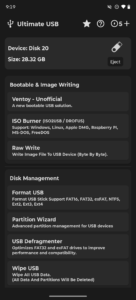
• Ventoy (Unofficial): multi-boot USB — many ISOs on one drive, pick at boot. Install, update or clean it, with Secure Boot support, 4K alignment, MBR/GPT and FAT32/exFAT/NTFS. Copy ISOs over, or download them straight to the drive.
• ISO Burner (ISO2USB / DROFUS): Windows 7–11, Linux, Apple DMG, Raspberry Pi, MS-DOS, FreeDOS.
‣ Windows customization: bypass TPM 2.0 / Secure Boot / 4GB RAM, skip the Microsoft account, create a local account, turn off BitLocker, data collection and forced Copilot/OneDrive/Outlook, copy your regional settings, "Windows CA 2023" bootloaders.
‣ Windows To Go: a full portable Windows that boots and runs from the drive itself.
‣ Linux persistence: keep your files and changes between boots.
‣ High-speed mode, install.wim splitting for FAT32 / Secure-Boot PCs, MBR/GPT, cluster size, label.
• Raw Write (DD): write any image byte by byte, exactly as-is.
🧹 ADVANCED DISK MANAGEMENT
• Format USB: FAT16, FAT32, exFAT, NTFS, EXT2/3/4, with MBR/GPT, cluster size and label.
• Partition Wizard: create, delete, format, rename, wipe, back up and restore partitions, convert MBR ↔ GPT, with undo before you apply.
• Bad Blocks Check: write-and-verify scan that finds failing sectors and fake-capacity drives.
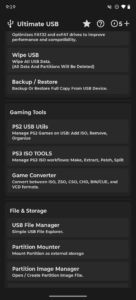
• USB Defragmenter: consolidate fragmented files on FAT32 and exFAT for faster reads.
• Wipe USB: permanently erase all data and partitions.
• Backup & Restore: full byte-by-byte image of the device.
🎮 RETRO GAMING TOOLS
• PS2 USB Utils: add, remove, rename, organize and export games. Direct copy or UL split, 4GB+ ISOs, OPL playlists, ul.cfg regeneration, split-game import, quick defrag, artwork downloads, plus PS1 (.VCD) import for POPStarter.
• PS3 ISO Tools: make ISOs from folders, extract, patch target CFW version, split for FAT32, join segments, auto-rename, [online]/[auto] tags, game info, SFO & icon extraction.
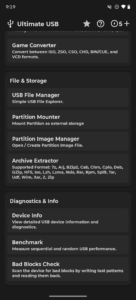
• Game Converter: ISO ↔ ZSO / CSO / CHD / VCD, BIN/CUE ➔ ISO or CHD, ZSO ↔ CSO, at max compression.
📁 FILES & STORAGE
• USB File Manager: copy, move, delete, rename, search and sort — and open drive files straight in other apps, with no copy to the phone.
• Partition Mounter: mount partitions, even hidden ones, into the Android Files app, read-only or read/write.
• Partition Image Manager: create, open and browse .img/.bk images.
• Archive Extractor: 7z, RAR, ZIP, ISO, TAR, GZip, BZip2, WIM, CAB, DEB, RPM and more, with passwords.
📊 DIAGNOSTICS & HARDWARE
• Device Info & Benchmark: vendor, product, serial, block size, plus sequential and random speed tests.
• Works with flash drives, portable SSDs, card readers and OTG hubs. HDDs are not officially supported (power limits).
💰 FAIR TOKEN SYSTEM
Almost everything is FREE. Only Ventoy install/update, ISO burning, formatting and the Partition Wizard cost tokens (1–3), earned FREE by watching one short ad.
👑 PRO VERSION
One-time lifetime purchase: no ads, no tokens, archive extraction straight to USB, full offline use.
⚠️ GOOD TO KNOW
• Keep the app in the foreground — operations pause when minimized to protect the drive.
• The free version needs internet for ads; disable ad-blockers and blocking Private DNS.
• Tokens live on your device: clearing app data or uninstalling clears them. Pro is tied to your account and stays safe.
• Drive not detected? Test it on a PC, try another cable, or reformat to FAT32.
Download Ultimate USB 12.1.1
This release comes in several variants (we currently have 4). Consult our handy FAQ to see which download is right for you.

Version:12.3.3
Uploaded:September 9, 2026 at 9:07PM UTC
File size:63.50 MB
Downloads:105
Version:12.3.2
Uploaded:August 19, 2026 at 12:29AM UTC
File size:134.53 MB
Downloads:139
Version:12.3.1
Uploaded:August 18, 2026 at 9:08PM UTC
File size:134.53 MB
Downloads:13
Version:12.3.0
Uploaded:August 17, 2026 at 11:56PM UTC
File size:134.16 MB
Downloads:16
Version:12.2.0
Uploaded:August 14, 2026 at 2:27AM UTC
File size:132.26 MB
Downloads:45
Version:12.1.1
Uploaded:August 10, 2026 at 4:25AM UTC
File size:132.06 MB
Downloads:55
Version:12.0.2
Uploaded:August 7, 2026 at 12:59AM UTC
File size:116.99 MB
Downloads:23
Version:12.0.0
Uploaded:August 6, 2026 at 1:53AM UTC
File size:117.33 MB
Downloads:19
Version:10.2.4
Uploaded:July 6, 2026 at 3:15AM UTC
File size:106.61 MB
Downloads:419
Version:10.2.3
Uploaded:July 4, 2026 at 9:22PM UTC
File size:106.58 MB
Downloads:34
Follow APK Mirror


