

 Premium
What's new in Network Guru: Speed Indicator 2.1
NEW
- Connection health score on the dashboard
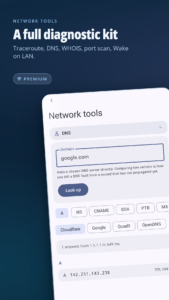
- DNS benchmark: find your fastest resolver
- Scheduled speed, latency and Wi-Fi signal monitoring, with trends
- Alerts for latency spikes and unreliable connections
- Auto speed test when you join a new Wi-Fi
- Export speed tests, app usage and the connection log to CSV
- Back up and restore your settings
FIXED
- Dual SIM showed the wrong carrier name
- Indonesian and Hebrew never loaded
- No full screen ad when you return to the app
About Network Guru: Speed Indicator 2.1
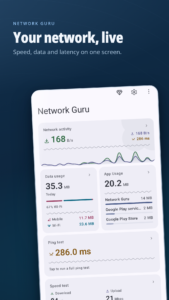
Stay informed with real-time download and upload speed, data usage, and ping statistics, all in one clean interface. Network Guru is a lightweight yet powerful tool to monitor your internet connection performance.
Premium
📡 Real-time speed monitor
View current download and upload speeds in the status bar, notification panel, or floating widget.
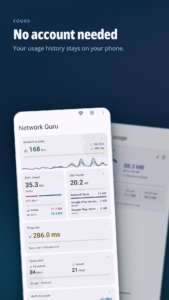
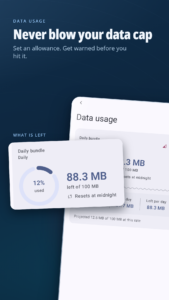
📊 Usage history
Track daily and monthly mobile data and Wi-Fi usage, including sent and received data.
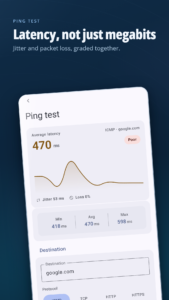
📶 Ping test
Measure connection stability with minimum, maximum, and average ping, along with packet loss.
Run ping tests to a custom destination of your choice (e.g., google.com or any server).
During the test, a real-time graph visualizes ping fluctuations for better insight.
🚀 Advanced speed test
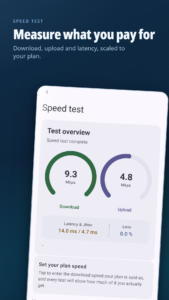
Perform detailed speed tests including:
- Download and upload speeds (in Mbps)
- IPv4 and IPv6 addresses
- Server location
- Latency and jitter
- Packet loss
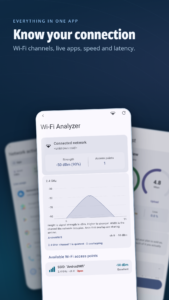
📍 Wi-Fi Analyzer
Inspect nearby networks and get info like SSID, BSSID, signal strength, frequency, and more.
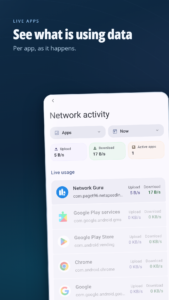
📱 Per-app usage
Monitor mobile data and Wi-Fi usage for each app across different time ranges.
View a ranked list of apps by total usage (download + upload), with separate stats for Wi-Fi and mobile.
Tap on any app to see detailed foreground and background usage, including:
- Data received (download)
- Data sent (upload)
- Total usage for both Wi-Fi and mobile
💬 Floating widget
A lightweight floating indicator that displays real-time upload and download speed in one or two lines.
Customize the appearance and manually position it anywhere on the screen for quick access without opening the app.
🎨 Customization
Choose speed units (kbps, Mbps, KB/s, MB/s), indicator layout, update frequency, app theme and more.
🪙 Ad-free experience
- Remove ads for 24 hours (free, renewable daily)
- 1-week or 1-month ad-free subscriptions available
🛠️ Built with user feedback
Over 90% of the features were requested by users. Got an idea? Join the community and help shape future updates.
Network Guru is your all-in-one solution for speed monitoring, network usage tracking, Wi-Fi analysis, and connection diagnostics, precise, lightweight, and customizable.
Download Network Guru: Speed Indicator 2.1
This release comes in several variants (we currently have 3). Consult our handy FAQ to see which download is right for you.

Version:2.1
Uploaded:September 3, 2026 at 7:55PM UTC
File size:12.68 MB
Downloads:11
Version:2.0
Uploaded:August 14, 2026 at 3:37AM UTC
File size:12.36 MB
Downloads:331
Version:1.9-beta5
Uploaded:January 9, 2026 at 5:39PM UTC
File size:8.81 MB
Downloads:254
Version:v1.7.23
Uploaded:June 6, 2023 at 4:30PM UTC
File size:5.14 MB
Downloads:299
Version:v1.7.22
Uploaded:August 18, 2022 at 8:06AM UTC
File size:5.07 MB
Downloads:34
Version:v1.7.21
Uploaded:January 22, 2022 at 6:23PM UTC
File size:4.92 MB
Downloads:77
Version:v1.7.20
Uploaded:January 12, 2022 at 8:43PM UTC
File size:4.89 MB
Downloads:76
Version:v1.7.19
Uploaded:January 11, 2022 at 12:21AM UTC
File size:4.89 MB
Downloads:42
Follow APK Mirror


