

 Premium
What's new in Samsung My Files 4.1.92.111
[Update]
- The Get more space notification that appears when your device has less than or equal to 1 GB of storage space left will no longer be provided.
(The notification that appears when your device has less than or equal to 500 MB of storage space left will continue to be provided.)
- The issue that unintended files are selected on the file search result has been fixed.
About Samsung My Files 4.1.92.111
[Updates]
- Fixed the issue of "Predictive text" not working when performing searches in My Files.
Premium
- Fixed the issue of errors occurring when files are copied using drag and drop in Multi window mode.
- Fixed the VI (Visual Interaction) error that occurred when deleting files in "Get More Space - Unused files".
- Fixed the issue of the number of items not being displayed for the Google Drive folder.
- Now displays an update icon when a new version update is required.
[Introducing My Files]
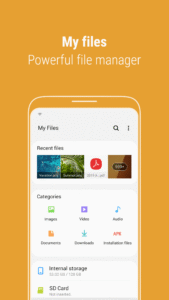
"My Files" manages all the files on your smartphone, just like a file explorer on your computer.
You can also manage files stored on SD cards, USB drives and files in the cloud storage connected with your smartphone at the same time.
Download and experience "My Files" now.
[New features in My Files]
1. Try 15 GB of free storage provided by Samsung Cloud Drive.
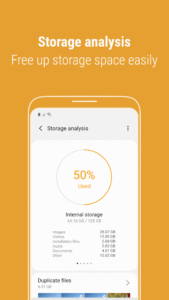
2. Using the Get more space feature, expand your storage space by deleting unnecessary files or backing them up to the Cloud.
3. With icons displayed for frequently used items (e.g., Camera, Download, and Social network services), finding what you want is now faster and easier.
[Key features]
- It’s easy to search for files on a mobile phone, SD card, or USB storage device, and to manage your files.
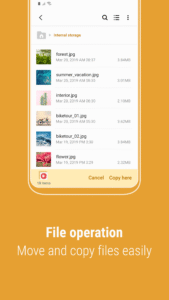
.Users can create folders; move, copy, share, compress, and decompress files; and view file details.
- Try our user-friendly features.
.The Recent Files list: Files the user has downloaded, run, and/or opened
.The Categories list: Types of files, including downloaded, document, image, audio, video, and installation files (.APK)
.Folder and file shortcuts: Show on the device home screen and the My Files main screen
- Enjoy our convenient Cloud services.
.Samsung Cloud Drive
.Google Drive
※ Supported features may be different depending on models.
Download Samsung My Files 4.1.92.111
This release may come in several variants. Consult our handy FAQ to see which download is right for you.
Known valid signatures: 9ca5 29c6 9741.

Version:15.6.01.13
Uploaded:September 18, 2026 at 9:31PM UTC
File size:66.81 MB
Downloads:626
Version:15.6.01.22
Uploaded:August 7, 2026 at 10:11AM UTC
File size:56.22 MB
Downloads:3,893
Version:15.6.00.74
Uploaded:July 23, 2026 at 8:58PM UTC
File size:56.22 MB
Downloads:2,483
Version:15.4.09.5
Uploaded:June 26, 2026 at 7:26AM UTC
File size:55.76 MB
Downloads:1,488
Version:15.4.08.8
Uploaded:June 12, 2026 at 10:48AM UTC
File size:65.90 MB
Downloads:1,751
Version:15.4.08.6
Uploaded:June 11, 2026 at 3:01PM UTC
File size:65.90 MB
Downloads:41
Version:15.4.08.3
Uploaded:May 10, 2026 at 5:38PM UTC
File size:55.47 MB
Downloads:3,387
Version:15.4.06.13
Uploaded:May 6, 2026 at 9:25PM UTC
File size:74.89 MB
Downloads:1,521
Version:15.6.00.29
Uploaded:April 22, 2026 at 7:39PM UTC
File size:66.96 MB
Downloads:2,274
Version:15.6.00.26
Uploaded:April 21, 2026 at 5:44AM UTC
File size:67.04 MB
Downloads:327
Follow APK Mirror


